There are four effects for each of the Spirit's two signal paths:
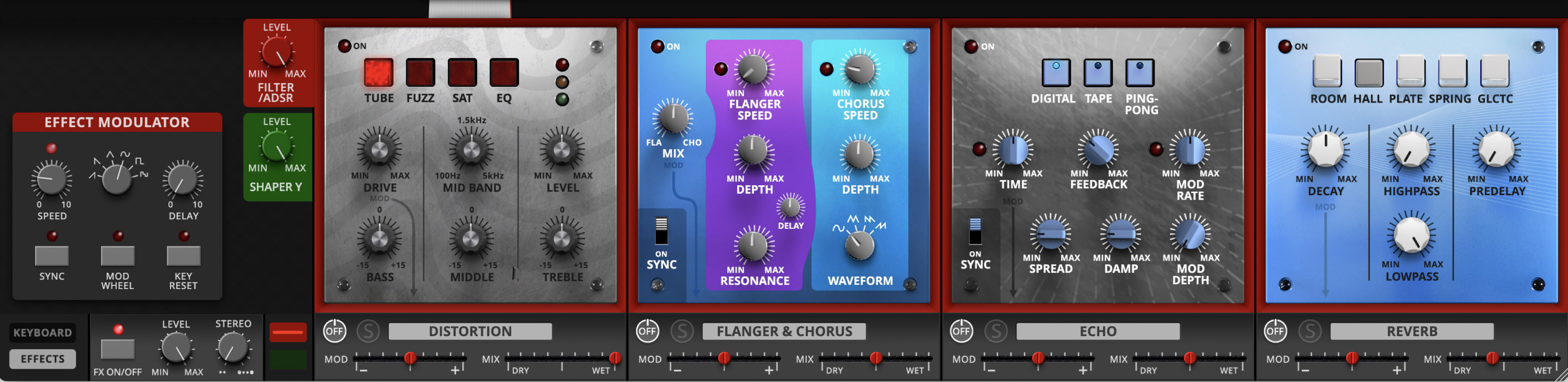
The Filter/ADSR path features Distortion, Flanger & Chorus, Echo, and Reverb. To display this effects set, click the Red tab to the left of the effects chain. To display the full controls for the set, click the Effects button at the bottom left of the panel.
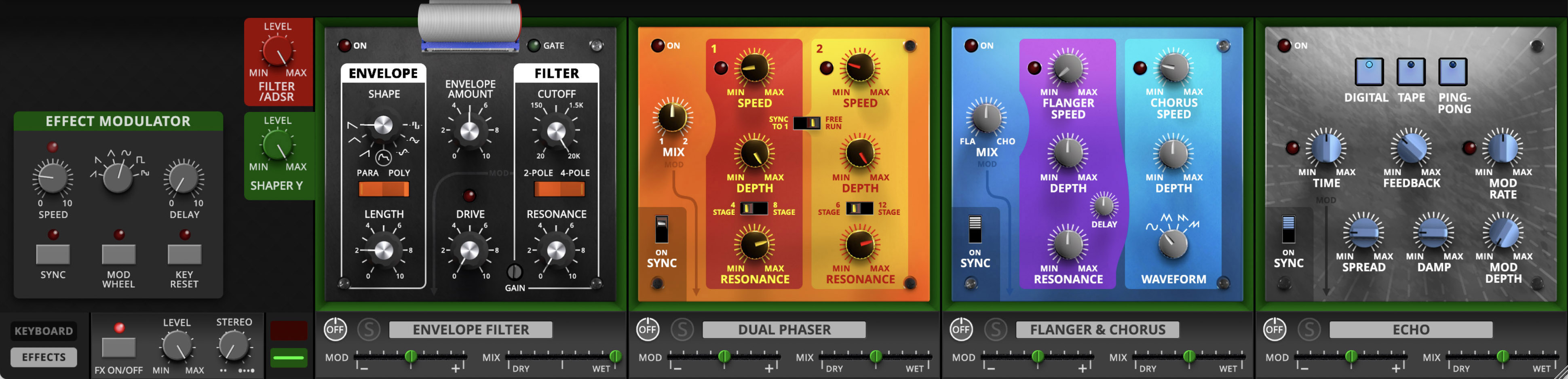
The Shaper Y path features an Envelope Filter, Dual Phaser, Flanger & Chorus, and Echo. To display this effects set, click the Green tab to the left of the effects chain. To display the full controls for the set, click the Effects button at the bottom left of the panel.
You can easily tweak each effect to taste, bypass it, finely control its interaction with the synthesizer's audio path, and even modulate the entire chain with its own Effects Modulator.
First we're going to start at the bottom. Under each effect is a set of controls that are always accessible, even in Keyboard View. These are the controls most likely to be needed quickly while playing.
FX On/Off- Bypasses the entire Effects chain
Level- Adjusts the level of the entire Effects chain
Stereo- widens the stereo image of the sound after the Effects
Next, each of the Effects has the following controls:
On/Off
Solo (bypasses all other Effects)
Modulation Amount (from the Effect Modulator)
Wet/Dry Mix
When we open the Effects View, we are presented with detailed controls for the four Effects, which we'll go through in order. But first, as we look to the left:
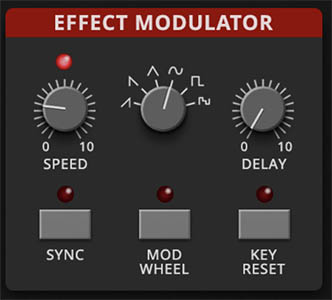
The Effect Modulator
Sometimes you may want to modulate a delay time or a phaser sweep for extra movement or a bit of weirdness. Enter the Effect Modulator. It's a dedicated LFO just for the effects. Used subtly, the Effect Modulator can add motion and depth. Push it harder, and things can get more dramatic and unstable. Either way, it’s one of the quickest ways to make an effect feel more varied and animated.
Each effect has one specific parameter that is permanently tied, or “hard-wired,” to the Effect Modulator. In other words, you don’t assign modulation destinations manually. The destination is already chosen for you by the effect’s design.
To see which parameter is being modulated, look for the arrow labeled “Mod” on the effect’s panel. That graphic points from the affected control down toward the Effect Modulator, making it easy to spot the modulation target at a glance. If a control has that arrow, it’s the one the Effect Modulator will affect.
This means every effect has its own built-in modulation relationship. On one effect, the Effect Modulator might animate delay time. On another, it might sweep a tonal or spatial parameter. The exact target depends on the effect, but the visual cue is always the same: Follow the “Mod” arrow.
Effect modulator controls include:
Speed – 0.01 Hz to 20 Hz, or tempo-syncable from 1/64T to 8 beats. LED above flashes in time.
Waveform – Ramp, sawtooth, triangle, sine, square, or random.
Delay – Fade-in time for modulation (0–5000 ms).
Sync – Locks modulation speed to host tempo.
Mod Wheel – Lets your MIDI Mod Wheel scale the modulation depth in real time.
Key Reset – Restarts the waveform with each key press.
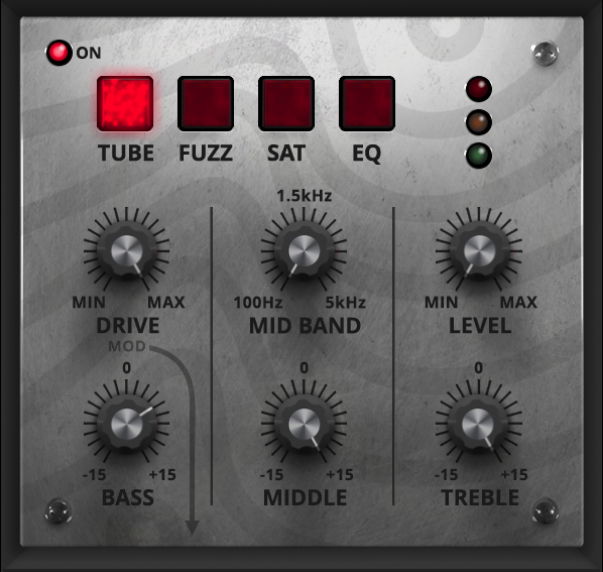
Distortion & EQ
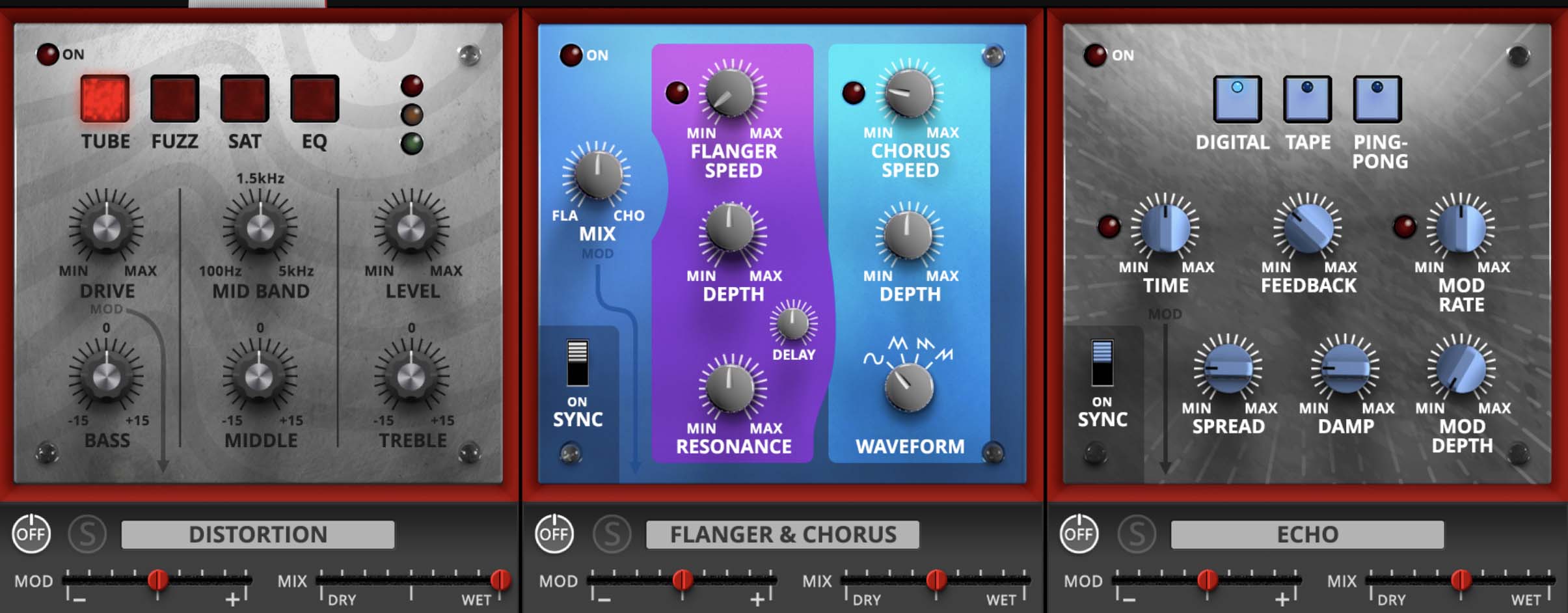
Sometimes clean just won’t cut it. Distortion adds grit, attitude, and warmth. The Distortion & EQ effect offers four modes:
Tube – Smooth overdrive like a cranked guitar amp.
Fuzz – Aggressive, buzzy saturation modeled after germanium fuzz pedals.
Sat – Tape-style saturation for warmth and compression.
EQ – A standalone 3-band equalizer without added drive.
Controls:
Drive – Amount of gain/saturation (active in Tube, Fuzz, and Sat modes). This can be controlled by the Effect Modulator.
Level – Output volume to balance the effect.
Bass / Middle / Treble – ±15 dB gain for tone shaping.
Mid Band Frequency – Selects which frequencies the Middle control boosts/cuts.
Modulation Target – In Tube, Fuzz, and Sat modes, Drive is modulatable. In EQ mode, the Mid Band frequency can be modulated.
Tip: A touch of tape saturation can add body to pads without sounding distorted. Crank Fuzz on a Lead sound to make it snarl.
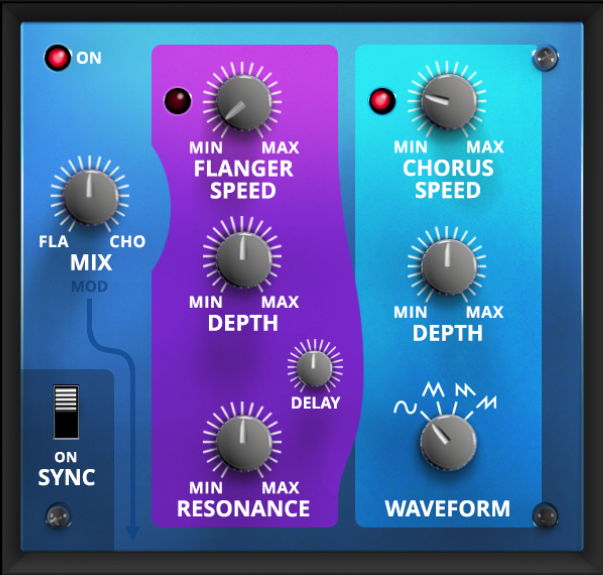
Flanger & Chorus
These are two of the most popular effects making use of very short time delays, modulated by an LFO. Flanging mixes a dry signal with one delayed by (in this case) between 1.0 and 13 ms, creating a comb filter effect. Chorusing uses time delays in the 30 ms neighborhood to thicken a sound and simulate the sound of multiple sources rather than just one.
Flanger controls include:
Flanger Speed- LFO sweep rate, from 0.01 Hz to 8 Hz, or 8 beats to 1/64th triplet when the Sync switch in the lower left corner is On
Depth- Amount of the flanger effect
Delay- The basic delay time that's modulated by the LFO, ranging from 1.0 to 13 ms. The smaller the Delay, the higher-frequency the notches will sound.
Resonance- Turning this up creates the whooshing "jet" flanger sound.
Chorus controls include:
Chorus Speed- LFO sweep rate, from 0.01 Hz to 8 Hz, or 8 beats to 1/64th triplet when Sync is On
Depth- Amount of the chorus effect
Waveform- The LFO waveform will drastically change the sound of the chorus effect. Choices include sine, triangle, sawtooth, and ramp.
The Mix knob controls the blend of the flanger and chorus; this can be controlled by the Effect Modulator.
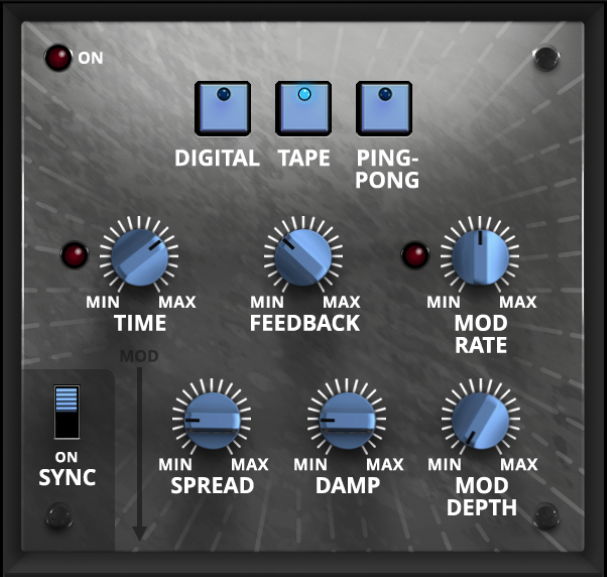
Echo
Stompbox delay pedals and tape echo boxes were and are popular additions to keyboard rigs, so having one here is pretty much a given, right?
The Echo offers a choice of three modes:
Digital- A clean digital delay that would have set you back a lot of money in the 1970s
Tape- A rich tape-loop delay sound with plenty of saturation and no mangled tapes
Ping Pong- A classic effect where echo taps alternate between left and right channels.
Controls include:
Delay Time- Adjustable from 1.0 ms to 2000 ms (2 seconds), or 8 beats to 1/64th triplet when the Sync switch in the lower left corner is On. This can be controlled by the Effect Modulator.
Feedback- How much of the delayed signal is fed back to the input for repeating echoes. Ranges from 0% (single slapback echo) to 100% (echoes that never die away). For certain settings of Feedback and DelayTime, the Tape mode can produce runaway echoes and "bathtub reverb" effects.
Spread- Stereo width of the delay signal.
Damp- High-frequency damping, to make echoes more soft and bassy than the dry signal.
Mod Rate and Mod Depth- Controls for modulating the Delay Time for everything from mild chorusing to heavy pitch glitching. Mod Rate has a range of 0.2 Hz to 20 Hz and does not follow the Sync switch.
Reverb
Now here's an effect that wasn't available for any reasonable amount of money in the 1970s, and certainly wouldn't fit into a stompbox! In the 1970s, the only small and reasonably portable reverbs were the spring tanks in guitar amps and tape echoes like the RE-201 Space Echo. If you wanted a plate reverb, you had to go to a studio that had one built into a wall, and if you wanted room or hall ambience, you found a room or a hall. Digital reverbs were obscenely expensive, huge, delicate boxes only suitable for studio racks, and you couldn't hope for a nice huge outer-space ambience without one.
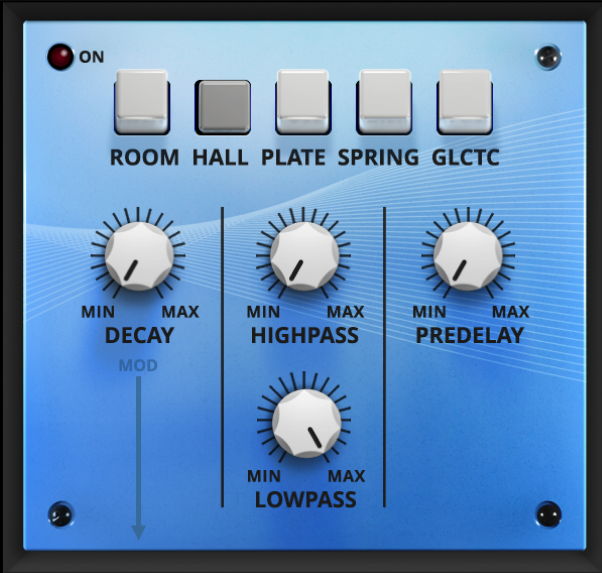
Well, guess what? Yep. This Reverb lets you choose between Room, Hall, Plate, Spring, and Galactic. (What's a "Galactic" reverb? Try it and see, young padawan.)
The Reverb has common controls for all five of its modes. They are:
Decay- The "size" of the space, which can be controlled with the Effect Modulator
Highpass and Lowpass- filters on the reverb input to limit high ringiness and low mud. Each has a cutoff frequency range of 20 Hz to 20 kHz.
Predelay- The time before the onset of reverb, from 0.0 ms to 150 ms. Longer Predelays give the impression of larger spaces. Note that the Spring doesn't have a Predelay setting.
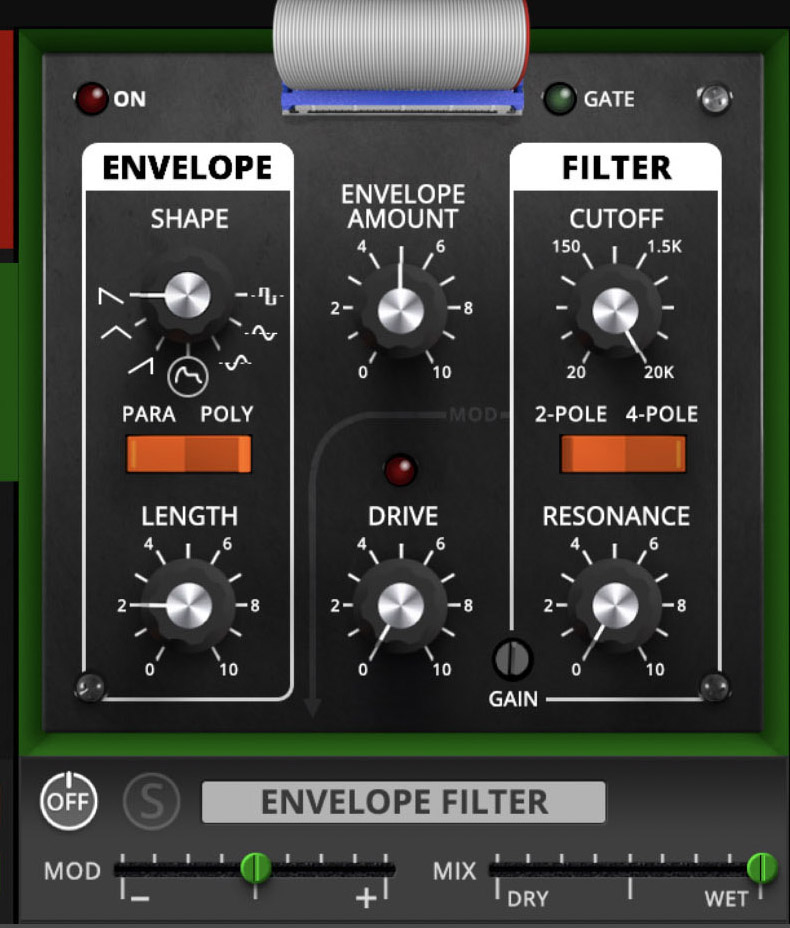
Envelope Filter
The Envelope Filter is a triggered modulation effect. Every time you play a key, it generates a filter sweep. Unlike a traditional envelope follower that reacts to signal volume, this one gives you consistent, predictable sweeps. Great for auto-wah effects, synth zaps, and funky textures.
Envelope Section:
Shape – Pick an envelope contour (ramp, triangle, square, etc.). Shapes determine how the filter cutoff moves over time. Square acts more like an LFO.
PARA/POLY Switch
PARA (Paraphonic)- One shared envelope and filter for all notes.
POLY (Polyphonic)- Each note triggers its own envelope and filter, enabling more detailed, note-specific modulation.
Length – Duration of the envelope sweep. Short = snappy; long = slow evolving.
Envelope Amount – Sets how far the filter cutoff moves in response to the envelope.
Filter Section:
Cutoff – Base frequency of the filter. The envelope adds/subtracts from this point.
2-Pole / 4-Pole – Choose slope steepness: 2-pole = smoother; 4-pole = sharper. This can be controlled by the Effect Modulator.
Resonance – Boosts frequencies at the cutoff, making sweeps more dramatic.
Drive – Adds gain before the filter for extra grit and presence.
Other Controls:
Gain (Trimmer) – Balances the output level.
MOD Slider – Adjusts how much modulation is applied.
MIX Slider – Balances dry vs. processed.
Tip: Set a long ramp-up shape with high resonance on Strings for dramatic sweeps that evolve with each note, or go short and snappy for funky auto-wah leads.
Tip 2: Filters on Filters
You don’t have to trigger the Envelope Filter with an envelope at all. Just leave the sensitivity low and it becomes a fixed filter instead. This essentially gives you an extra paraphonic filter that you can apply to a single sound, or drop in the global FX chain for the whole mix. Stack it with the synth's built-in filters, and the multiple filters line up in series to carve out shifting bands of tone. This technique is an excellent way to shape formant-like textures, focus a patch more narrowly, or travel to new sonic realms the synth never imagined.
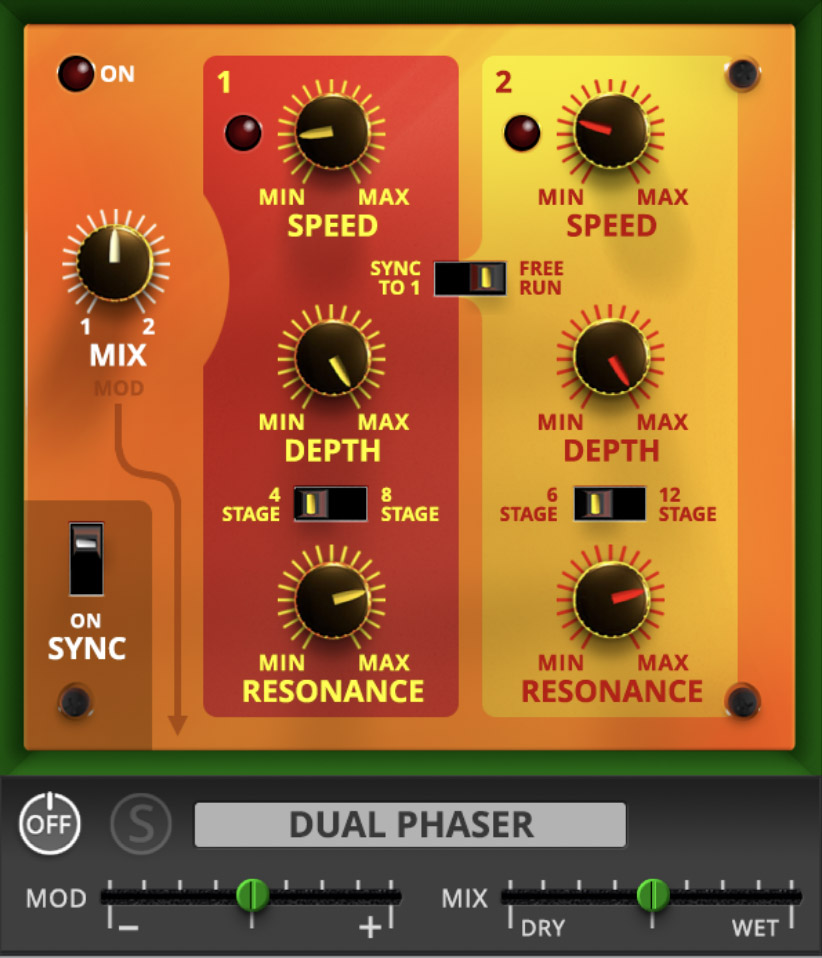
Dual Phaser
One very popular (and very expensive!) effect from the same era as the Odyssey was the Mu-Tron Biphase, a dual phase shifter with a glorious sound. Here, have one for free. No, really, it's on us.
The two phase shifters are almost identical in their function sets and parameter ranges. Each one has controls for:
Speed- phaser rate, from 0.01 Hz to 8 Hz, or 8 beats to 1/64th triplet when the Sync switch in the lower left corner is On
A switch lets you choose between synchronizing both Speeds to Phaser 1, or letting the two free run independently.
Depth- Amount of the phaser effect
Stages- How many allpass filters are active in each phaser circuit. Each pair of stages creates one sweepable frequency notch, so fewer stages result in a gentler phasing, while more stages produce more aggressive phasing.
Phaser 1 can choose between 4 and 8 stages (2 or 4 notches)
Phaser 2 can choose between 6 and 12 stages (3 or 6 notches)
Resonance- This adds resonance to give a sharper and more hollow sound.
There's also a Mix knob to balance the two phasers; this can be controlled by the Effect Modulator.