Arpeggiator
The DS-2’s Arpeggiator is one of those tools that can either either be simply useful or hugely inspiring, depending on how far you push it. At its simplest, it takes the notes you hold and turns them into a repeating rhythmic pattern. But because the DS-2 lets you route the arpeggiator to the Synth layer, the Poly layer, or both, it can do more than just the standard hold a chord and get a pattern thing.
That routing flexibility is a big deal. You can run an arpeggio on the Synth engine while playing sustained Poly chords underneath it. Or flip that around and let the Poly layer do the rhythmic work while the Synth voice stays steady and direct. Or, of course, send the arpeggiator to both and let the whole instrument lock into motion together. It’s one of the most musically interesting parts of the DS-2 because it encourages you to create a layered performance rather than just pattern playback.
A Good Starting Workflow
A simple way to build a strong DS-2 arp patch is this:
Choose whether the arp should control Synth, Poly, or both.
Pick a Pattern and Direction that fit the role.
Set Oct. Range and Speed to define the basic contour.
Add Swing, Chance, and Feel to make the rhythm more human or more unruly.
Then shape the patch itself so the arpeggiated layer has a clear job in the sound.
That last part is key. A good arpeggiator patch usually isn’t just an interesting arp setting. It’s an interaction between arp motion and sound design.
Arp and Hold
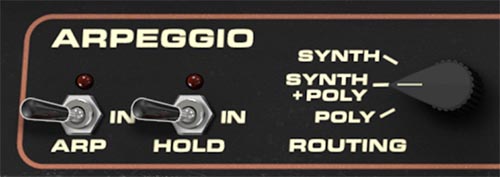
The Arp switch turns the arpeggiator on or off. Simple enough, but this is the master gate for the whole section.
The Hold switch keeps the arpeggio running after you release the keys. This is especially useful when you want both hands free to tweak filter, modulation, effects, or Multi settings while the pattern continues.
Tip: Hold is your friend when sound-designing with the arpeggiator. Turn it on, latch a pattern, then start shaping the sound in real time.
Routing
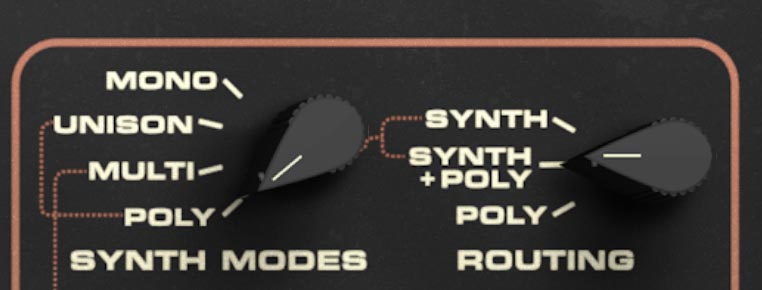
The Routing knob determines which sound engine the arpeggiator controls: Synth, Synth + Poly, or Poly. Be aware that this control is only available when the DS-2 is set to Synth + Poly Mode. If the DS-2 Routing is set to either Synth or Poly, this control is disabled.
This is one of the DS-2’s smartest arpeggiator features, because it makes the arp feel like part of the instrument architecture rather than just a simple rhythm tool.
In Synth mode, only the Synth engine is arpeggiated. This is perfect when you want a rhythmic lead or sequenced line while the Poly layer stays free for pads, held chords, or atmospheric support.
In Poly mode, only the Poly engine is arpeggiated. This can create wider, more harmonically spread rhythmic textures while leaving the Synth voice available for a played lead or bass — especially in Split patches.
In Synth + Poly mode, both engines are arpeggiated together. This gives you the most unified and dramatic result, especially when both layers are contributing to the patch.
Tip: One of the best DS-2 tricks is to set Routing to Synth, hold a chord so the Synth engine arpeggiates it, and then play additional notes or chord textures on the Poly side. It’s a great way to make one patch feel like two performances working together.
Pattern
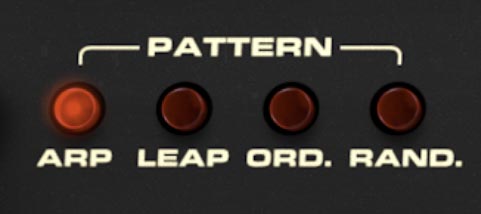
The Pattern buttons choose how the arpeggiator organizes the notes you hold. The available patterns are:
Arp
This is the classic arpeggiator behavior. It plays the held notes in a regular stepped pattern, ideal for traditional synth arpeggios and clean rhythmic lines.
Leap
This pattern adds octave jumping behavior, creating a more animated and tumbling motion. It’s great for patterns that should feel larger or a little more dramatic.
Ord.
Short for Order, this pattern plays the notes in the order you pressed them. This is especially useful when you want more control over the melodic shape of the pattern rather than leaving it to pitch order.
Rand.
Short for Random, this pattern plays the held notes in unpredictable order. It’s excellent for generative textures, unstable rhythmic figures, or any pattern that should feel less repetitive and more live.
Tip: Order is one of the most musical arp modes because it rewards deliberate playing. Instead of just holding a chord, you can compose the pattern by the order you enter notes.
Tip: Random works especially well when the patch has modulation or evolving effects, because the combination keeps the phrase from feeling mechanical.
Direction
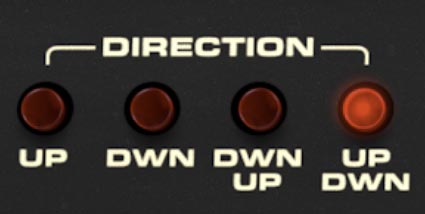
The Direction buttons set the direction of motion through the arpeggiated notes:
Up plays from lower to higher notes.
Dwn plays from higher to lower notes.
Dwn Up moves downward, then reverses direction.
Up Dwn moves upward, then reverses direction.
These may sound like simple variations, but they can change the feel of a pattern quite a bit. Up and Down tend to sound clear and direct. The two alternating modes feel more flowing and cyclical. If a pattern feels too obvious or stiff, try switching from straight Up or Down to one of the alternating directions. It often makes the phrase feel more musical immediately.
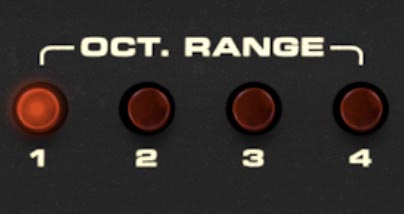
Oct. Range
The Oct. Range buttons set how many octaves the arpeggio spans, from 1 to 4.
At 1 octave, the pattern stays compact and focused. As you increase the range, the arpeggio repeats the held notes across additional octaves, creating a broader, more dramatic contour.
Smaller ranges are often best for bass parts, tighter riffs, and patterns that need to stay rhythmically grounded. Larger ranges create more sweeping, expansive motion and are especially effective with Leap or alternating directions.
Tip: A wider octave range can make even a simple chord sound far more elaborate.
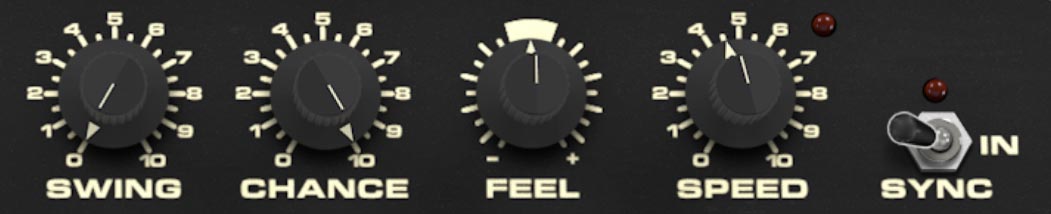
Swing
The Swing knob adds rhythmic shuffle by delaying every second step of the arpeggio. At lower settings, the pattern stays straight and grid-like. As you increase Swing, the rhythm develops more groove and lilt. This is one of the quickest ways to make an arpeggio feel less robotic. Even a small amount can make the pattern sit more musically.
Tip: If the arp feels too stiff, add a little Swing before changing anything else.
Chance
The Chance knob controls the probability that each step will sound. At higher settings, more notes play consistently. At lower settings, some notes are dropped, creating rests, syncopation, and a more unpredictable rhythmic shape. This is a very effective control for making a repeating arpeggio feel less repetitive. It can introduce just enough instability to keep a pattern moving without turning it into total randomness.
Tip: Moderate Chance settings are often the sweet spot. Too high and everything plays. Too low and the arp may feel broken.
Feel
The Feel knob adjusts the timing feel of the arpeggio. This is a more subtle groove control than Swing. While Swing changes the timing relationship between alternating steps, Feel shifts the overall rhythmic vibe, making the pattern feel either more relaxed or more urgent depending on the setting.
Tip: Use Feel after setting Swing and Speed. Think of it as the final nudge that makes the pattern sit right.
Speed
The Speed knob controls the playback rate of the arpeggiator. Slower settings create more spacious, deliberate patterns. Faster settings turn held notes into complex rhythmic streams. This control has an obvious technical function, but musically it changes the whole personality of the arpeggiator. A slow arpeggio can feel hypnotic or cinematic. A fast one can feel urgent and sequencer-like.
Tip: If a pattern isn’t working, don’t assume the notes are at fault. Sometimes it just wants a different Speed.
Sync
The Sync switch locks the arpeggiator to host tempo in a DAW, or to the internal clock in standalone mode. When Sync is enabled, the arpeggiator follows rhythmic note divisions rather than running freely. This is especially useful when the arpeggiator needs to sit tightly with a track, tempo-synced modulation, delay effects, or drum parts.
Creative Ways to Use the DS-2 Arpeggiator
One of the best uses of the DS-2 arpeggiator is layer contrast.
Set the arp Routing to Synth, then create a punchy Synth patch for the repeating pattern. Leave the Poly layer broader and more sustained so you can play chords around the moving line. This gives you a “motion in front, atmosphere behind” effect without needing two separate patches.
Or do the reverse. Route the arp to Poly, then let the Synth engine handle a stable voice while the Poly section creates movement.
When you want the whole instrument to move together, switch Routing to Synth + Poly and treat the DS-2 like a full layered arpeggiated machine. This is especially effective when Synth and Poly have clearly different tone roles, because the arp pattern becomes more dimensional.
Tip: Try Order pattern with Routing set to Synth, then play your held notes in a deliberate sequence instead of a block chord. You can get surprisingly melodic results without sounding like a step sequencer.
Tip: Leap plus a wider Oct. Range is excellent for animated Berlin-school style motion, especially with some Swing and filter movement.
Tip: Random plus moderate Chance can create generative textures, especially when the Poly layer has longer release or more atmospheric effects.
Tip: A small amount of Swing, a little Feel, and a touch of Chance will often do more for musicality than extreme settings on any one of them.