Making the Most of the DS-2’s Unique Voices
If the DS-2 were just another vintage-style synth, we’d begin with oscillators, filters, envelopes, and the usual section-by-section tour of the panel. But the DS-2 isn’t really a usual anything. Its whole personality starts with a more interesting idea: it gives you a full-featured Synth engine alongside a companion Poly engine with its own set of Pitch, VCA Release, high- and low-pass filters (EQs, really), and Volume controls. If you treat the two engines as musical co-conspirators by combining and contrasting them in creative ways, you can make real synth magic happen. In the 1978 original, Crumar essentially combined a mono synth section with a 44-note polyphonic string section, and that unusual split personality is a huge part of why it still feels distinctive today.
About the Two Engines
The first useful mindset shift is this: Don’t approach the DS-2 like a one-voice instrument. Approach it like a layered sound machine with two different kinds of personality. The Synth side gives you the focused, shaped, animated voice you’d expect from a proper well-equipped performance synth. The Poly side gives you additional depth and atmosphere. Used on their own, each has its own charm. Used together, they can produce sounds that feel bigger, stranger, and more alive than either section would by itself. That’s the secret here: both personalities working together in ways that let you blend edge and bite with body.
Oscillators That Sound Different
The other thing that makes the DS-2 special is the character of its oscillators. In an attempt to build a synthesizer that didn’t have the tuning problems of traditional analog synthesizers, Crumar employed a cutting-edge concept to create oscillators that wouldn’t drift.
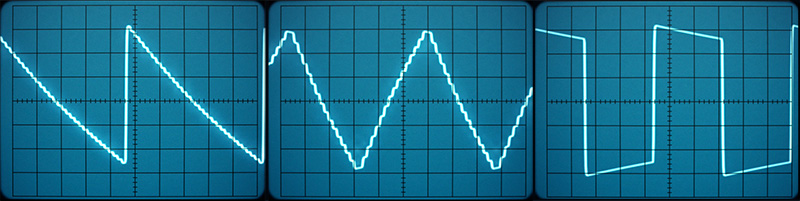
For each DS-2 waveform in the Synth section, there are digital values. As the oscillator’s clock advances, the next value is generated and a digital-to-analog chip (DAC) produces a voltage to match. You can think of this as a sort of primitive sample-playback, though this isn’t how any modern sampler works. There’s no attempt to smoothly transition from one sample to another. As a result, the waveforms produced have unique harmonics and are unmistakably stair-stepped, as you can see below:
In addition to the above, we’ve added a 32-sample sine wave to the second oscillator that’s anything but pure. Despite the stair-stepped nature of these waveforms, these emulated waveforms are low-aliasing, so you can play very high octaves without hearing aliasing artifacts that you often find in sample-based virtual instruments. And, of course, we've expanded the original monophonic Synth section to 4, 8, or 16 polyphonic voices, added Unison, and a multi-voice mode to introduce per voice variations in pitch, panning, and more.
Similarly, the Poly section of the DS-2 had its own approach to tone generation. It used divide-down oscillators to create square waves and combined them in such a way as to create stair-stepped, pseudo-sawtooth waves. These, too, are harmonically complex, and they sound slightly different than a real sawtooth wave.
Cherry Audio DS-2 employs a similar approach, combining divide-down square waves through identical virtual resistors and using highpass filtering to produce the same "sawtooth" waveforms. We also expanded this section by adding a VCA Release control, so that individual notes can have their own release envelopes. By increasing the release time and adding chorusing and reverb, the Poly section becomes a very faithful reproduction of an analog string synth — and more.
Like the hardware, the Cherry Audio DS-2’s Poly section is paraphonic, with a single filter, VCA envelope, and VCA. The same filter cutoff, resonance, and modulation settings that are applied to the Synth section also affect the paraphonic Poly filter. It’s an unusual architecture, but very true to the original hardware despite the fact that we’ve made the synth section fully polyphonic.
Between the two sections, the resulting timbres are neither the glassy, polished sound of later digital synths nor the rounded, buttery sound we associate with classic analog designs. The DS-2’s tone has a more jagged, harmonically edgy quality, with a gritty, slightly stepped character that gives it a sound all its own. There’s a rawness to it, with rasp and bite.
That unique tone is part of what makes the DS-2 so rewarding to explore. It doesn’t always hand you a perfectly finished sound right out of the gate. Instead, it gives you something more interesting: a voice with personality, grain, and texture. That means the DS-2 often shines brightest when you play up what makes it distinctive instead of trying to force it into sounding like some other synth you already know.
How to Approach Sound Design on the DS-2
All of the above may change how you build patches. On the DS-2, it often pays to lean into contrast rather than trying to smooth everything flat. Let the Synth engine provide edge, motion, and articulation. Let the Poly engine add size and harmonic mass. Use the Synth side when you want presence. Bring in the Poly side when the sound needs to occupy more space. And if a patch starts feeling too tame, the answer usually isn’t more. It’s smarter layering. A little edge from one section and a little breadth from the other will usually get you further than piling on extra modulation (or effects) and hoping for the best.
So before you dive into the details, keep in mind that the DS-2’s greatest strength isn’t just that it has a Synth engine and a Poly engine. It’s that they complement each other. Start by exploring each side on its own, then combine them. That’s when the DS-2 shows its true sonic colors.
Choosing Synth, Poly, or Synth + Poly
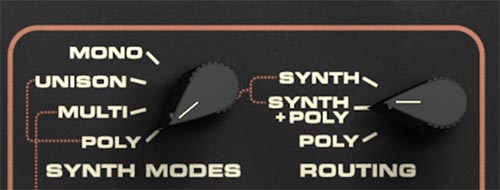
The Routing knob at the far right of the front panel is the switchboard for the instrument’s overall voice architecture. It lets you choose among three operating modes: Synth, Poly, and Synth + Poly. When the Routing knob is set to Synth, you’ll hear only the Synth engine, and the Poly section is effectively out of the picture. When it’s set to Poly, the opposite is true: the Poly engine becomes active, and the Synth oscillator section is bypassed. When it’s set to Synth + Poly, both engines are active together, letting you blend the sharper, more focused voice of the Synth side with the broader, more spacious character of the Poly side.
Why the Routing Knob Matters So Much
This is an important navigation point on the panel, because it helps explain why certain controls seem active in one patch and not in another. If the Routing knob is set to Synth, the Poly engine controls won’t contribute to the sound. If it’s set to Poly, the main Synth engine controls won’t define what you hear in the same way. And if it’s set to Synth + Poly, both sections matter, which is where the DS-2 starts showing off a little. So anytime a sound isn’t behaving the way you expect, this is one of the first places to check.
Three Ways to Think About the DS-2
In practical use, these three modes give you three different ways to think about the instrument. Synth mode is ideal when you want a more direct, focused sound and want to work primarily with the DS-2’s main synth voice. Poly mode shifts attention to the poly side, which is useful for layered harmonic textures, and sounds that need more width or spread. Synth + Poly mode is where things get especially interesting, because it lets you treat the two engines like complementary layers. One can provide bite, articulation, and motion, while the other adds body, and harmonic weight.
Dedicated Effects for Each Voice
That contrast becomes even more powerful because the DS-2 doesn’t just give you two sound engines. It gives each engine its own dedicated effects chain. That’s a big deal. It means Synth and Poly don’t have to differ only in oscillator character or envelope behavior. They can also live in different sonic spaces. You might keep the Synth side dry, sharp, and upfront for clarity and attack, while giving the Poly side chorus, delay, or reverb for width and atmosphere. Or you might do the opposite and turn the Synth engine into a smeared, animated texture while the Poly side stays focused and supportive. Either way, the point is the same: effects on the DS-2 are more than polish. They're part of the sound design architecture.
A Good Workflow for Programming
A good rule of thumb is to decide on your Routing mode early, before getting too deep into editing. Ask yourself a simple question: Do you want this patch to be carried by the Synth engine, the Poly engine, or the interaction between both? Once you answer that, the rest of the panel becomes easier to navigate and the instrument starts to feel more intuitive. The DS-2 isn’t difficult, but it does reward this kind of top-down thinking. Choose the voice architecture first, then shape the sound inside it. Then use the dedicated effects chains to decide how close together, or how dramatically different, those two voices should feel. That approach will save time, reduce confusion, and get you to the fun part faster.
Tip: If a patch seems confusing, start by checking the Routing knob in the Poly section. It tells you which engine, or combination of engines, is actually in play. Then check which effects chain you’re hearing. On the DS-2, those two choices together can completely change how you should read the rest of the panel.