Shaping the Volume of the Sound
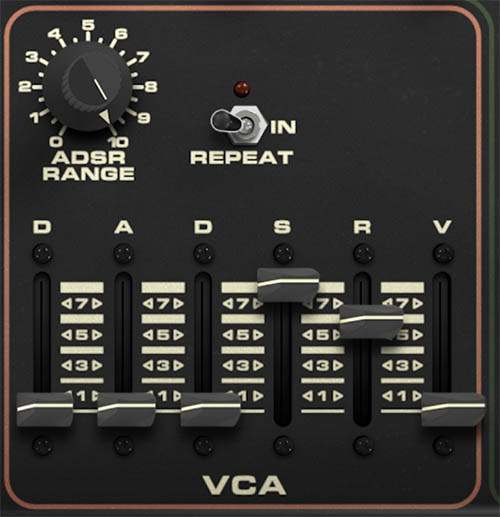
In the same way that the VCF shapes the tone, the VCA of the Synth section shapes the contour of loudness, from sharp and percussive to slow and swelling to long and lingering. On the DS-2, the VCA section includes its own DADSR envelope, plus ADSR Range, Velocity, and a Repeat switch. That gives you a lot of control over amplitude movement, whether you want a bass that snaps, a lead that sustains, a pad that eases in gently, or a repeating pulse that drives the rhythm.
Remember:
The VCF envelope shapes the movement of harmonic tone
The VCA envelope shapes the movement of loudness
On the DS-2, both can be subtle or dramatic, both can repeat, and both can play a major role in the final character of a patch. If you start treating the VCA as more than just a basic amp section, the synth becomes more expressive.
ADSR Range
The ADSR Range knob sets how strongly the VCA envelope affects amplitude. In practical terms, this determines how much of the envelope shape you actually hear in the volume contour of the sound. At higher settings, the envelope has a more obvious effect, making the Attack, Decay, Sustain, and Release stages more clearly defined. At lower settings, the envelope’s influence is reduced, resulting is less overall volume.
Tip: If the amp envelope feels flat, check ADSR Range before assuming the sliders are the problem.
The DADSR Envelope
Like the filter section, the VCA uses a DADSR envelope, which adds a Delay stage before the usual Attack, Decay, Sustain, and Release stages. Together, these sliders define the volume shape of the patch. Whether a sound feels punchy, plucky, swelling, sustained, or spacious depends a lot on what happens here.
The D slider at the far left sets the Delay time before the envelope begins. With the slider low, the sound starts almost immediately when you play a note. Raise it, and the sound waits before fading in. This is useful for staggered textures, slow-building pads, and sounds that shouldn’t appear the instant you press a key.
The A slider sets Attack time, which controls how quickly the sound rises to full level once the envelope begins. Short attack times produce an immediate, punchy onset. Longer attack times create a gentler fade-in, which works well for pads, swells, and less percussive sounds.
The second D slider sets Decay time, which controls how long it takes the sound to fall from its initial peak to the sustain level. A short decay gives you a tighter, more percussive contour. A longer decay creates a slower settling after the initial note onset.
The S slider sets the Sustain level, which determines how loud the sound remains while you continue holding a key. High sustain values keep the sound strong and steady. Lower sustain values make it drop away more after the initial attack and decay stages.
The R slider sets Release time, which controls how long the sound takes to fade out after you release the key. A short release gives you a quick stop. A longer release creates a smoother, more lingering tail.
Tip: For basses and synth brass, start with fast Attack, short-to-medium Decay, moderate Sustain, and short Release. For pads, do almost the opposite and let the sound gradually fade in and fade out.
V: Velocity Amount
The V slider controls velocity amount for the VCA envelope. This determines how much your playing strength affects the loudness response of the patch.
With higher velocity settings, harder playing produces a stronger amplitude response, making the sound feel more expressive and performance-sensitive. With lower settings, the volume remains more even no matter how hard or softly you play. This is one of the easiest ways to make a patch feel less static. Even a simple sound can become much more playable when it responds naturally to touch.
Tip: If a patch sounds good but feels stiff under the fingers, add some Velocity. It often makes the difference between just a preset and a truly expressive instrument.
Repeat
The Repeat switch turns amplitude-envelope looping off or in. When enabled, the VCA envelope repeats rather than running only once per note.
This creates repeating changes in loudness, from gentle pulsing to more obvious rhythmic gating, depending on the envelope settings. Because the DS-2 uses a DADSR envelope rather than a basic ADSR, the repeated contour can be more varied and expressive than a simple on-off tremolo.
Short settings can produce tight, choppy pulses. Longer settings can create rolling swells or repeating waves of volume. And because this happens in the amp section, the effect is often more dramatic and obvious than repeating filter movement alone.
Tip: If Repeat seems too subtle, exaggerate the Attack, Decay, or Release settings so the repeating contour is easier to hear.
Tip: Try using VCA Repeat together with a more stable filter setting for rhythmic volume pulsing, or combine it with VCF Repeat for more animated, sequencer-like patterns.
How to Use the VCA Envelope Musically
The VCA section is where you decide how the sound behaves as a performance.
For plucked or percussive sounds, use a fast attack, short decay, low-to-medium sustain, and short release. For leads, you’ll often want a fast or moderately fast attack, solid sustain, and enough release to avoid abrupt cutoffs. For pads, slower attack and longer release will help the sound feel softer and more spacious.
The Delay stage is especially useful when layering the DS-2’s engines. A delayed VCA onset can let one part of the patch speak immediately while another fades in a moment later. That can create a more staged, dimensional sound without needing effects to do all the work.
Tip: A little Delay on the amp envelope can be very effective in layered sounds. It lets the patch unfold instead of dropping everything at once.
VCA Release in the Poly Section
The VCA Release knob of the Poly section (not present in the original hardware) sets the release time for its amplifier. This is independent of the main Synth VCA or VCF release settings. It allows the Poly layer to continue trailing off after the Synth sound has already stopped. It is a relatively simply but surprisingly powerful tool for building layered patches with different articulations.
Practical Sound Design Ideas
For a punchy synth bass, keep Delay at minimum, set Attack fast, use a short Decay, moderate Sustain, and short Release. Add a little Velocity if you want the patch to feel more alive under your fingers.
For a slow pad or ambient texture, raise Attack and Release, experiment with a bit of Delay, and keep Sustain fairly high so the sound stays present once it arrives.
For rhythmic pulsing sounds, enable Repeat and set the envelope for a clear contour. Lower sustain and more pronounced attack and decay settings usually make the motion easier to hear.
For more expressive lead sounds, use enough Sustain to keep the note solid while held, enough Release to avoid a hard drop, and some Velocity so the patch responds dynamically as you play.