Digital Delay
One of the more distinctive features of the original Korg DW-8000 was its built-in programmable digital delay. Introduced in 1985, this delay went considerably beyond producing conventional echoes. By combining adjustable delay times, feedback, and internal modulation, it could create everything from subtle doubling and chorus to dramatic flanging, slapback echoes, and spacious repeating delays.
Cherry Audio DW-8K retains this versatile six-parameter design as an integral part of its synthesis architecture. Unlike the separate effects processors available in DW-8K's Effects view, the Digital Delay is permanently accessible on the main synthesis panel, making it easy to add depth, movement, and dimension without opening the Effects view or assigning an additional processor.
Cherry Audio also expands the original design with synchronization options and access to the delay parameters through the Mod Matrix. This makes it possible to animate delay times, introduce rhythmic changes, and create expressive effects that respond to modulation generators, envelopes, performance controls, and other modulation sources.
Digital Delay Controls
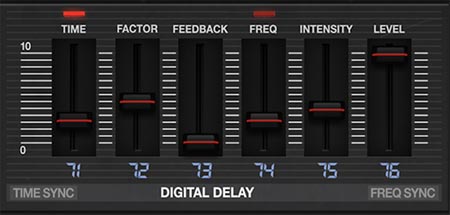
The Digital Delay section contains six sliders: Time, Factor, Feedback, Frequency, Intensity, and Level. Two additional buttons, Time Sync and Freq Sync, provide synchronization options.
Understanding the relationship between Time, Frequency, and Intensity is particularly important because these controls determine whether the delay behaves like a conventional echo or a time-modulated effect such as chorus or flanging.
TIME: (0–7.00) Sets the basic delay time, determining the interval between the original signal and the delayed signal.
Lower settings produce extremely short delays suitable for flanging, chorus, and related effects. Higher settings create progressively longer delays that can be used for doubling, slapback, and repeating echoes.
The original DW-8000 divided the delay time into eight ranges, extending from approximately 2–4 milliseconds at the shortest setting to approximately 256–512 milliseconds at the longest. DW-8K retains the familiar Time and Factor programming arrangement.
FACTOR: (0–15.00) Provides fine adjustment of the delay time within the range established by Time. On the original DW-8000, Factor adjusted the delay time using a multiplier ranging from approximately 0.5 to 1.0. Think of Time as the coarse adjustment and Factor as the fine adjustment. Together, they provide considerably more control than a single delay-time parameter.
Factor is especially useful when programming short delay effects, where even a small timing adjustment can noticeably influence the sound. For example, when creating a flanger, changing Factor alters the spacing of the characteristic peaks and notches in the frequency response. With a doubling effect, it helps establish the separation between the original and delayed sounds.
FEEDBACK: (0–15.00) Determines how much of the delayed signal is fed back into the delay input to create additional repeats. At low settings, the delayed signal produces relatively few repetitions. Increasing Feedback allows the repeats to continue for longer, creating denser echoes and more pronounced resonant effects.
Feedback is useful for more than conventional echoes. With very short delay times, increasing Feedback can emphasize the sweeping, hollow, or metallic qualities associated with flanging. At higher settings, especially when combined with longer delay times, Feedback can produce sustained repeating textures and more dramatic delay effects.
FREQUENCY: (0–31) Controls the rate of the Digital Delay's internal low-frequency oscillator, which modulates the delay time.
This control is easily misunderstood because its name might suggest an audio-frequency adjustment. In fact, Frequency determines how quickly the delay time is modulated, rather than filtering the delayed signal. Lower Frequency settings produce slower movement, making them useful for gentle chorus and sweeping flange effects. Higher settings introduce faster modulation, which can produce increasingly animated or unusual textures.
The audible result depends on the Intensity setting. If Intensity is set to zero, changing Frequency will not produce audible delay-time modulation.
INTENSITY: (0–31) Determines the depth of the delay-time modulation generated by the internal low-frequency oscillator. At zero, the delay time remains steady. Increasing Intensity causes the delay time to vary more dramatically according to the Frequency setting. This interaction is the key to producing chorus and flanging effects.
With short delay times, modest Intensity settings create gentle movement and thickening. Higher settings produce more pronounced sweeping and pitch variations. At longer delay times, modulation can introduce movement into the echoes themselves, making them less static and more animated.
LEVEL: (0–15) Adjusts the level of the delayed signal. Lower settings introduce a subtle delayed component beneath the original sound, while higher settings make the delay more prominent. For chorus and flanging, the balance between the original and delayed signals is especially important. The two signals interact to produce the characteristic thickening and frequency cancellations associated with these effects.
For conventional echoes, Level determines how clearly the repeats are heard in relation to the original note.
TIME SYNC: (Off/On) Enables tempo synchronization for the delay time. This is useful for creating rhythmic echoes that follow the tempo of a DAW project or DW-8K's internal tempo. With synchronization enabled, Time operates in a tempo-related context rather than solely as a freely adjusted delay time.
FREQ SYNC: (Off/On) Enables tempo synchronization for the internal delay modulation oscillator. This allows the repeating movement created by Frequency and Intensity to follow a musical clock, making it particularly useful for rhythmic chorus, flanging, and other time-modulated effects.
Time Sync and Freq Sync operate independently, allowing the delay repeats and the modulation movement to be synchronized as needed.
Understanding Time and Frequency
Although both Time and Frequency affect the delay, they perform fundamentally different jobs. Time determines how long the signal is delayed. Frequency determines how quickly that delay time changes. For example, imagine setting a relatively short delay time with Feedback near zero.
With Intensity at zero, the delay remains fixed. Depending on the Time and Factor settings, the result might be subtle thickening, doubling, or a short echo. Now increase Intensity and use Frequency to introduce slow movement. The delay time begins changing continuously, producing the pitch and phase interactions associated with chorus or flanging. Increase Frequency and the movement becomes faster. Increase Intensity and the delay-time variation becomes more pronounced.
This relationship explains why the Digital Delay is capable of such a wide range of sounds despite having only six principal controls. It also makes the section particularly rewarding to experiment with. A small adjustment to Factor, Frequency, or Intensity can transform a conventional echo into something considerably more animated.
Creating Chorus Effects
Chorus is created by combining the original signal with a slightly delayed signal whose delay time changes continuously.
As the delay time moves, subtle pitch and phase differences develop between the two signals. These interactions produce the familiar impression of multiple instruments playing together.
DW-8K's Digital Delay is particularly well suited to creating this effect.
To create a gentle chorus:
Start with a sustained sound, such as a string or pad preset.
Set TIME to a short-to-moderate delay range, beginning around 2–3, and adjust FACTOR until the sound begins to thicken without producing an obvious echo.
Set FEEDBACK close to zero.
Set FREQUENCY to a relatively slow value, around 4–8.
Increase INTENSITY gradually, beginning around 3–7.
Raise LEVEL until the sound becomes fuller and more animated.
Listen for a gentle thickening rather than an obvious echo.
If the effect sounds too wobbly or exaggerated, reduce Intensity or Frequency. If it sounds too static, increase Intensity slightly.
Tip: Chorus often works best when the modulation is barely noticeable as a separate effect. A subtle amount can make DW-8K's digital waveforms sound richer and more organic, particularly when combined with small amounts of oscillator detuning.
Creating Flanging Effects
Flanging uses the same basic principle as chorus but generally employs shorter delay times and more pronounced interaction between the original and delayed signals.
These interactions create a series of peaks and notches in the frequency response. As the delay time changes, the peaks and notches move, producing the familiar sweeping, hollow, or jet-like character of a flanger.
Feedback can make the effect substantially more pronounced.
To create a sweeping flanger:
Select a harmonically rich sound, such as a sawtooth-based pad or sustained lead.
Set TIME near its minimum.
Use FACTOR to fine-tune the short delay time.
Set FEEDBACK to a moderate value, around 7–11.
Set FREQUENCY relatively low, around 2–6.
Increase INTENSITY to approximately 7–14.
Adjust LEVEL until the sweeping effect becomes clearly audible.
Experiment with Factor while holding a sustained note. Small changes can noticeably alter the character of the effect.
Increase Feedback for a sharper, more resonant sweep. Reduce it for a softer, more conventional flanging effect.
Tip: Bright digital waveforms such as SAW, CLAVI, and E GUITAR provide plenty of harmonic content for a flanger to work with. Filtering the sound slightly before applying the effect can help tame any excessive brightness.
Creating Doubling Effects
Doubling creates the impression that two instruments or performances are playing together.
Rather than producing a long, obvious echo, a relatively short delayed signal combines with the original to make it sound thicker and more substantial.
Unlike chorus, doubling generally requires little or no delay-time modulation.
To create a doubling effect:
Select a lead, brass, or keyboard sound.
Set TIME to a short or moderate delay range, beginning around 2–3.
Adjust FACTOR to establish the desired separation.
Keep FEEDBACK at zero or a very low setting.
Set INTENSITY to zero initially.
Raise LEVEL until the sound becomes noticeably fuller without producing an obvious rhythmic echo.
If desired, introduce a very small amount of Intensity for additional movement.
The key is finding a delay time that reinforces the original sound without making the second event sound like a separate note.
Tip: Doubling works especially well with monophonic leads. A small amount can make a single-oscillator patch sound considerably larger without requiring an additional oscillator or unison voices.
Creating Slapback Echoes
Slapback is a short, clearly audible echo that follows the original sound.
Originally associated with early tape echo techniques, it became a defining feature of rockabilly, early rock recordings, and many classic electronic music productions.
Slapback can add a sense of space and rhythmic emphasis without the density of a long repeating delay.
To create a slapback echo:
Select a plucked keyboard, bass, or lead sound.
Set TIME toward the middle or upper portion of its range, beginning around 4–5.
Adjust FACTOR until the delayed signal becomes a distinct, closely spaced echo.
Keep FEEDBACK low, around 0–4.
Set INTENSITY to zero for a stable delay time.
Raise LEVEL until the echo adds the desired rhythmic emphasis.
For a classic slapback sound, aim for one clearly audible repeat rather than a long series of echoes.
Tip: Try slapback with DW-8K's Autobend section. A short pitch movement at the beginning of each note, followed by a closely spaced echo, can produce lively, expressive synthesizer leads.
Creating Longer Echoes
At longer Time settings, the Digital Delay behaves more like a conventional echo processor.
Increasing Feedback produces repeating echoes that gradually fade away. This is useful for rhythmic leads, atmospheric pads, and sound effects.
To create a repeating echo:
Select a relatively short, percussive sound so individual echoes are easy to hear.
Set TIME toward the upper end of its range, around 6–7.
Adjust FACTOR to fine-tune the interval between repeats.
Set FEEDBACK to approximately 5–10.
Keep INTENSITY at zero initially.
Increase LEVEL until the repeats are clearly audible.
Introduce a small amount of Frequency and Intensity if you want the echoes to develop subtle pitch movement.
Higher Feedback settings produce longer repeating patterns, while lower settings create cleaner, more controlled echoes.
Enable Time Sync when you want the repeats to follow the tempo of a musical passage.
Tip: A repeating echo can make a simple monophonic phrase sound much more elaborate. Try playing a sparse lead line and allowing the repeats to fill the spaces between notes.
Modulating Digital Delay Parameters
One of Cherry Audio DW-8K's most powerful additions to the original delay architecture is the ability to modulate its parameters using the Mod Matrix.
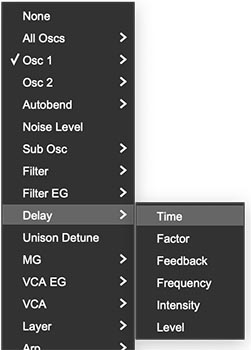
All six Digital Delay parameters are available as modulation destinations:
Time
Factor
Feedback
Frequency
Intensity
Level
This opens up possibilities that go well beyond the delay's built-in modulation oscillator.
For example, you can use a Matrix MG to sweep the delay time, keyboard pressure to increase feedback, or an envelope to change the delay's character over the course of each note.
The Mod Matrix provides eight routing slots, each with Source, Destination, Via, and bipolar Depth controls. This allows a wide variety of modulation sources to influence the delay.