Filter
The Voltage Controlled Filter (VCF) is how DW-8K’s digital waveforms become warm pads, sharply defined basses, expressive brass, and everything in between. The oscillators provide the harmonic material; the filter shapes that material by removing or emphasizing different frequencies. A small adjustment can soften a bright waveform, highlight an interesting overtone, or completely change the character of a sound.
The original Korg DW-8000 paired its digital oscillators with an analog lowpass filter built around the NJM2069 chip. Cherry Audio expands on this hybrid design with three distinctive filter models, three response types, and three selectable slopes. The models are inspired by classic Korg instruments, but the available responses and slopes are modern DW-8K additions.
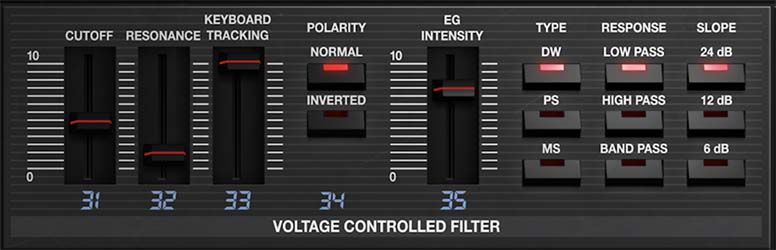
DW-8K's filter offers three independent choices: TYPE selects the filter model and its underlying tonal character; RESPONSE determines which frequencies are passed or attenuated; and SLOPE determines how sharply the rejected frequencies are reduced. All three filter models, DW, PS, and MS, can operate in Lowpass, Highpass, or Bandpass mode at 6, 12, or 24 dB/octave. That gives you 27 combinations before even touching Cutoff or Resonance.
Filter Type Selection
The DW, PS, and MS settings select three vintage-inspired filter personalities. This is more than a choice between dark and bright: the models can differ in resonance behavior, intensity, and how they react as Cutoff moves. The most revealing differences often emerge when Resonance is raised and the filter is swept.
DW: (DW-8000) Based on the character of the Korg DW-8000’s NJM2069 analog filter. The DW model is a natural choice for warm, rounded pads, classic hybrid synthesizer tones, musical basses, and bright digital waveforms that need a little softening. It is a useful starting point when you want the sound of the original instrument.
PS: (PS-3300) Inspired by the Korg PS-3300’s characteristically clean-sounding filter. The PS model is well suited to strings, pads, and smoothly moving textures that let the oscillator waveforms stay in the spotlight. The original PS-3300 used 12 dB/octave lowpass filters; DW-8K extends this distinctive character with additional slopes and responses.
MS: (MS-20) Inspired by the more aggressive Korg MS-20 filter character, with a stronger, edgier resonant personality. Choose MS for biting leads, deep sweeps, animated sequences, and sounds that benefit from a bit of controlled rudeness. It can be particularly expressive when paired with Bandpass mode or a steeper slope.
Tip: To compare the three models, keep the response, slope, and oscillator settings unchanged. Set Resonance to a moderate value, then switch between DW, PS, and MS while repeating the same phrase. Afterward, try the comparison again with more resonance.
Filter Response
Filter response determines which portion of the frequency spectrum is emphasized or attenuated. Each response is available with every filter model and every slope.
Lowpass: (LP) Allows frequencies below Cutoff to pass while progressively reducing frequencies above it. Lower Cutoff settings produce darker, rounder sounds; higher settings allow more upper harmonics through. Lowpass is the classic choice for warm pads, basses, brass-like attacks, and familiar synthesizer sweeps.
Highpass: (HP) Allows frequencies above Cutoff to pass while progressively reducing lower frequencies. Raising Cutoff thins out the low end, making the sound leaner, lighter, and sometimes more percussive. Highpass is useful for removing excess bass from pads, creating bright textures, or making a part sit above a bass instrument in a mix.
Bandpass: (BP) Emphasizes a band of frequencies around Cutoff while reducing frequencies above and below it. Sweeping Cutoff moves that emphasized region through the sound, often producing hollow, nasal, or vowel-like colors. Bandpass is especially effective for expressive leads, unusual percussion, and rhythmic filter movement.
Tip: If a sound becomes too thin with Highpass or Bandpass selected, this is often the intended effect of the response rather than a problem with the oscillator. Lower Cutoff, reduce Resonance, or switch to a gentler slope to regain some body.
Filter Slope
SLOPE: (6, 12, 24 dB/octave) Sets how quickly frequencies outside the selected filter response are reduced. The slope can be changed independently of the filter model and response. In Lowpass mode, the attenuation occurs above Cutoff; in Highpass, below Cutoff; and in Bandpass, on both sides of the emphasized frequency region.
6 dB/octave: The gentlest setting. It preserves more of the surrounding harmonic content for an open, subtle tone. A useful choice for soft tonal shaping, airy pads, and filter movements that should be heard rather than felt as a dramatic effect.
12 dB/octave: A balanced middle ground with a more noticeable filter effect while retaining some openness. Good for expressive brass, leads, evolving textures, and musical Bandpass sweeps.
24 dB/octave: The steepest setting. It provides more decisive separation between passed and rejected frequencies, making Lowpass sounds darker, Highpass sounds leaner, and Bandpass effects more focused. Try it for punchy basses, striking resonant sweeps, and tighter, more pronounced timbral changes.
Tip: For a quick demonstration of slope, choose a harmonically rich waveform, set Resonance fairly low, and switch between 6, 12, and 24 dB/octave without moving Cutoff. You will hear how much harmonic detail each slope allows to remain.
Filter Controls
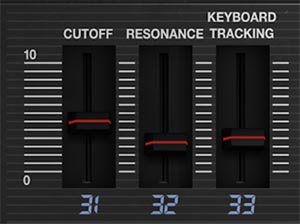
CUTOFF: (0-63) Sets the filter’s operating frequency. With Lowpass response, lowering Cutoff removes upper harmonics and darkens the sound. In Highpass, raising Cutoff removes more low-frequency energy. In Bandpass, moving Cutoff shifts the highlighted frequency region, often giving the sound a speaking or vowel-like quality. Cutoff also provides the starting point for movement produced by the filter envelope and other modulation sources.
RESONANCE: (0-31) Emphasizes frequencies around the Cutoff region. At modest settings, it adds definition and character; higher settings produce a more pronounced peak, making filter sweeps easier to hear. The audible result depends on the selected model, response, and slope. High settings may introduce prominent ringing or whistling, so listen for changes in volume and low-frequency weight.
Cutoff and Resonance work together. With Lowpass selected, a resonant sweep can transform an ordinary bright waveform into a familiar animated synthesizer tone. With Bandpass selected, the same sweep can sound more hollow and vocal-like. In Highpass mode, a resonant peak may emphasize the edge of a bright, thin sound rather than its low-frequency body.
KEYBOARD TRACKING: (0-3) Determines how Cutoff changes as notes are played higher or lower on the keyboard. Increasing keyboard tracking can help preserve a more consistent sense of brightness across the instrument’s range, particularly in Lowpass mode. It also changes how a resonant peak relates to the notes you play, making it a valuable tool for tuned, expressive filter effects.
Tip: If your bass notes sound nicely rounded but upper notes become unexpectedly dull, try increasing keyboard tracking. If you want a darker top end or a pronounced tonal contrast between low and high notes, reduce it instead.
Filter Envelope Modulation
The VCF Envelope adds movement to the filter's Cutoff setting over the life of each note. A fast sweep can give a sound a brassy punch or a plucked attack, while a slow sweep can gradually reveal upper harmonics in a pad. The envelope can also produce interesting movement in Highpass and Bandpass modes.
The EG Intensity and Polarity controls in the Filter section determine how strongly the envelope affects Cutoff and whether that movement is positive or inverted. The envelope's Attack, Decay, Break Point, Slope, Sustain, Release, and Velocity controls are located in the separate Envelopes section. See the Envelopes chapter for details.
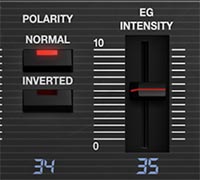
EG INTENSITY: (0-31) Determines how strongly the VCF Envelope modulates the filter cutoff. Low settings produce subtle changes in tone, while higher settings create more pronounced sweeps. At zero, the envelope has no effect on Cutoff.
The audible result depends on the starting Cutoff setting, the envelope's shape, and the selected Polarity. For example, a relatively low Cutoff combined with a high EG Intensity can produce a dramatic filter opening during the envelope's Attack stage.
POLARITY: (Normal/Inverted) Determines the direction of the filter envelope's modulation.
With Normal selected, the envelope raises Cutoff as its level increases, then lowers it as the envelope falls. This is the conventional setting for bright attacks, expressive brass, and plucked synthesizer sounds.
With Inverted selected, the envelope operates in the opposite direction. As the envelope rises, Cutoff moves downward; as the envelope falls, Cutoff moves back upward. This can produce unusual inward-moving sweeps, darker attacks, and sounds that become brighter as their initial envelope movement subsides.
VELOCITY: (0-7) The VCF Envelope's Velocity control determines how strongly playing velocity influences its response. Increasing velocity sensitivity allows harder and softer keystrokes to produce different amounts of filter-envelope movement.
With Normal polarity, stronger playing can produce a more pronounced upward filter sweep. With Inverted polarity, stronger playing can produce greater downward movement instead. This makes Velocity especially useful for expressive keyboard sounds, brass, plucked instruments, and dynamically responsive pads.
Periodic and performance-controlled modulation can also bring the filter to life. Try a slow Modulation Generator for gentle movement, a Matrix EG for an additional independent envelope, or the Parameter Animator for rhythmic changes in Cutoff. See the Modulation and Motion Controls chapters for more information.
Tip: If a positive envelope sweep seems barely audible in Lowpass mode, lower the starting Cutoff so the envelope has room to open it. In Highpass mode, remember that moving Cutoff upward removes bass rather than adding brightness in the same way as a Lowpass sweep.
Creating Sounds With the Filter
Compare the Models, Responses, and Slopes
A short listening experiment makes the three independent choices much easier to understand. Start simple, changing only one setting at a time.
Choose a harmonically rich waveform for Oscillator 1, and reduce other sound generators if necessary so the filter is easy to hear.
Select DW, Lowpass, and 12 dB/octave. Lower Cutoff to a middle setting and add a modest amount of Resonance.
Play a repeated phrase, then switch to PS and MS without changing anything else. Listen for shifts in weight, edge, and resonance.
Return to your favorite filter Type and switch the response between Lowpass, Highpass, and Bandpass. Adjust Cutoff as needed to hear the most useful part of each response.
Keep the chosen response, then compare 6, 12, and 24 dB/octave. Notice how the steepness changes the amount of harmonic detail and the focus of the filter.
Finally, introduce a little filter-envelope movement and tune the combination by ear. The best choice is the one that supports the musical part, not necessarily the most dramatic one.
Sound Design Starting Points
Classic DW pads: Try DW with Lowpass at 12 or 24 dB/octave. Use modest Resonance, a moderately open Cutoff, and a slow filter-envelope movement. The result can soften the digital oscillators without hiding their distinctive harmonic detail.
Silky vintage strings: Start with PS, Lowpass, and 6 or 12 dB/octave. Keep Resonance gentle and use gradual Cutoff movement. This makes a good setting for spacious chords that need to remain smooth as they evolve.
Expressive synth brass: Choose DW or PS with Lowpass at 12 dB/octave. Begin with Cutoff slightly lowered, then use a short, positive filter-envelope movement to brighten the attack. Add just enough Resonance to define the articulation.
Solid bass with a defined attack: Use DW, Lowpass, and 24 dB/octave. Start with a fairly low Cutoff and a short envelope sweep. For a more aggressive bass, compare MS at the same settings, then readjust Resonance and output level as needed.
Bright, mix-friendly layers: Try PS with Highpass at 6 or 12 dB/octave. Gradually raise Cutoff until the patch stops competing with the bass and kick drum. A gentler slope can preserve a little warmth while reducing unnecessary low end.
Vocal-like leads: Select PS or MS with Bandpass at 12 dB/octave, then sweep Cutoff slowly with moderate Resonance. PS is a good starting point for smooth, rounded movement; MS pushes the same idea toward a more pronounced edge.
Percussive electronic accents: Choose MS with Highpass or Bandpass at 24 dB/octave. Use a short filter-envelope movement and experiment with Resonance for sharp, animated attacks. Short notes and a touch of ambience can give these sounds plenty of personality.
Evolving sequences: Start with MS, Bandpass, and 12 or 24 dB/octave. Modulate Cutoff while a repeating note pattern plays. Small movements can produce rhythmic color changes; larger sweeps turn the filter into a central part of the performance.
A Few More Filter Tips
Start with the sound source: A filter cannot reveal harmonics that the oscillator does not produce. If a sweep seems too subtle, try a brighter waveform or temporarily raise the oscillator level while comparing settings.
Use Resonance sparingly: A little resonance often adds more character than a lot. Excessive amounts can draw attention away from the played note, particularly with the more assertive MS model.
Think in terms of arrangement: A thick pad may sound impressive on its own but compete with bass and piano parts in a mix. Highpass response can create room without changing the notes, voicing, or performance.
Explore unexpected combinations: The PS model is not limited to gentle Lowpass pads, and MS is not restricted to aggressive leads. Try PS with a steep Bandpass setting, or MS with a gentle 6 dB/octave Lowpass response. The model, response, and slope can each contribute a different part of the sound.
Adjust by ear after changing models: The same numeric Cutoff and Resonance positions may not give equally loud or equally bright results across filter models. Compare them in a musical context and make small compensating adjustments.