Getting Started
Cherry Audio's Memorymode 2 is inspired by one of the most formidable analog polysynths of the early 1980s. The original Memorymoog paired a Mini-inspired three-oscillator voice architecture with a rich transistor-ladder filter, six-note polyphony, patch memory, and a sound that could be enormous, silky, aggressive, or all three at once.
It was also an ambitious instrument released during a difficult period for its manufacturer. To complicate matters further, it faced stiff competition from other programmable polyphonic instruments including the Sequential Circuits Prophet-5 and Oberheim's OB-X series. Early examples were often temperamental, tuning could be unpredictable, and reliability wasn’t always its strongest suit. None of that diminished the sound, however. A well-maintained Memorymoog — or one updated with the Lintronics Advanced Memorymoog (LAMM) modification introduced in 1992 — remains one of the most powerful and distinctive American analog polysynths ever built.
Memorymode 2 captures the distinctive sound and architecture of that original instrument while leaving its less endearing qualities in the past. You now get two independent layers with three oscillators per voice, 16-voice polyphony per layer, a switchable 12/24 dB per octave filter with optional resonance compensation, expanded modulation, MPE, modern preset management, and built-in effects, all without needing a specialist technician standing by with a soldering iron and words of reassurance.
This latest version of Memorymode also expands its original sound quality and functionality. Its substantially improved analog modeling brings greater depth and detail to the oscillators and filter, while the newly CPU-optimized dual-layer architecture places two complete synthesizer layers inside a single preset. Each layer includes its own three-oscillator voice engine, modulation, arpeggiator, polyphonic sequencer with Touch Animator, and effects chain. A third Global effects chain processes the combined output.
Memorymode 2 also adds polyphonic aftertouch, an expanded Polyphonic Voice Mode with a new Multi-Voice option, and a broad collection of effects ranging from its standard set of studio tools to the new Wide Phaser and Rotary Speaker effects. All in all, its a worthy successor to both the original synth and to Cherry Audio's original re-imagining of it.
Your First Few Minutes
Memorymode 2 can run as an instrument plug-in inside a DAW or as a standalone application.
When using the plug-in version, create an instrument track in your DAW and load Memorymode 2 from the instrument plug-in menu. When using the standalone version, connect a MIDI keyboard and select the appropriate audio and MIDI devices in Settings.
Once Memorymode 2 is open:
Choose a sound from the Preset Browser at the top of the window.
Play a few notes or chords and adjust the Master Volume to a comfortable level.
Explore several presets before changing any controls. This is the quickest way to hear how the two layers, voice modes, sequencers, modulation, and effects can work together.
Click New when you’re ready to begin programming from a clean starting point.
Click-and-drag a control to adjust it. Or map it to a physical MIDI keyboard controller using the MIDI Controllers Setup process outlined later in this user guide. Depending on your Settings, you can also double-click a control to type its numeric or percentage value, or use the mouse wheel or trackpad to adjust the value.
As you browse, listen for how each preset uses oscillator tuning, filter movement, envelope shape, voice assignment, stereo placement, and effects. Some sounds rely on one strong layer. Others combine two contrasting layers into something much larger than either could produce alone.
Compatibility with Memorymode Version 1
There are a few important things to note if you already have Cherry Audio's Memorymode version 1, originally released in 2021:
Memorymode 2 does not install over the original Memorymode. The two are separate apps and plugins, and can coexist on the same system without interfering with each other. Your User Presets or third-party presets in v1 remain untouched and unmodified.
You can continue to use Memorymode v1. It will remain in your Account Library for future downloads and activations.
Any of your DAW projects that used Memorymode v1 will still call up that version of the plugin.
The preset files for Memorymode v1 (*.memorymodepreset) are different files and associations than those for v2 (*.memorymode2preset).
Memorymode 2 does not automatically import the presets from v1. Instead, we have already included the original Preset Collections from v1 as the "Legacy Collection" and those under the names of the original sound designers (example: "Huston Singletary Collection"), ready to use in Memorymode 2.
Memorymode 2 also includes a refined set of the original 100 Memorymoog factory presets, imported directly from a cassette tape program backup to ensure unprecedented accuracy compared to the hardware.
If you wish, you can selectively import your User Presets or third-party presets from v1 into Memorymode 2, simply by dragging and dropping the file(s) onto the user interface of Memorymode 2. Do not zip them. These preset files will be automatically duplicated and translated to v2 format as single-layer whole presets, as v1 did not support layers or splits. They will be added to your v2 User Presets collection under the category "V1 Presets." See the section in this User Guide, Importing Presets, for details.
Memorymode 2 presets are not backward compatible with v1.
The integrated effects associated with v1 presets -- Phaser, Ensemble, Echo, Reverbs -- are automatically assigned to Cherry Audio's most recent effects and effects chain system in the Upper Layer effects chain. The original Phaser is the new Wide Phaser Effect, Ensemble becomes Flanger & Chorus, Echo becomes Digital Delay, and Reverb becomes Digital Reverb Room, Hall, or Plate).
Every attempt has been made to facilitate a seamless and equivalent import of presets from v1 to v2 that would result in the same sound. Due to improvements made in Memorymode 2's emulation of the original Memorymoog hardware analog signal path (especially in the filter and envelopes), there may be some small differences that require manual tweaking to get v2 presets to sound precisely as they did in v1. The good news is that your sounds in Memorymode 2 are more accurate to the hardware than ever before!
A Quick Tour of the Signal Path
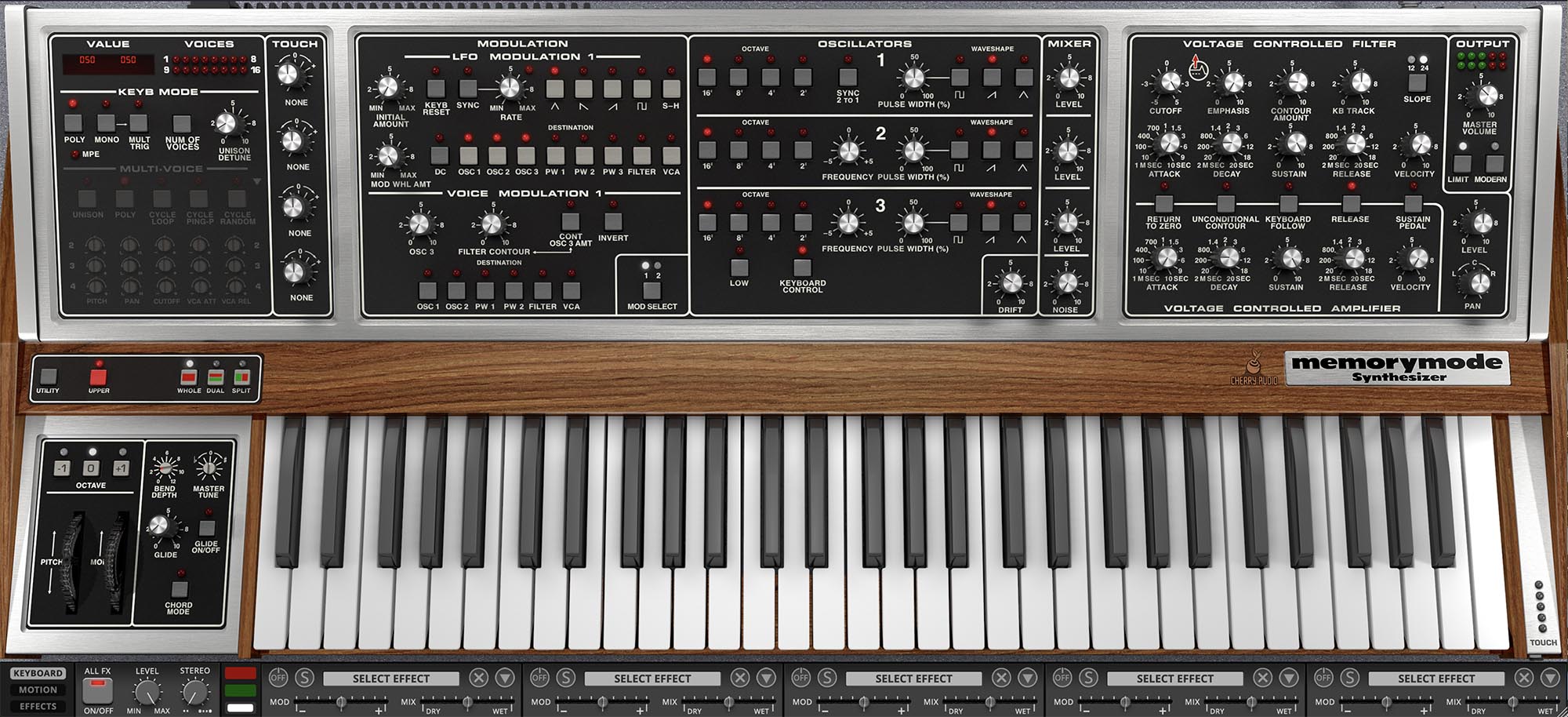
Memorymode 2 contains two independent synthesizer layers, each supporting up to 16 voices of polyphony. Within each layer, the signal follows the familiar path of a classic subtractive analog synthesizer: oscillators create the raw sound, the mixer combines them, the filter shapes the tone, and the amplifier controls its volume.
Each voice begins with three closely related oscillators. All three offer selectable octave ranges and ramp, triangle, and variable-width pulse waves, which can be combined to create anything from a simple, focused tone to a dense wall of harmonics.
The oscillators also have a few important differences. Oscillator 1 includes Sync 2 To 1, which forces Oscillator 2 to restart its waveform in step with Oscillator 1. Sweeping Oscillator 2’s pitch while sync is active produces the bright, tearing harmonics associated with classic oscillator-sync sounds.
Oscillators 2 and 3 include Frequency controls for fine-tuning, detuning, and creating fixed musical intervals. Oscillator 3 also includes a sub-audio Low range and a Keyboard Control switch that disconnects it from normal keyboard pitch tracking. These features allow Oscillator 3 to serve as a powerful per-voice modulation source as well as an ordinary audio oscillator.
The three oscillator signals are combined in the Mixer, where each has its own level control. A noise source can also be added for breath, grit, percussion, wind, or general electronic weather.
The combined signal then enters the Voltage Controlled Filter, or VCF. The filter shapes the tone by reducing or emphasizing parts of the frequency spectrum. Lower Cutoff settings generally produce darker, rounder sounds, while higher settings allow more upper-frequency detail to pass through.
The Emphasis control, more commonly known as resonance, boosts frequencies around the cutoff point. Low settings can add definition and character. Higher settings create a more pronounced peak and can eventually drive the filter into self-oscillation. Memorymode 2’s improved analog modeling gives the filter greater depth and movement, while the optional Emphasis Compensation button helps preserve the sound’s level and low-frequency weight as emphasis is increased.
A dedicated filter envelope can animate the cutoff frequency over time. This is where static oscillator tones become plucks, sweeps, brass-like attacks, bubbling sequences, and slowly evolving textures.
After the filter, the signal passes through the Voltage Controlled Amplifier, or VCA. The VCA envelope determines how the sound’s volume develops from the moment a note begins until it fades away. Because the filter and amplifier have separate envelopes, brightness and volume can evolve independently.
Two Kinds of Modulation
Each layer includes two complementary modulation systems: LFO Modulation and Voice Modulation.
LFO Modulation uses a single low-frequency oscillator that affects all active voices together. This makes it ideal for unified vibrato, tremolo, pulse-width movement, filter sweeps, and other effects where every note should rise and fall in step.
Voice Modulation works independently within each voice, using Oscillator 3, the filter envelope, or a combination of both as modulation sources. Because every played note has its own Oscillator 3 and filter envelope, the modulation can develop separately for each voice. This is especially useful for polyphonic filter movement, audio-rate modulation, oscillator interactions, and animated chords whose notes don’t all move as a single block.
The two systems overlap in some applications, but their musical behavior is quite different. LFO Modulation moves the whole performance together. Voice Modulation becomes part of the individual voice itself.
Working with Two Layers
Memorymode 2’s dual-layer architecture is one of its most important additions. Each preset can contain two complete synthesizer sounds, an Upper layer and a Lower layer, with independent oscillators, filter settings, envelopes, modulation, voice behavior, polyphonic sequencing, Touch Animator data, and effects.
The layers can reinforce one another or serve completely different musical roles. You might combine a warm sustained pad with a brighter percussive attack, place a solid bass beneath a moving sequence, or spread contrasting textures across the stereo field. Even relatively simple sounds can become remarkably rich when the two layers are tuned, shaped, and animated differently.
Each layer follows its own complete signal path:
Oscillators → Mixer → Filter → Amplifier → Layer Effects
The processed Upper and Lower layers are then combined and sent through the Global effects chain before reaching the Master Volume control and audio output:
Upper Layer + Lower Layer → Global Effects → Master Output
Because each layer has its own polyphonic sequencer and Touch Animator, the two sounds can play different note patterns, respond to different performance gestures, and use entirely different processing while remaining part of the same preset.
When learning the instrument, it’s often best to begin with one layer at a time. Build a sound you understand, then bring in the second layer with a clear purpose. Two enormous sounds stacked together aren’t always twice as good. Sometimes they’re just twice as enormous.
Designing Your Own Presets
Begin with a simple one-oscillator sound. Turn down Oscillators 2 and 3, open the filter, and temporarily disable the effects. Listen closely to Oscillator 1 by itself, then add the remaining oscillators one at a time.
Next, adjust the filter and envelopes. Try short amplifier decay and release settings for plucked sounds, or slower attack and release settings for pads. Add filter-envelope movement, then introduce modulation, voice effects, sequencing, and the second layer gradually. This approach makes it easier to hear what each section contributes instead of confronting the full analog stampede all at once.
Memorymode 2 rewards experimentation. Turn knobs, press buttons, exaggerate settings, and listen carefully to what changes. You won’t damage the instrument, upset a collector, or reduce its auction value. When you create something worth keeping, save it as a new preset rather than overwriting the original. This gives you the freedom to experiment while preserving a reliable route back to where you started.
Technical Assistance
Cherry Audio’s installation, authorization, and automatic-update systems are designed to keep setup relatively painless. Should you encounter a problem, help is available through the Cherry Audio user forums and technical support portal.
The forums are useful for general questions, sound-design discussions, and advice from other users. For account, installation, authorization, or technical problems requiring direct assistance, contact Cherry Audio Support.
Cherry Audio Forums:
https://forums.cherryaudio.com/viewforum.php?f=37
Technical Support:
https://cherryaudio.kayako.com/