Selecting the VCF or VCA Envelope
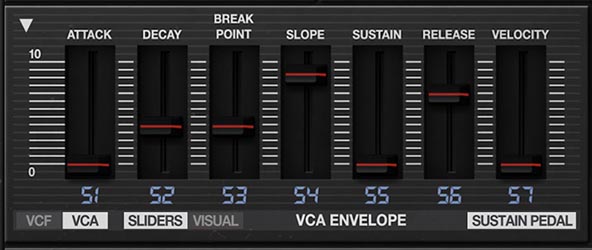
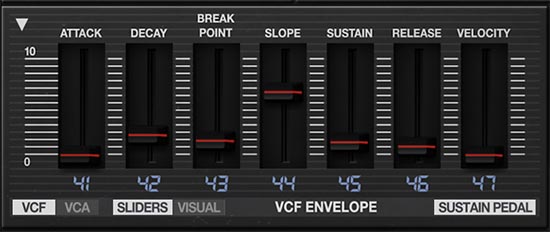
The envelope section is located along the lower-left portion of the main synthesis panel. Click the VCF or VCA label at the bottom-left of the section to display the corresponding envelope and its settings.
VCF: Selects the filter envelope, which controls changes in filter cutoff over time. Its audible effect also depends on the filter's EG Intensity, Polarity, and Cutoff settings. For example, a short filter envelope can make a sustained note begin brightly and quickly become darker.
VCA: Selects the amplifier envelope, which controls the note's volume over time. A fast attack with a short decay can create a plucked note; a slower attack and long release are useful for strings and pads.
The two envelopes are independent. Editing the VCF envelope doesn't change the VCA envelope, and vice versa. This lets a sound become darker while remaining loud, for example, or swell in volume while its brightness follows an entirely different contour.
To switch between the two envelopes:
Click VCF at the bottom-left of the envelope section to display the filter envelope.
Adjust its parameters as desired.
Click VCA to display the amplifier envelope.
Adjust the VCA envelope independently.
When using a preset with Upper and Lower layers, check which layer is selected before editing. The envelope controls show the settings for the currently selected layer.
Visual View
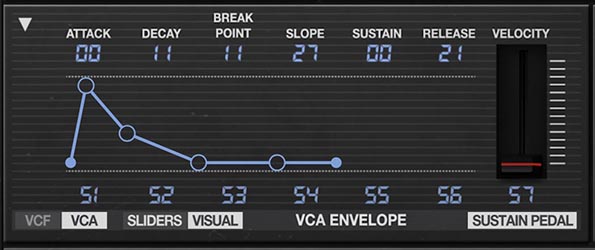
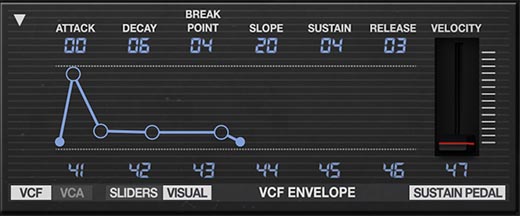
Click VISUAL to replace the six stage sliders with an interactive graphical envelope display. A blue line connects the envelope's stage points, making it easy to see the attack peak, Break Point level, transition to Sustain, and release. The parameter names and numerical values remain visible above the graph, while the Velocity slider stays at the right.
In Visual view, you can edit the envelope directly by clicking and dragging its stage points. Drag a point horizontally to adjust its timing or vertically to change its level, as appropriate for that stage. The envelope contour updates immediately as you make adjustments, and the corresponding numerical values change to reflect the new settings.
Visual view is particularly useful for understanding how Break Point and Slope work together. Dragging the point at the end of the Decay stage vertically adjusts the Break Point level, while moving it horizontally changes the Decay time. Adjusting the Slope stage changes the duration of the subsequent transition from Break Point to Sustain. This makes it easy to experiment with two-stage decays, gradual swells, and more elaborate envelope shapes while immediately seeing the results of your adjustments.
Both views provide access to the same envelope parameters. Sliders view offers precise, individual control over each stage, while Visual view lets you shape the entire envelope graphically, making it especially convenient for creating and refining complex contours.
Understanding the Six Envelope Stages
A conventional ADSR envelope rises during Attack, falls during Decay, settles at a Sustain level, and enters Release when the key is lifted. DW-8K adds another destination and another timed movement before Sustain:
Key down → Attack peak → Decay to Break Point → Slope to Sustain → Key up → Release
This distinction matters. Break Point sets a level, while Slope sets a time. Neither is simply a second Sustain control. With Break Point higher than Sustain, the envelope falls in two stages: first from its peak to Break Point, then from Break Point to Sustain. With Break Point lower than Sustain, the second transition rises instead, creating a second attack or swell. When Break Point and Sustain are equal, there is no level change between them, and the contour behaves much like an ordinary ADSR envelope.
The original DW-8000 used values of 0–31 for all six envelope parameters, an arrangement retained in DW-8K. Four parameters, Attack, Decay, Slope, and Release, determine the timing of the envelope's transitions. The remaining two, Break Point and Sustain, establish the intermediate and sustained levels. Understanding this distinction makes the extended envelope much easier to program.
Envelope Controls
ATTACK: (0–31) Sets how long the envelope takes to rise from its initial level to its peak after a note is played. Low settings produce a quick, sharp onset; higher settings create a slower rise. In the VCA envelope, this changes how quickly the sound becomes loud. In the VCF envelope, it changes how quickly the filter envelope reaches maximum intensity.
DECAY: (0–31) Sets the time required for the envelope to move from its Attack peak to the Break Point level. Low values make the first drop quick, while higher values extend it. Unlike a conventional ADSR envelope, Decay doesn't necessarily end at Sustain: it ends at Break Point, which may be above or below Sustain.
BREAK POINT: (0–31) Sets the intermediate envelope level reached at the end of Decay. Higher values keep the envelope closer to its initial peak, while lower values produce a more substantial first drop. Break Point doesn't lengthen Decay itself; it changes the level at which that stage ends. A high Break Point followed by a long Slope can create the impression that the note holds its initial strength or brightness before settling gradually.
SLOPE: (0–31) Sets how long the envelope takes to travel from Break Point to Sustain. Low values make this second transition quick; higher values stretch it out. If Break Point is higher than Sustain, Slope creates a second decay. If Break Point is lower than Sustain, it creates a second attack. This makes Slope useful for everything from natural-sounding two-stage decays to pads that dip and then bloom again.
SUSTAIN: (0–31) Sets the level maintained after the Slope stage has finished, for as long as the note remains held. Sustain is a level, not a duration. Higher values keep the envelope elevated; low values allow the filter movement or volume to settle close to zero. If Break Point equals Sustain, the Slope stage has no level difference to traverse.
RELEASE: (0–31) Sets how long the envelope takes to return to its resting level after a note is released. Low values produce a quick ending; higher values create longer tails. The VCA Release determines how long the note remains audible, while VCF Release determines how its brightness continues to change during that tail.
VELOCITY: (0–7) Sets how strongly keyboard playing velocity affects the selected envelope. Higher sensitivity produces a greater difference between softly and firmly played notes. In the VCA envelope, this can make harder notes louder; in the VCF envelope, it can make them brighter or more dynamically shaped, depending on the filter settings.
Making the Most of Break Point and Slope
Break Point and Slope are the controls that make this envelope particularly interesting. Instead of moving directly from an initial peak to a sustained level, you can define an intermediate point and decide how quickly the envelope moves away from it.
A Two-Stage Decay
Set Break Point higher than Sustain. The envelope first falls from the Attack peak to Break Point at the Decay rate, then continues downward to Sustain at the Slope rate.
With a relatively high Break Point and a slow Slope, the sound stays closer to its initial intensity before fading more gradually. On a VCA envelope, this can suggest the lingering body of a plucked string or struck instrument. On a VCF envelope, it can let a bright attack retain some presence before slowly becoming warmer and darker.
It's worth making the distinction clear: raising Break Point doesn't extend the Decay time. It raises the level reached when Decay ends. Increasing Slope is what lengthens the second transition.
A Second Attack
Set Break Point lower than Sustain. After the envelope falls to Break Point, the Slope stage moves upward toward Sustain rather than continuing downward.
This produces a second rise without retriggering the note. It's an excellent way to create an evolving pad, a slowly blooming string texture, or an electronic sound that seems to regain energy after its initial attack.
For a pronounced effect, try a quick Attack, a moderate Decay, a low Break Point, a higher Sustain, and a long Slope. In the VCF envelope, the sound can begin bright, become darker, then slowly brighten again. In the VCA envelope, it can become quieter after the initial attack before swelling back to a sustained level.
A Familiar ADSR Contour
Set Break Point to the same value as Sustain. The envelope arrives at that level at the end of Decay, so the subsequent Slope stage has no further change in level to make. The overall contour behaves like a conventional ADSR envelope, regardless of how long the Slope setting would otherwise be.
This is a useful starting point when programming familiar basses, leads, organs, and straightforward pads. Once the basic shape sounds right, separate Break Point from Sustain and adjust Slope to introduce a second movement.
VCF Envelope
The VCF envelope controls the changing tonal character of a note by modulating the filter cutoff. It doesn't directly control volume, although a very low cutoff can remove enough harmonics to make a sound seem quieter.
The EG Intensity control in the Voltage Controlled Filter section determines how strongly the envelope affects cutoff. If EG Intensity is at zero, changing the VCF envelope may produce no audible cutoff movement. The filter's Polarity setting determines whether the envelope drives cutoff in its normal or inverted direction.
For a classic plucked synthesizer sound, use a quick VCF Attack, a short Decay, and a lower Break Point and Sustain level. The note begins with a bright accent, then quickly loses upper harmonics. Raising Break Point or lengthening Slope allows that brightness to linger or disappear more gradually.
For an evolving pad, try a slower Attack and a Slope stage that continues to change the cutoff long after the note begins. The VCF envelope can move independently from the VCA envelope, so you can maintain steady volume while the harmonic character slowly changes.
Tip: When experimenting with VCF envelope shapes, begin with moderate filter resonance and enough EG Intensity to hear the movement clearly. Once you've established the contour, adjust Cutoff, Resonance, and Polarity to place the movement where it works best musically.
VCA Envelope
The VCA envelope determines how a note's volume develops over time. It's one of the most important factors in whether a patch feels percussive, plucked, sustained, or atmospheric.
A short Attack and low Sustain are useful for plucked and struck sounds, while a longer Attack and higher Sustain create softer entries and more continuous tones. Release determines how naturally notes fade after you lift the keys.
Break Point and Slope make these familiar contours more flexible. A high Break Point with a long downward Slope can produce a strong initial body followed by a gentle extended fade. A low Break Point with a higher Sustain creates a dip and a second swell, something a standard ADSR envelope can't produce on its own.
The two envelopes don't have to match. For example, you might use a fast VCA Attack so the note speaks immediately, while giving the VCF envelope a slow Attack so brightness gradually increases. Or use a slow VCA Attack with a quick VCF transient for a sound that swells in volume but carries a brief tonal accent at the beginning.
Envelopes and the Mod Matrix
In addition to their primary filter and amplifier functions, the VCF and VCA envelopes can also be selected as modulation sources in DW-8K's Mod Matrix. This allows their contours to influence additional parameters, opening up possibilities beyond conventional filter and volume shaping. For example, try using the VCF Envelope to modulate Noise Level, allowing a burst of noise to follow the same contour as a filter sweep. Or route the VCA Envelope to Delay Level so the delayed signal changes as the note develops.
These assignments can be useful when you want several aspects of a sound to follow a related contour without programming multiple independent modulation sources. DW-8K also provides eight additional Matrix Envelope Generators, each with its own Attack, Decay, and repeating-envelope options. These are described in detail in the Modulation chapter.
Sustain Pedal
A SUSTAIN PEDAL button appears at the lower-right of the envelope section. This is separate from the SUSTAIN envelope parameter. Sustain sets an envelope's held level; a sustain pedal is a performance control associated with holding notes after keys are released. The button controls whether sustain-pedal performance messages can hold notes beyond the physical release of the keys.
Copying Envelope Settings
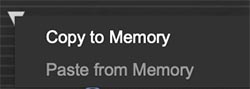
The small white triangle at the upper-left corner of the envelope section opens a utility menu with two commands: Copy to Memory and Paste from Memory.
This provides a convenient way to reuse an envelope shape instead of recreating its settings one parameter at a time.
To copy and paste an envelope:
Click VCF or VCA to display the envelope you want to copy.
Click the white triangle at the upper-left corner of the section.
Choose Copy to Memory.
Select the envelope you want to receive the copied settings.
Open the triangle menu again and choose Paste from Memory, when available.
This is a useful way to establish related filter and amplifier contours, or to begin with a familiar shape and modify it for a different purpose.
Envelope Sound Design Techniques
The following exercises provide a few practical starting points. They're most revealing with a simple oscillator sound and minimal effects, since long reverbs or delays can disguise the actual envelope contour.
Creating a Plucked Sound With a Lingering Body
Use the VCA envelope to establish a strong initial attack followed by a slower second decay.
Select VCA, then click VISUAL so you can see the complete contour.
Set ATTACK close to minimum for a quick onset.
Choose a relatively short DECAY so the first drop occurs quickly.
Set BREAK POINT above the eventual Sustain level.
Set SLOPE to a medium or long value so the envelope falls gradually from Break Point to Sustain.
Set SUSTAIN low, then adjust RELEASE for the desired tail.
Hold a note long enough to hear both decay stages, then vary Break Point and Slope independently.
A higher Break Point retains more of the initial body. A longer Slope extends the gradual fade toward Sustain. This technique works especially well with electric piano, plucked string, bell, and digital percussion waveforms.
Making a Pad That Dips and Blooms
Use Break Point below Sustain to create a second rise after the initial attack.
Select VCF and set the filter's POLARITY to Normal. Choose a moderately low CUTOFF setting and raise EG INTENSITY enough to hear the envelope's movement clearly.
Set a moderate ATTACK and DECAY to establish the initial rise and subsequent fall toward Break Point.
Set BREAK POINT relatively low.
Set SUSTAIN higher than Break Point.
Increase SLOPE to make the second rise slow and expressive.
Use a VCA envelope with enough Sustain and Release to keep the sound audible throughout the movement.
Hold a chord and listen as the brightness changes through the two distinct phases.
For a more dramatic version, create a similar dip-and-rise contour in the VCA envelope. The note can soften after its initial onset before swelling back into view.
Programming a Classic ADSR Bass or Lead
Simplify the envelope first, then introduce an extra stage only when the sound needs it.
Select VCA and choose a fast ATTACK.
Set BREAK POINT and SUSTAIN to the same level.
Adjust DECAY for the desired initial fall in volume.
Set RELEASE to suit the articulation of the part.
Repeat the approach with VCF, using its envelope to shape the brightness of each note.
Once the basic sound works, raise or lower BREAK POINT relative to Sustain and adjust SLOPE to hear what the extra stage contributes.
This approach makes it easy to understand the additional controls without losing the simplicity of a familiar ADSR sound.
Making Filter and Amplifier Envelopes Work Together
Give the two envelopes different jobs so a sound changes in more than one way.
Set the VCA envelope for a smooth, sustained pad with a moderate Attack and a relatively long Release.
Select VCF and use a faster Attack with a higher Break Point.
Set VCF SUSTAIN lower than Break Point and use a long SLOPE.
Adjust the filter's Cutoff and EG Intensity to hear a gradual reduction in brightness while the note maintains its volume.
Try the opposite relationship by setting VCF Break Point below Sustain, creating a secondary brightening motion.
The VCA keeps the sound present while the VCF gives it an evolving tonal character. This separation is one of the simplest ways to make sustained patches feel more organic and expressive.
A Few Final Envelope Tips
Remember Which Parameters Control Time. Attack, Decay, Slope, and Release determine rates or durations. Break Point and Sustain determine levels. Keeping that distinction in mind makes complex envelopes much easier to program.
Hold Notes Long Enough to Hear the Slope Stage. With a long Slope setting, short notes may be released before the envelope completes its movement toward Sustain. For testing, hold a sustained note or chord so you can hear the entire contour.
Use Visual View to Understand the Shape. If a patch doesn't behave as expected, switch to Visual view and examine the relationship between Break Point and Sustain. The graphical contour is especially valuable when the second transition moves upward rather than downward.
Give the Filter and Amplifier Different Jobs. The VCF envelope can create a transient or extended tonal change while the VCA envelope controls the overall note shape. They don't need identical settings to sound cohesive.
Try Subtle Velocity Sensitivity. A small amount of velocity response can give a patch a more natural playing feel without making every note sound radically different. Larger amounts can be useful for expressive keyboard and percussive sounds.
Use Break Point and Slope With Restraint. The extra stage is powerful, but it doesn't need to be obvious. A gentle second decay can make a sound feel more natural, while a slight upward transition can introduce movement without drawing attention to the envelope itself.
The six-stage VCF and VCA envelopes are central to DW-8K's expressive character. Start with a familiar ADSR contour, then use Break Point and Slope to shape the space between the initial attack and the sustained portion of the note. Often, that's where a patch begins to feel genuinely alive.