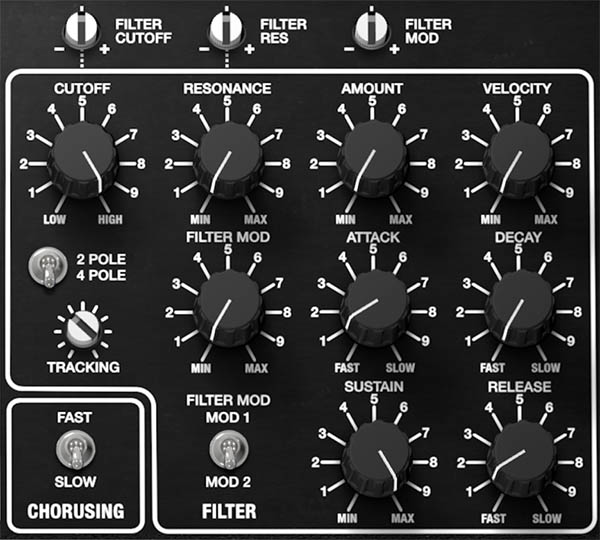
Filter and Filter Envelope
Pentaphonic’s Filter takes the harmonically rich output of its three oscillators and Noise source and shapes it into something more musically useful. Lowering the cutoff removes upper harmonics and darkens the sound. Raising resonance emphasizes frequencies around the cutoff point. The dedicated Filter envelope can then move the cutoff automatically each time a note is played, turning a static oscillator tone into a pluck, sweep, brass-like attack, slowly opening pad, or something considerably stranger.
The original Gleeman Pentaphonic used one 4-pole lowpass filter per voice, with a 24 dB/octave response. Cherry Audio retains that fundamental architecture but expands it with switchable 2-pole and 4-pole operation, keyboard tracking, velocity response, and direct modulation from either Modulation 1 or Modulation 2.
Filter Controls
Cutoff
CUTOFF: (40 Hz to 24,000 Hz) Sets the filter cutoff frequency. Frequencies below the cutoff pass through relatively unaffected, while frequencies above it are progressively reduced.
Higher settings allow more upper harmonics through, producing a brighter and more open sound. Lower settings remove more high-frequency content, making the sound darker, softer, and rounder. Cutoff is the filter’s starting point. The Filter envelope, keyboard tracking, Velocity, and Filter Mod all work relative to this base setting.
This relationship is important. If Cutoff is already set very high, there may be little room for the Filter envelope to open it any further. Lowering Cutoff gives the envelope more room to create an audible sweep.
Tip: If increasing Filter AMOUNT doesn’t seem to be doing much, lower CUTOFF first. The envelope may be working perfectly well but have nowhere left to move.
Resonance
RESONANCE: (0 to 100%) Emphasizes frequencies around the filter cutoff point.
Low settings add subtle definition around the cutoff frequency. Higher settings create a stronger peak, making filter movement more obvious and giving the sound a sharper, more pronounced tonal character. The Pentaphonic filter can reach self-oscillation at maximum resonance.
Resonance and Cutoff interact closely. Moving Cutoff changes both the brightness of the oscillator signal and the frequency at which the resonant peak occurs.
Tip: Moderate Resonance settings are often more useful than maximum values. A small resonant peak can add articulation and character without overwhelming the oscillator tone.
Filter Slope
2-POLE / 4-POLE: (2-Pole, 4-Pole) Selects the steepness of the lowpass filter response.
The original Gleeman Pentaphonic used a 4-pole, 24 dB/octave filter. Cherry Audio adds a gentler 2-pole mode, giving the modern instrument two distinctly different tonal responses.
2-Pole
The 2-pole setting produces a shallower response, conventionally equivalent to approximately 12 dB/octave. More upper-frequency content remains above the cutoff point, giving the filter a brighter, more open character. Use it for pads, strings, layered sounds, brighter polyphonic patches, or anytime you want filtering without removing too much harmonic detail.
4-Pole
The 4-pole setting produces the steeper 24 dB/octave response associated with the original Pentaphonic.
It removes upper harmonics more decisively and generally produces a darker, more focused sound with a stronger interaction between Cutoff and Resonance. Use it for basses, leads, resonant sweeps, percussive patches, and sounds that benefit from more pronounced filtering.
Tip: Don’t think of 2-Pole as simply a weaker filter. Its shallower slope can preserve valuable harmonic detail in pads and complex three-oscillator sounds that might become overly dark in 4-Pole mode.
Tracking
TRACKING: (0 to 100%) Determines how strongly the filter cutoff follows keyboard pitch.
Increasing Tracking causes the filter to open progressively as higher notes are played, helping upper notes retain brightness while lower notes remain darker and fuller. Without sufficient tracking, a fixed low Cutoff setting can make notes progressively duller as you move up the keyboard. Increasing Tracking helps maintain a more consistent tonal balance across the playing range.
Tip: Moderate Tracking is useful for pads, brass, strings, and other sounds that need to remain clear across several octaves. Lower values can be effective for dark basses and intentionally muted upper registers.
Filter Amount
AMOUNT: (0 to 100%) Sets how strongly the Filter envelope affects Cutoff.
At 0%, the Filter envelope has no effect on Cutoff, regardless of the Attack, Decay, Sustain, and Release settings. Increasing Amount allows the envelope to move the filter through a progressively wider range.
Cutoff and Amount should generally be considered together:
CUTOFF establishes where the filter begins.
AMOUNT determines how far the envelope moves it from that starting point.
A low Cutoff with high Amount can create a dramatic opening sweep. A higher Cutoff with moderate Amount produces a more subtle change in brightness.
Understanding Cutoff and Amount
This is one of the most important relationships in the entire Filter section.
If Cutoff is very low and Amount is high, the envelope can create a large tonal movement from dark to bright. If Cutoff is already near maximum, increasing Amount may appear to have little effect because the filter has very little remaining range available above its starting point. When programming envelope-driven filter sounds, it’s often faster to establish Cutoff and Amount first, then fine-tune the ADSR timing.
Velocity
VELOCITY: (0 to 100%) Sets how strongly incoming note velocity affects the filter response.
At 0%, playing harder or softer doesn’t alter the filter’s brightness. Increasing Velocity allows stronger key strikes to produce a brighter filter response. This can make Pentaphonic considerably more expressive. A patch can remain warm and subdued when played softly, then become brighter and more assertive as playing velocity increases.
The audible effect depends on the Cutoff and Amount settings. If the filter is already completely open, additional velocity may produce relatively little change.
Tip: Moderate Velocity settings often produce the most natural results.
Filter Mod
FILTER MOD: (0 to 100%) Sets the amount of modulation applied to the filter cutoff from the selected modulation source.
The switch beneath the control selects either MOD 1 or MOD 2.
FILTER MOD SOURCE: (MOD 1, MOD 2) Selects which modulation section controls the Filter Mod amount.
Slow modulation can create gradual tonal movement in pads and sustained sounds. Faster settings can produce rhythmic sweeps, pulsing textures, or more pronounced modulation effects.
Because Modulation 1 and Modulation 2 can operate independently, the filter can use whichever source best suits the patch. For example, Modulation 1 might provide slow oscillator movement while Modulation 2 drives a faster filter pulse.
Creating a Simple Filter Sweep
To add cyclic filter movement:
Lower CUTOFF until the oscillator tone becomes noticeably darker.
Select MOD 1 or MOD 2 beneath FILTER MOD.
Raise FILTER MOD gradually.
Adjust the selected modulation section’s RATE.
Choose the desired modulation SHAPE.
Adjust the modulation Depth and Filter Mod amount until the movement has the desired intensity.
Start with a relatively slow rate. Filter modulation is easiest to understand when you can clearly hear the cutoff opening and closing.
Filter Envelope
Pentaphonic’s Filter envelope creates a changing control signal every time a note is triggered. This signal is applied to Cutoff according to the AMOUNT setting.
The envelope follows the familiar four-stage ADSR structure:
Attack determines how quickly the filter moves toward its maximum envelope level.
Decay determines how long it takes to fall from that peak toward the Sustain level.
Sustain establishes the level maintained while the note remains held.
Release determines how long the filter takes to return toward its resting position after the note is released.
Unlike the original hardware, Cherry Audio Pentaphonic significantly extends the available envelope times. The original Pentaphonic synth provided approximately 5 milliseconds to 5 seconds for Attack, Decay, and Release. The Pentaphonic software provides much longer Decay and Release ranges, allowing slowly evolving pads, drones, and atmospheric textures that would have been difficult to create on the original instrument.
Attack
ATTACK: (5 ms to 7715 ms) Sets how long the Filter envelope takes to rise from its starting level to its maximum level after a note is triggered.
Short settings create an immediate filter opening and are useful for basses, plucks, percussion, and sharply articulated sounds. Longer settings cause the sound to brighten gradually after the note begins, making them useful for pads, strings, swells, and evolving textures.
Attack becomes audible only when AMOUNT is raised and Cutoff leaves enough room for the envelope to move the filter.
Tip: For slowly opening pads, lower Cutoff, raise Amount, and increase Attack. The volume can arrive first while the timbre gradually opens afterward.
Decay
DECAY: (8 ms to 19,727 ms) Sets how long the Filter envelope takes to fall from its maximum level to the Sustain setting.
Short Decay settings create a quick drop in brightness after the initial attack. Longer settings allow the filter to continue evolving over several seconds. The result depends heavily on Sustain. If Sustain is set to 100%, there may be little or no audible Decay because the envelope has nowhere lower to go.
Tip: For classic analog brass, use a fast Attack, moderate Decay, and medium Sustain. The filter opens quickly, then settles into a slightly darker held tone.
Sustain
SUSTAIN: (0 to 100%) Sets the Filter envelope level maintained while a note remains held after the Attack and Decay stages have completed.
Low Sustain settings allow the filter to close substantially after the initial attack. Higher Sustain settings keep the held portion of the sound brighter. Unlike Attack, Decay, and Release, Sustain controls a level rather than a period of time. The Sustain setting also establishes the starting point for the Release stage.
Tip: Use low Sustain for plucks and percussive patches. Use medium or high Sustain for pads, strings, organs, and sustained leads that should remain harmonically open while held.
Release
RELEASE: (8 ms to 19,727 ms) Sets how long the Filter envelope takes to return toward its resting level after a note is released.
Short settings cause the filter to close quickly when the key is released. Long settings allow the tonal contour to continue evolving during the release tail.
Filter Release is easiest to hear when the Amp envelope also has enough Release time for the sound to remain audible. If the Amp closes immediately, the Filter envelope may still be moving internally, but there will be little left to hear.
Tip: Matching Filter and Amp Release settings creates a natural, unified decay. Different values can produce more interesting results, such as a sound that becomes progressively darker as it fades away.
Programming the Filter
The Filter becomes much easier to understand when its controls are approached in a logical order rather than adjusted simultaneously.
Creating a Basic Filter Envelope
To create a simple envelope-driven filter sweep:
Choose a harmonically rich oscillator waveform such as RAMP or one of the Pulse shapes.
Set the Filter to 4-POLE.
Lower CUTOFF until the raw oscillator sound becomes noticeably darker.
Raise AMOUNT until the Filter envelope produces a clear sweep.
Set ATTACK relatively fast.
Set DECAY to a moderate value.
Lower SUSTAIN so the filter settles after the initial attack.
Set RELEASE to suit the Amp envelope and musical role of the sound.
Adjust Cutoff and Amount together until the sweep has the desired range.
Add Resonance only after the basic filter movement is working.
Making Creative Use of the Filter
Pentaphonic’s Filter can do considerably more than simply make bright sounds darker. Here are some examples to inspire you.
Create a Resonant Pluck
Lower Cutoff, raise Resonance moderately, increase Amount, then use a very fast Attack, short Decay, low Sustain, and short Release. The Filter envelope creates a bright transient at the beginning of each note, then rapidly settles into a darker body.
Add Brightness Without an Obvious Sweep
Use a fast Attack, short Decay, relatively high Sustain, and a modest Amount setting. Instead of producing a dramatic filter sweep, the envelope adds a brief bright accent at the beginning of the note. This works especially well for basses, brass, and keyboard sounds.
Make a Pad Evolve Slowly
Use a lower Cutoff, moderate Amount, long Attack, high Sustain, and long Release. The sound gradually opens after each note begins and continues evolving as notes overlap. Pentaphonic’s extended envelope times make this especially effective for ambient pads and slow-moving textures.
Use Velocity for Expressive Filtering
Set Cutoff somewhat lower than you normally would, then increase VELOCITY. Soft notes remain darker, while harder notes open the filter more. This is particularly useful for polyphonic patches because the sound can respond to the performance rather than relying entirely on automatic modulation.
Combine Envelope and LFO Movement
The Filter envelope and Filter Mod don’t have to perform the same job. Use the envelope to create the basic shape of each note, then apply a smaller amount of slow Filter Mod to keep sustained notes moving after the envelope has settled. A pad might brighten gradually through the envelope while the selected modulation source gently sweeps the cutoff back and forth underneath it.
Contrast 2-Pole and 4-Pole
Program a sound in 4-Pole mode first, then switch to 2-Pole without changing anything else. The difference can be surprisingly significant.
The 4-Pole response generally produces a darker, more focused result. The 2-Pole mode preserves more upper harmonic content and can make dense three-oscillator patches feel more open. Neither is inherently better. Choose the one that leaves the right amount of harmonic information for the sound you’re building.
Filter Programming Tips
Start with Cutoff and Amount. Establish the filter’s resting position and envelope range before spending too much time adjusting the ADSR.
Use bright oscillator shapes when learning. Ramp, narrow Pulse, and COMP waveforms make filter movement easier to hear than Sine or Triangle.
Don’t automatically maximize Resonance. Moderate settings often provide better definition while preserving the body of the oscillators.
Let the Filter and Amp envelopes differ. Brightness and volume don’t have to rise and fall together.
Use Tracking to maintain balance across the keyboard. This becomes especially helpful with low Cutoff settings and wide playing ranges.
Add modulation after the envelope works. A good envelope establishes the note’s basic articulation; Filter Mod can then provide continuing movement.
Try 2-Pole before reaching for EQ. If a patch feels overly dark or closed, changing the filter slope may preserve the character you want more naturally than simply raising Cutoff.
Once the Filter envelope is working musically, the next stage is the Amp and Amp Envelope, which determines how those filtered voices develop in volume from the moment a note begins until it finally fades away.