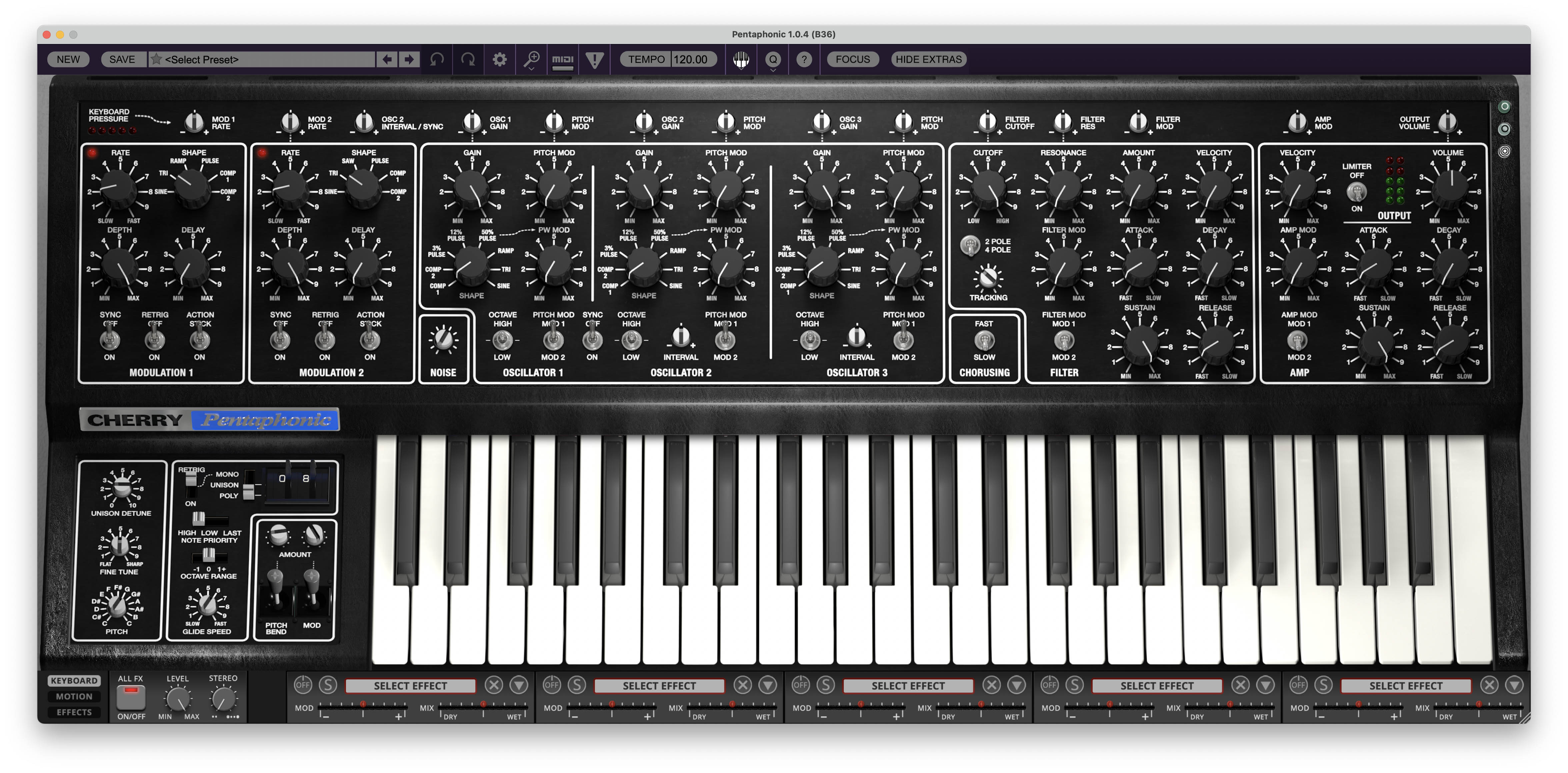
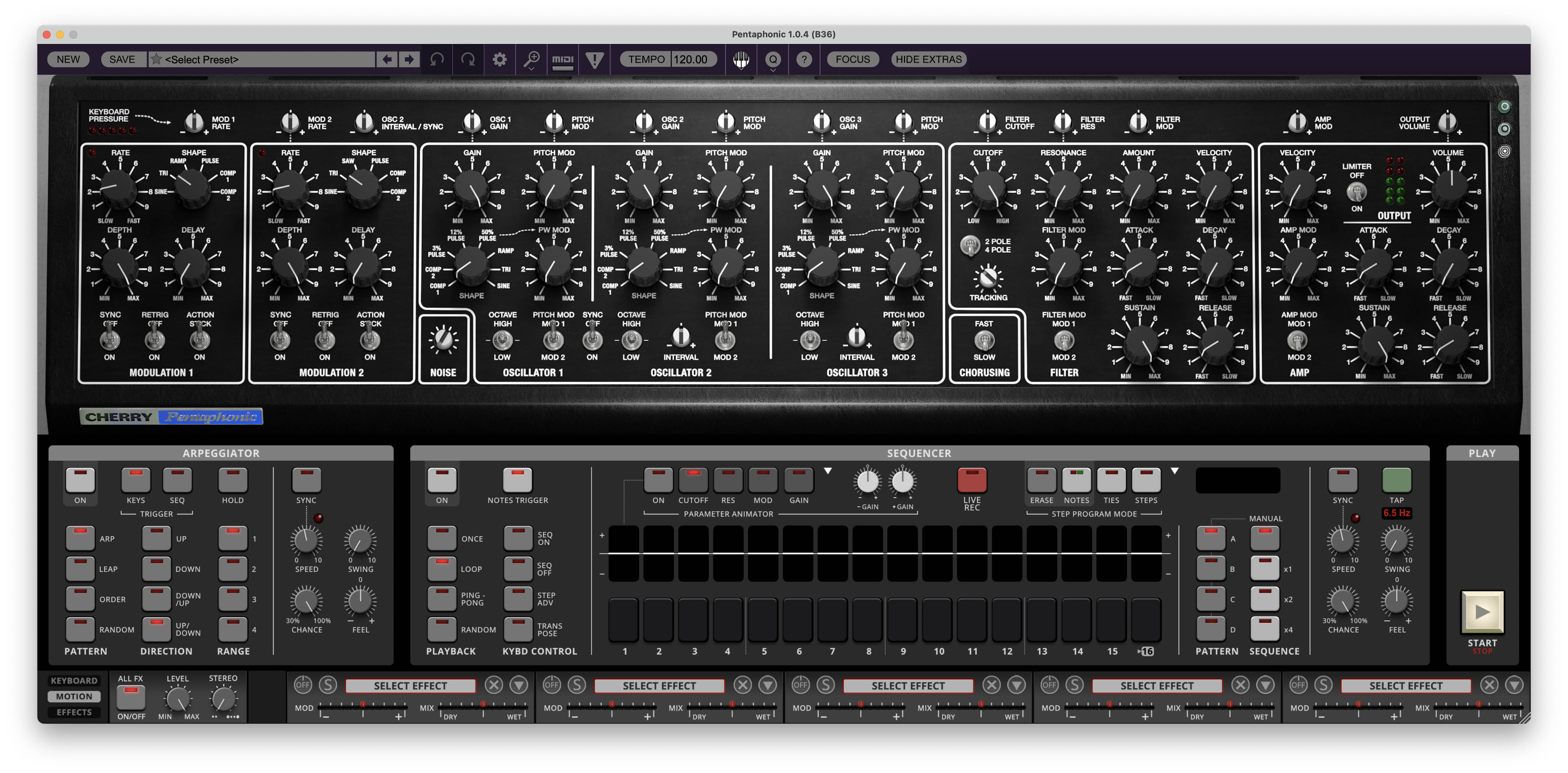
Cherry Audio Pentaphonic takes the unusual architecture and sonic character of the original Gleeman Pentaphonic and expands it into a considerably more capable modern instrument. The basic idea remains refreshingly approachable: three oscillators create the raw sound, a lowpass filter shapes its harmonic content, an amplifier controls its level over time, and modulation brings the whole system to life.
What Cherry Audio has added around that foundation is substantial. Pentaphonic includes two expanded modulation sections, velocity and keyboard tracking, additional filter options, broader performance controls, keyboard pressure routing, an arpeggiator, an advanced 4 x 16-step polyphonic sequencer with parameter animation, and a five-slot effects system.
The result is an instrument that can still be approached like a straightforward subtractive synthesizer, but can travel considerably further once you begin using its modern performance, modulation, sequencing, and effects features.
The original instrument followed a similarly direct architecture. Each of its five voices contained three digitally controlled oscillators, a 4-pole lowpass filter, a VCA, and separate Filter and Amp envelopes. A microcomputer handled voice assignment, pitch, sequencer memory, gates, and triggers. Cherry Audio preserves that fundamental organization while expanding nearly every part of it for contemporary production and performance.
Modulation 1 and Modulation 2
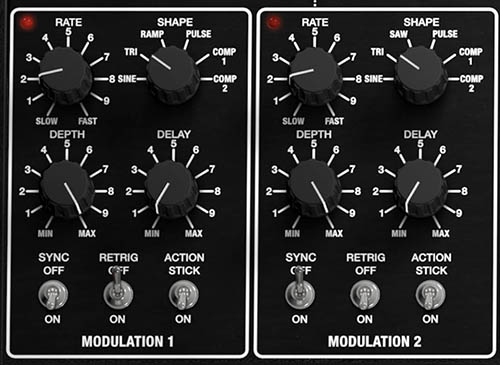
At the far left of the main panel are MODULATION 1 and MODULATION 2.
The original Gleeman contained a single low-frequency triangle-wave modulation source with Rate, Depth, and Destination controls. It could create pitch vibrato, amplitude tremolo, or filter movement.
Cherry Audio expands that idea substantially by providing two modulation sections, each with its own RATE, SHAPE, DEPTH, and DELAY controls, along with SYNC, RETRIG, and ACTION options. This makes modulation much more flexible than it was on the hardware, allowing the two sections to perform different musical jobs at the same time.
One modulation source might provide a slow, continuous filter sweep while the other introduces delayed vibrato. They can also interact with oscillator pitch, gain, filter behavior, amplitude, and other destinations throughout the synth.
The important idea for now is simple: Modulation 1 and Modulation 2 are Pentaphonic’s primary motion generators. Later chapters will examine their waveforms, ranges, triggering behavior, and routing in detail.
Oscillators
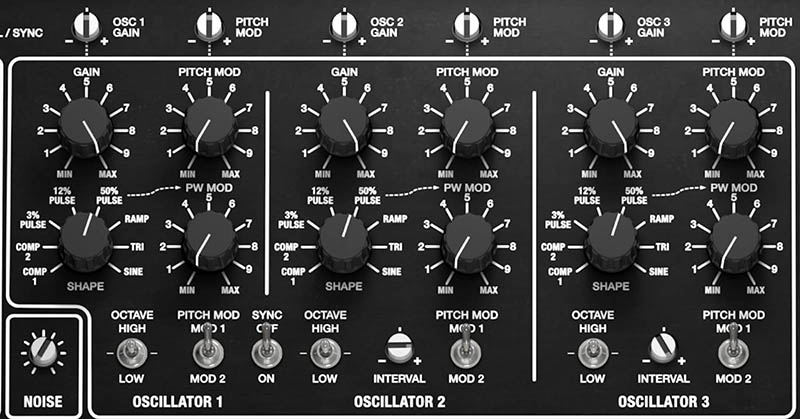
The heart of Pentaphonic is its three-oscillator voice architecture.
Each oscillator includes its own GAIN, SHAPE, octave, and modulation controls. Oscillators 2 and 3 also provide additional pitch-relationship controls, allowing the three oscillators to reinforce one another, form musical intervals, or create more complex harmonic structures.
One of the most distinctive elements retained from the original Gleeman is the oscillator waveform selection.
The original instrument provided eight fixed waveforms:
COMP 1, COMP 2, 3% PULSE, 12% PULSE, 50% PULSE, RAMP, TRI, and SIN.
COMP 1 and COMP 2 were unusual complex waves created specifically for the Pentaphonic. The original Gleeman Pentaphonic manual described the pulse waves as useful for woodwind-like sounds, Ramp for strings, and Triangle and Sine for pipe-like tones and bass reinforcement. Cherry Audio preserves these characteristic waveforms while adding modern modulation capabilities around them.
This makes the oscillator section an excellent place to begin exploring Pentaphonic. A single oscillator can produce a clear, focused sound. Two can add intervals or beating (via the Chorus control). All three together can create the large, polished harmonic character for which the original instrument became known.
Noise
The Noise source sits beside the oscillator bank and provides an additional non-pitched sound source.
Noise can add breath, air, grit, percussion, wind-like textures, and transient detail. Used subtly, it can keep a sustained patch from sounding overly smooth. Used more aggressively, it can become the primary sound source for effects and synthesized percussion.
Like the oscillators, Noise ultimately becomes part of the signal that is shaped by the Filter and Amp sections.
Chorusing
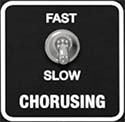
The CHORUSING section is an important part of Pentaphonic’s heritage. On the original Gleeman, Chorusing was not a conventional audio chorus effect. Instead, it slightly altered the tuning of Oscillators 2 and 3 relative to Oscillator 1. The original SLOW setting produced approximately ±0.39% detuning, while FAST increased this to approximately ±0.78%. The result was slower or faster beating among the three oscillators.
This is an important distinction because the effect begins at the sound source itself. Rather than processing an already completed synth signal, chorusing creates movement through the tuning relationship among the oscillators. Cherry Audio retains the familiar FAST/SLOW Chorusing control on the main panel.
Filter
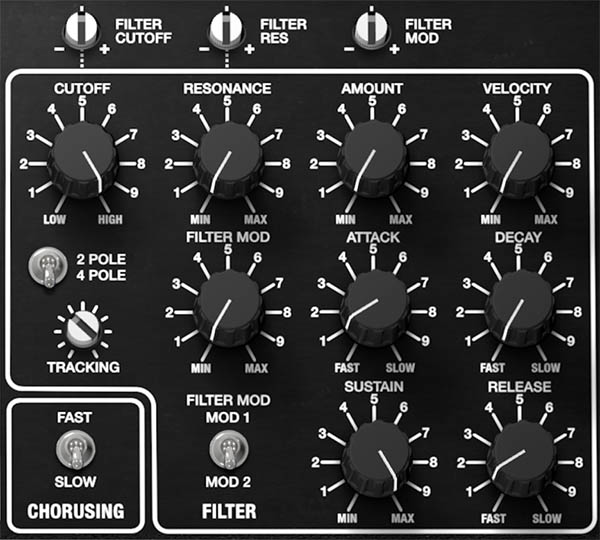
After the sound sources are combined, the signal moves into the FILTER section. The Filter determines how much harmonic content passes through the synth. Lower CUTOFF settings remove more upper-frequency content and create darker tones. Higher settings allow more harmonics through and produce a brighter, more open sound.
RESONANCE emphasizes frequencies around the cutoff point, allowing the filter to move from gentle tonal shaping toward sharper, more pronounced resonant effects.
The original Pentaphonic used a 4-pole, 24 dB/octave lowpass filter for each voice. At maximum resonance, the filters could self-oscillate. Cherry Audio expands this architecture with switchable 2-POLE / 4-POLE operation, along with TRACKING, VELOCITY, additional modulation control, and other modern conveniences.
The Filter also includes its own ADSR envelope. The AMOUNT control determines how strongly that envelope affects Cutoff, while ATTACK, DECAY, SUSTAIN, and RELEASE determine how the filter changes over the life of each note.
This interaction between oscillator harmonic content, base Cutoff, Resonance, and the Filter envelope is one of the most important relationships in Pentaphonic and what gives the synth its character.
Amp and Amp Envelope
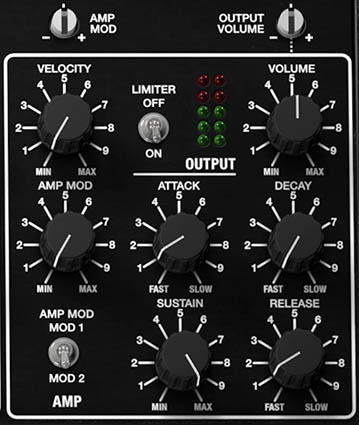
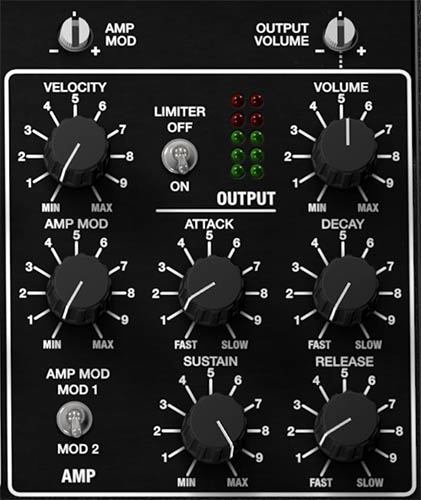
After filtering, the signal enters the AMP section. The Amp controls the volume contour of each played note. Its ATTACK, DECAY, SUSTAIN, and RELEASE controls determine whether a sound begins immediately or fades in, remains steady or falls away, stops sharply or trails naturally after a key is released.
The Filter and Amp envelopes work independently. This means brightness and loudness do not have to follow the same contour. For example, a sound can begin immediately in volume while slowly becoming brighter, or it can open brightly at the beginning and become darker while its volume remains sustained.
Pentaphonic also expands the original Amp architecture with VELOCITY and modulation controls, allowing playing dynamics and modulation sources to influence the final level.
Output
The OUTPUT section controls Pentaphonic’s final level.
The stereo LED meters provide visual feedback for output level, while VOLUME sets the final signal level. A switchable LIMITER provides protection against unwanted output peaks.
When programming sounds, it’s useful to remember that oscillator Gain, resonance, envelope behavior, polyphony, effects, and overlapping release tails can all contribute to final level. Set Output Volume with the loudest realistic passage in mind rather than judging level from a single note.
Keyboard Pressure
Running across the top of the main synthesis panel is the KEYBOARD PRESSURE modulation strip.
This is one of Cherry Audio’s most significant expansions of the original instrument.
A series of bipolar amount controls allows keyboard pressure to influence numerous parts of the sound, including modulation rate, oscillator behavior, filter parameters, Amp modulation, and Output Volume.
This turns aftertouch or pressure into a highly flexible performance source rather than a single hardwired expression control.
A patch might begin relatively restrained, then become brighter, wider, more animated, or louder as additional pressure is applied.
We’ll examine each pressure destination and its behavior in the Performance Controls chapter.
Panel Themes
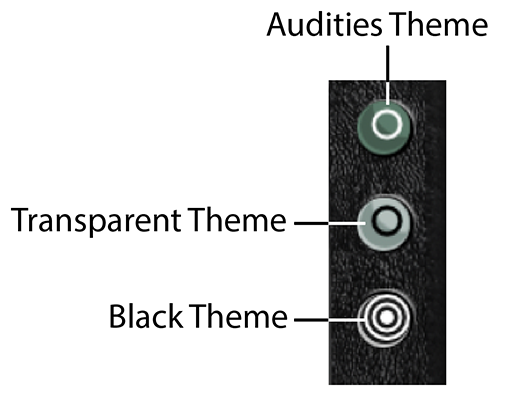
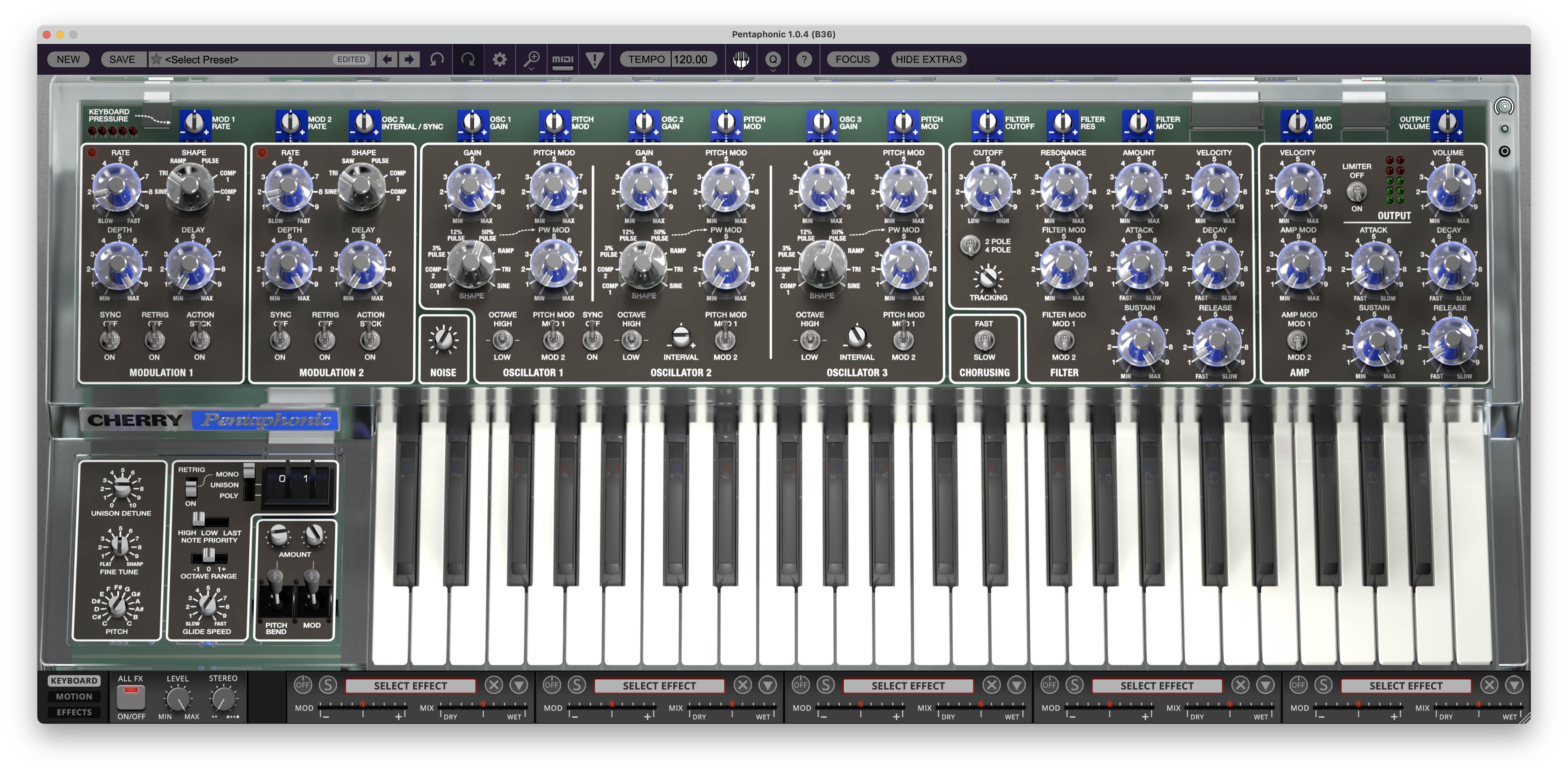
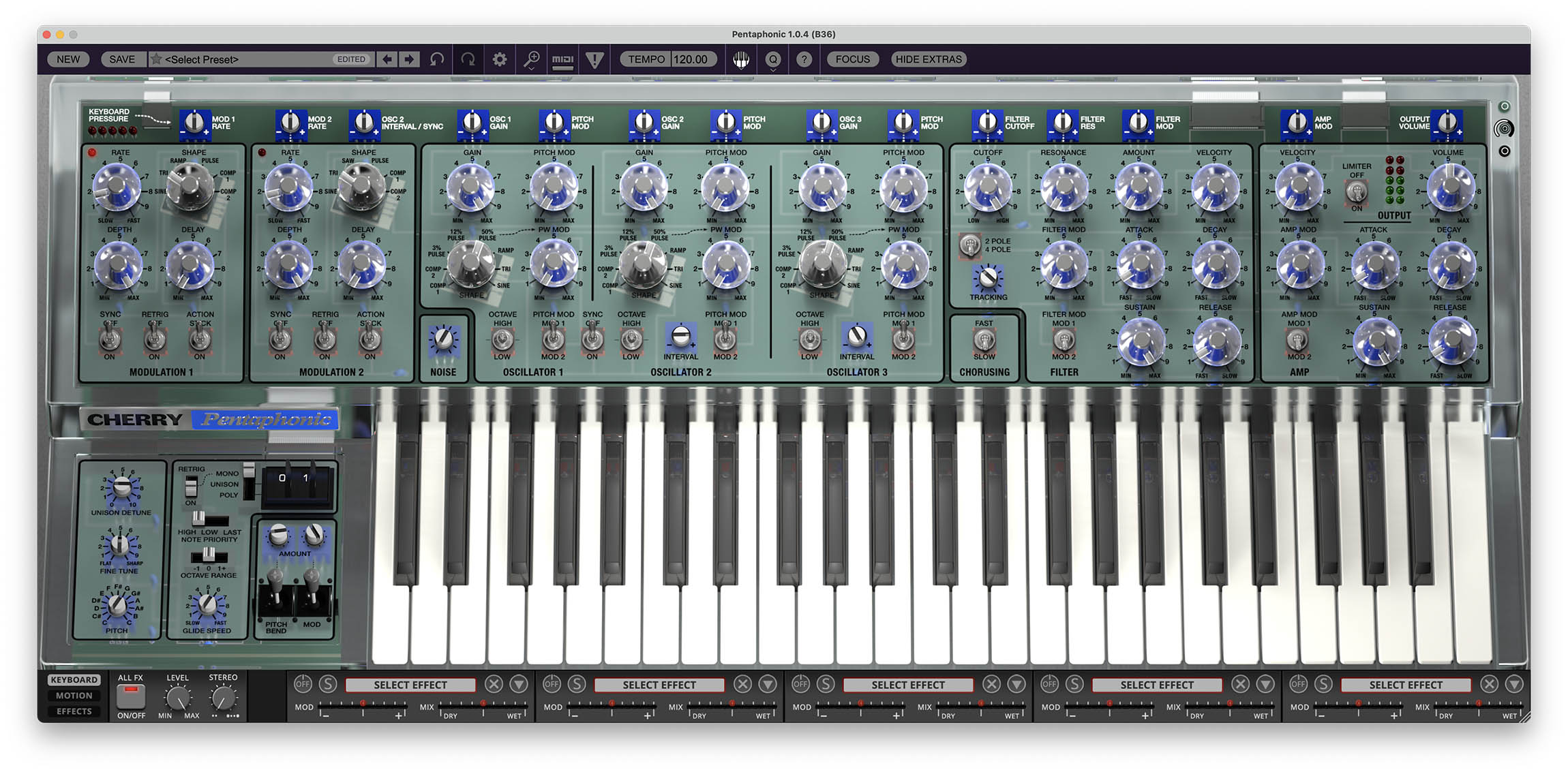
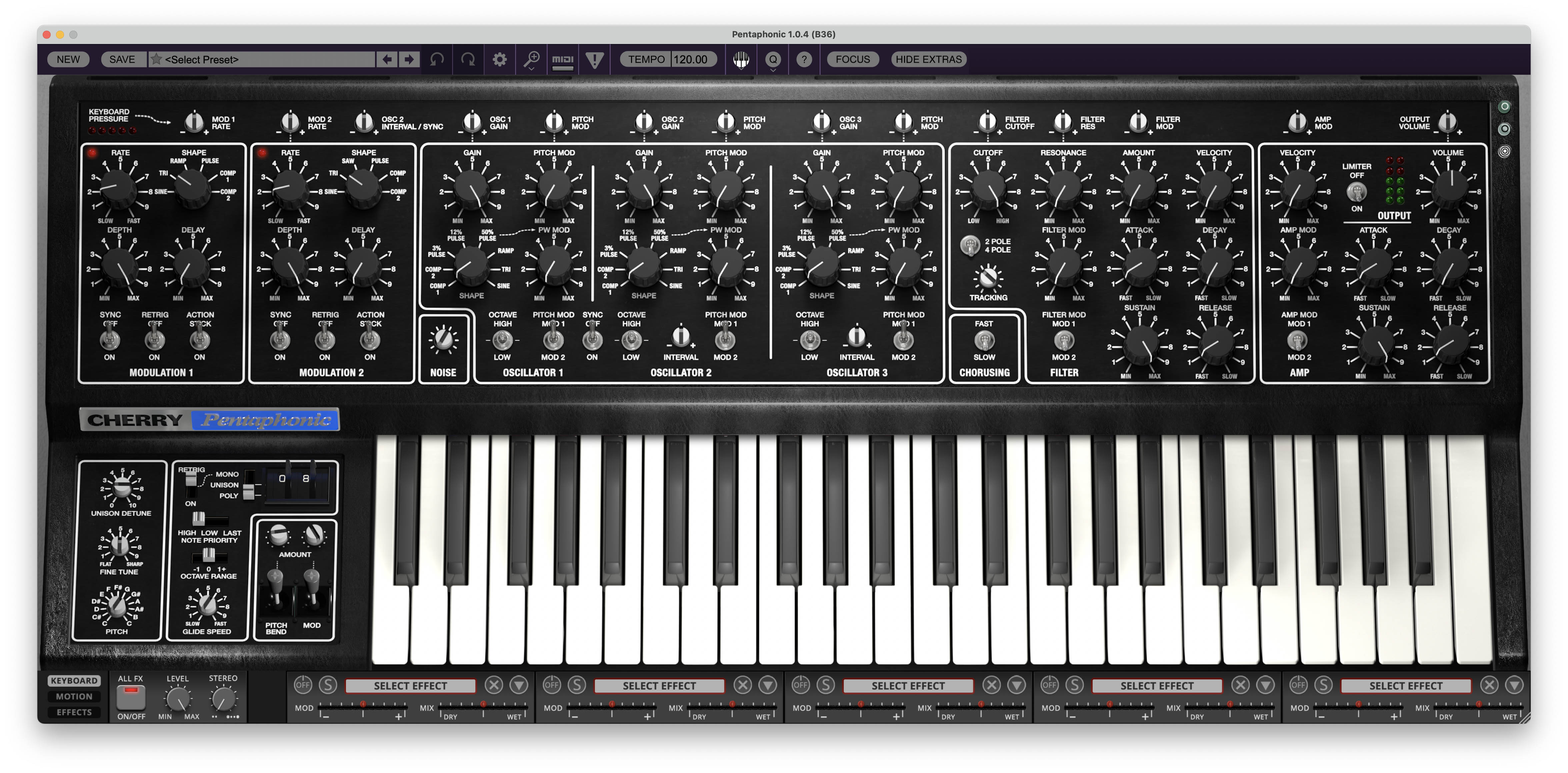
The three circular buttons at the upper-right corner of the panel let you change Pentaphonic’s visual theme. The choices are loosely inspired by different historical appearances of the original Gleeman hardware.
AUDITIES THEME: Displays the Audities-inspired panel appearance, with portions of the instrument’s internal components visible beneath the surface treatment.
TRANSPARENT THEME: Recreates the striking transparent look associated with the clear-bodied Gleeman instruments, allowing the internal circuitry and components to become part of the visual design.
BLACK THEME: Displays the conventional dark Pentaphonic panel used throughout most of this guide.
The Audities and Transparent theme buttons also act as opacity controls. Click and drag either button to increase or decrease the theme’s opacity, revealing more or less of the internal components beneath the panel.
This feature is cosmetic and doesn’t alter the sound or operation of Pentaphonic, but it provides a nice visual nod to the unusual hardware history that helped make the original instrument so memorable
Performance Controls
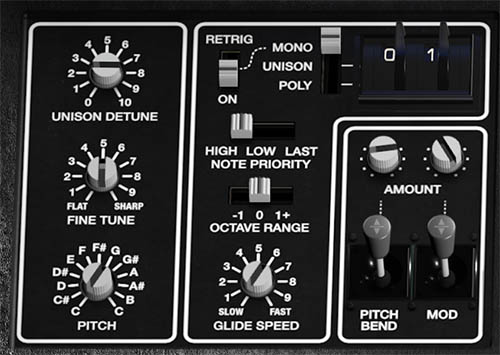
The lower-left portion of the Keyboard view contains Pentaphonic’s performance controls.
These determine how played notes are assigned and articulated and provide immediate access to tuning and expressive performance behavior.
Visible controls include MONO, UNISON, and POLY operation, HIGH, LOW, and LAST note priority, RETRIG, UNISON DETUNE, FINE TUNE, chromatic PITCH transposition, OCTAVE RANGE, GLIDE SPEED, and Pitch Bend and Mod performance controls.
Several of these ideas have direct ancestors in the original Gleeman.
The hardware Pentaphonic supported Mono and Poly modes, with high-note priority in Mono. Its Glide control operated in monophonic mode, and the original Pitch control transposed the complete instrument chromatically across a one-octave range.
Cherry Audio extends these ideas with additional voice modes, note priorities, unison operation, and contemporary performance control.
Three Main Views
Pentaphonic’s lower panel changes according to the KEYBOARD, MOTION, and EFFECTS buttons at the lower-left corner.
The upper synthesis panel remains available while these lower views change, so sound design, sequencing, performance, and effects remain closely connected.
Keyboard View
KEYBOARD displays the on-screen keyboard and Performance Controls.
This is the most direct view for conventional playing and sound design. It keeps the keyboard visible while leaving the main synthesis panel fully accessible above.
Use Keyboard view when programming oscillators, filters, envelopes, modulation, or performance behavior without needing the sequencing or expanded effects interfaces.
Motion View
Click MOTION to replace the keyboard with Pentaphonic’s Arpeggiator and Sequencer.
The ARPEGGIATOR occupies the left side and provides pattern, direction, range, synchronization, speed, swing, probability-style Chance, and Feel controls. It can turn held notes into conventional repeating figures or more animated performance patterns.
The SEQUENCER occupies the center and right side of the Motion view. It provides a 16-step programming area, four pattern memories, multiple playback modes, keyboard-control options, Live Record, Step Program modes, synchronization, Swing, Chance, Feel, and additional sequence-length or multiplication choices.
The PARAMETER ANIMATOR extends the sequencer beyond note playback. Visible targets include CUTOFF, RES, MOD, and GAIN, allowing step-based motion to become part of the patch itself.
This represents a major expansion over the original Gleeman sequencer.
The 1982 instrument included a real-time polyphonic recorder that could loop a recorded phrase while the keyboard remained playable. Keyboard notes could even steal voices from the sequence when necessary. Cherry Audio takes that original performance-oriented idea much further with programmable steps, multiple patterns, parameter animation, playback direction, probability-style controls, and synchronization to a modern production environment.
The detailed Motion chapter will cover programming notes, ties, patterns, live recording, transposition, utility functions, and Parameter Animator presets step by step.
Effects View
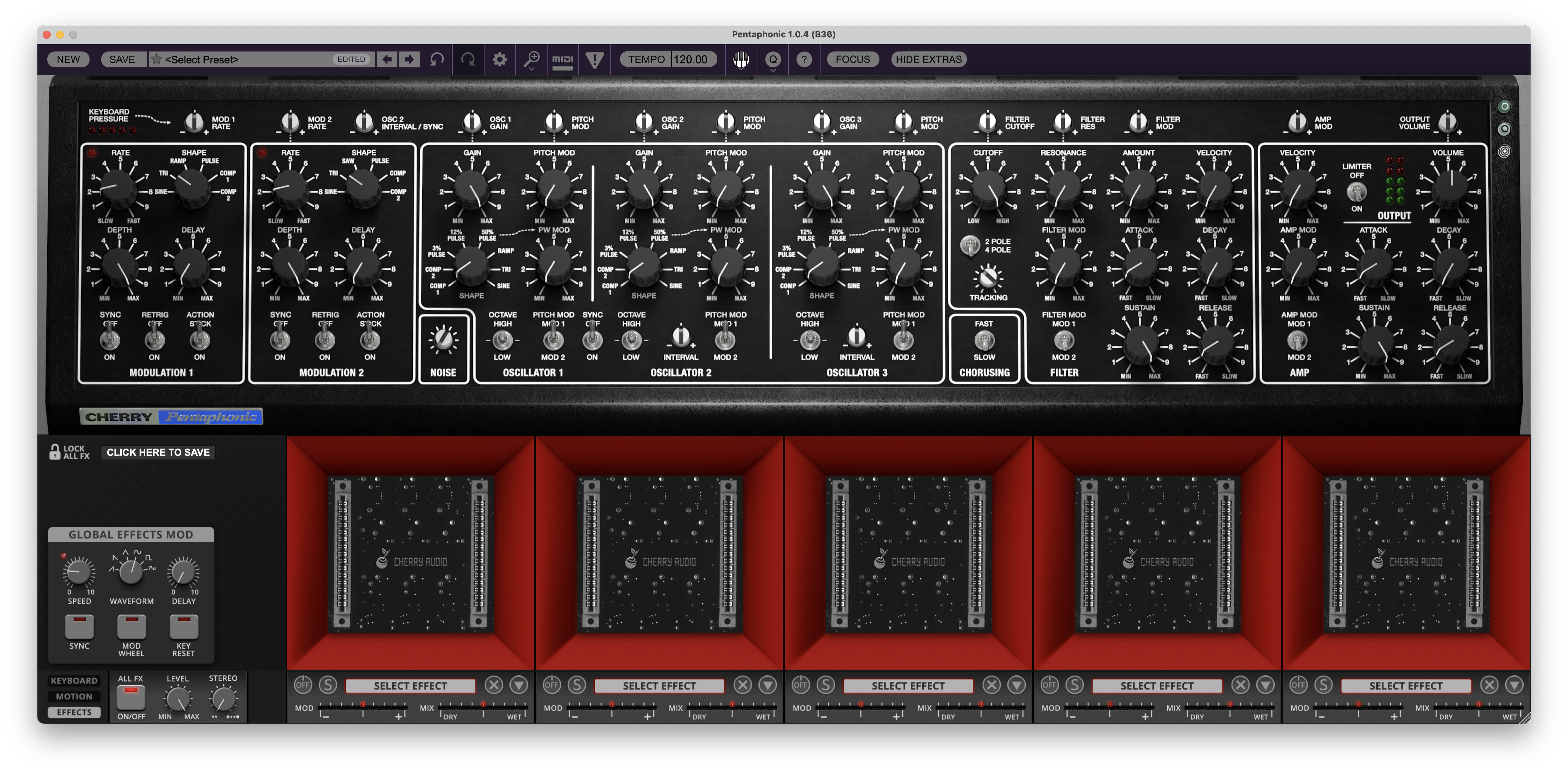
Click EFFECTS to display Pentaphonic’s five-slot effects environment.
Five large effect bays allow processors to be selected and arranged as part of the preset. Each slot includes its own effect selection and lower-strip controls for modulation and wet/dry balance.
The left side of the Effects view contains the GLOBAL EFFECTS MOD section, with controls for modulation speed, waveform, delay, synchronization, Mod Wheel interaction, and key reset.
An ALL FX section provides overall effect on/off, Level, and Stereo controls.
Effects can therefore serve two roles. They can provide conventional finishing duties such as ambience, width, dynamics, or delay, but they can also become part of the sound-design process itself, particularly when modulation is used to animate effect parameters. Effects don’t necessarily need to be the final coat of paint. Sometimes they’re part of the instrument.
Pentaphonic Signal Flow
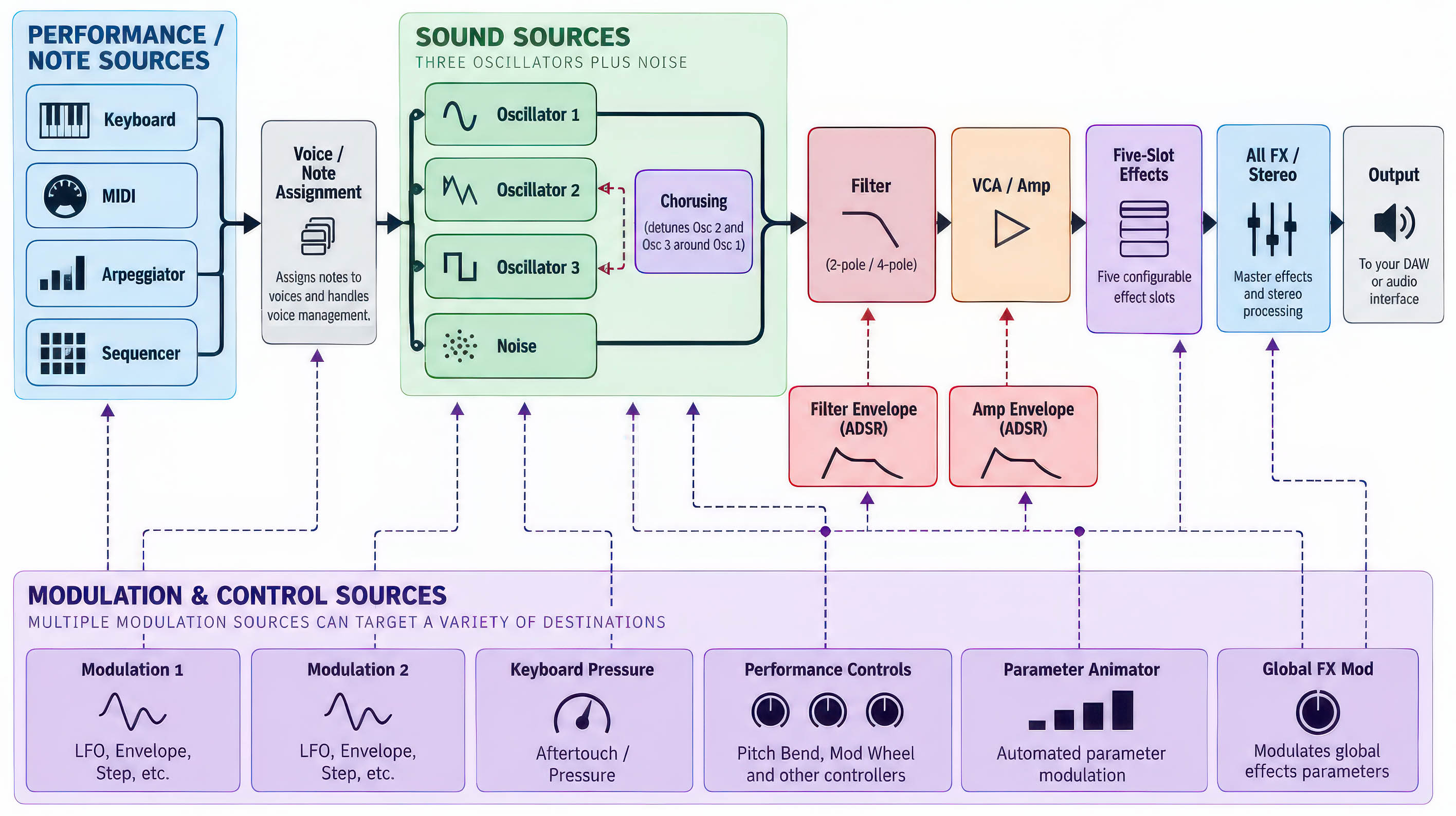
At the broadest level, Pentaphonic follows a familiar subtractive synthesizer path.
Its three oscillators and Noise source create the raw sound. The oscillator Gain controls determine their relative contribution. The resulting signal enters the Filter, where Cutoff, Resonance, modulation, and the Filter envelope shape its harmonic content. The Amp and its envelope then determine how the sound develops in level over time.
The completed synth signal can then be processed by Pentaphonic’s five-slot effects system before reaching the final Output.
What makes Pentaphonic more elaborate is everything that can influence those stages from outside the main audio path.
Modulation 1 and Modulation 2 can animate multiple synthesis parameters. Keyboard Pressure provides real-time expressive control. Performance controls determine pitch, articulation, glide, and voice behavior. The Arpeggiator and Sequencer generate note movement, while the Parameter Animator can impose step-based changes on sound parameters. The Global Effects Mod section extends modulation into the effects environment.
The basic signal flow therefore remains easy to understand even though the surrounding control system can become considerably more sophisticated.
Start with the three oscillators, Filter, and Amp and you have a very capable subtractive synthesizer. Begin adding dual modulation, pressure, motion sequencing, parameter animation, unison, and effects, and the same architecture can move into considerably more elaborate territory.
That balance between simplicity at the center and sophistication around the edges is one of Pentaphonic’s strongest design qualities.
The chapters that follow examine each section in detail, beginning with the oscillators and sound sources.