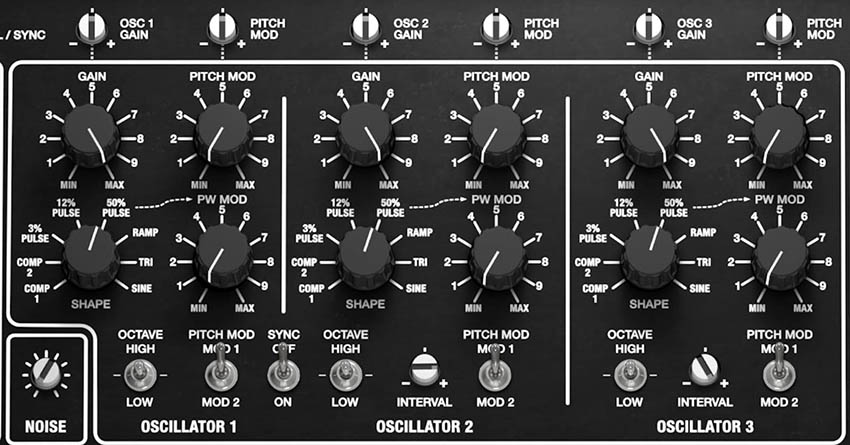
Pentaphonic’s three oscillators provide the raw material for nearly everything that follows. Each can contribute a simple fundamental tone, a harmonically rich waveform, a tuned interval, or a modulated component inside a much larger sound.
The basic architecture comes directly from the original Gleeman Pentaphonic. Each of its five voices contained three digitally controlled oscillators, giving the instrument 15 oscillators in total. The original oscillator sections shared GAIN, SHAPE, and OCTAVE controls and were designed to be stable immediately after power-up, without the warmup and tuning drift associated with many analog oscillators of the period.
Cherry Audio retains the unusual waveform set that gave the Gleeman much of its personality, but expands the oscillator architecture with pitch modulation, pulse-width modulation, oscillator synchronization, interval tuning, keyboard-pressure control, and additional modulation routing.
At its simplest, Pentaphonic can behave like a straightforward three-oscillator subtractive synth. Set the three oscillators to compatible octave ranges and waveforms, balance their Gain controls, then shape the combined result with the Filter.
But the real character begins to emerge when the oscillators are given different jobs. One can provide the main body of the sound, another can add a musical interval or chorusing, and the third can contribute brightness, low-frequency reinforcement, or contrasting waveform content.
Controls Common to the Oscillators
Although Oscillators 1, 2, and 3 have a few individual features, they share a common set of basic controls.
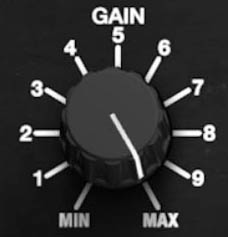
Gain
GAIN: (Min to Max) Sets the level of the oscillator in the combined sound. Higher settings make the oscillator more prominent, while lower settings allow it to serve as a supporting component beneath the other sound sources.
Gain is more than a matter of making all three oscillators equally loud. A useful three-oscillator patch often has a clear hierarchy: one oscillator provides the foundation, another adds color or detuning, and the third supplies reinforcement or an interval.
Tip: When a patch begins to sound crowded, try lowering one oscillator instead of changing its waveform or tuning. The problem may simply be that too many elements are competing at equal level.
Shape
SHAPE: (COMP 1, COMP 2, 3% PULSE, 12% PULSE, 50% PULSE, RAMP, TRI, SINE) Selects the oscillator waveform.
These eight shapes are one of Pentaphonic’s defining characteristics and are carried directly from the original Gleeman design. COMP 1 and COMP 2 are unusually complex waveforms created for their distinctive harmonic qualities.
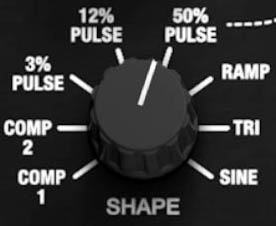
The remaining shapes move through progressively more familiar synthesizer territory:
COMP 1 and COMP 2 provide complex harmonic spectra unlike the conventional waveforms found on most subtractive synthesizers.
3% PULSE produces an extremely narrow pulse with a thin, bright, nasal character.
12% PULSE is wider and fuller but retains the hollow quality associated with asymmetric pulse waves.
50% PULSE is a symmetrical square wave, producing a strong fundamental with prominent odd-numbered harmonics. Pulse width modulation is applied to the 50% wave, but not to the 3% or 12% Pulse waves.
RAMP is the sawtooth waveform. It contains both odd and even harmonics and provides plenty of upper-frequency material for the Filter to shape.
TRI provides a smoother, rounder sound with substantially fewer upper harmonics.
SINE contains the least harmonic complexity and is useful for pure tones, low-frequency reinforcement, and softening brighter oscillator combinations.

The Two Comp Waveforms
COMP 1 and COMP 2 deserve special attention because they’re part of what makes Pentaphonic sound unlike a generic three-oscillator synth.
The original manual described them simply as two new “complex waveshapes” included for their unique harmonic qualities. Their stepped and irregular shapes contain a more complicated mixture of harmonics than Triangle, Sine, or the conventional pulse waves.
Musically, they’re useful whenever a patch needs harmonic interest before the Filter or effects are added. Try them for metallic keyboard tones, unusual pads, bells, digital-analog hybrids, or patches that need an edge without resorting to aggressive modulation.
A particularly useful technique is to combine a COMP waveform at moderate level with a more familiar Ramp, Pulse, or Triangle oscillator. The conventional waveform establishes the recognizable body of the sound, while the COMP oscillator adds spectral detail around it.
Octave
OCTAVE: (LOW, STANDARD, HIGH) Sets the oscillator’s octave range. Leave the toggle in the center position for the standard octave, move it up to shift the oscillator one octave higher, or move it down to shift the oscillator one octave lower.
The original Pentaphonic used a two-position LOW/HIGH switch. Cherry Audio adds a center Standard position. Rather than providing numerous organ-footage settings, each oscillator could simply be shifted between two broad registers.
Matching all three oscillators in the same octave produces a dense, unified sound. Splitting them between High and Low distributes the harmonic energy across a wider range. For example, two oscillators in High and one in Low can add weight beneath a lead or pad without requiring additional effects or EQ.

Pitch Mod
PITCH MOD: (Min to Max) Sets the amount of oscillator pitch modulation supplied by the selected modulation source.
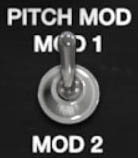
Each oscillator can receive pitch modulation from Pentaphonic’s modern modulation system. Small amounts are useful for vibrato and subtle instability. Larger amounts can create dramatic sweeps, special effects, and more obviously synthetic pitch movement. The source switch beneath the control selects the modulation section that supplies the movement (MOD 1 or MOD 2).
PITCH MOD SOURCE: (MOD 1, MOD 2) Selects Modulation 1 or Modulation 2 as the source for the oscillator’s Pitch Mod control.
Because the oscillators can use different modulation sources and depths, they don’t all have to move together. One oscillator can receive conventional vibrato while another remains stable, or two oscillators can use different modulation shapes or rates to create more complicated beating and harmonic motion.
This is one of Cherry Audio’s substantial expansions of the original design. The hardware Pentaphonic had a single modulation section whose Pitch destination affected oscillator pitch globally.
PW Mod
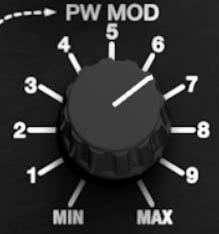
PW MOD: (Min to Max) Sets the amount of pulse-width modulation applied to the oscillator's 50% Pulse wave from the selected modulation source. PW Mod is not applied to the 3% or 12% Pulse waves.
PW MOD SOURCE: (MOD 1, MOD 2) Selects Modulation 1 or Modulation 2 as the pulse-width modulation source.
Pulse-width modulation changes the relationship between the high and low portions of a pulse waveform over time, altering its harmonic content without changing the played pitch. Slow modulation produces the familiar moving, animated quality associated with classic PWM pads and strings.
This is another important Cherry Audio addition. The original Gleeman did not provide continuous pulse-width control. Instead, it offered three fixed pulse shapes at 3%, 12%, and 50%. Pentaphonic retains those characteristic starting shapes while adding modulation possibilities unavailable on the original hardware.
Oscillator 1
Oscillator 1 serves as a natural reference point for the three-oscillator structure.
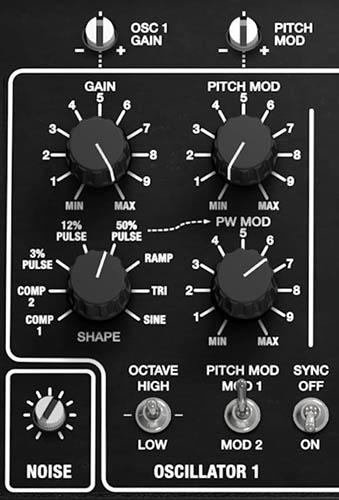
It includes the shared GAIN, SHAPE, OCTAVE, PITCH MOD, and PW MOD functions and can be used alone for simple sounds or as the central pitch around which Oscillators 2 and 3 are tuned.
A useful way to learn Pentaphonic is to begin with Oscillator 1 by itself. Choose each Shape in turn and listen without effects or heavy filtering. This gives you a reliable sense of the raw harmonic vocabulary before additional oscillators begin altering the picture.
Hearing the Waveforms Clearly
To audition Pentaphonic’s oscillator waveforms:
Start from a simple or initialized preset.
Raise Oscillator 1 GAIN to a comfortable level.
Lower Oscillator 2 and Oscillator 3 GAIN to minimum.
Open the Filter sufficiently to hear the oscillator clearly.
Disable or reduce effects if necessary.
Set Oscillator 1 SHAPE to SINE.
Play sustained notes and move through TRI, RAMP, the three PULSE shapes, COMP 1, and COMP 2.
Listen to how each waveform changes the amount and distribution of harmonic content before any additional filtering or processing.
This is worth doing at least once. The COMP waves in particular make much more sense when heard beside the conventional shapes.
Oscillator 2
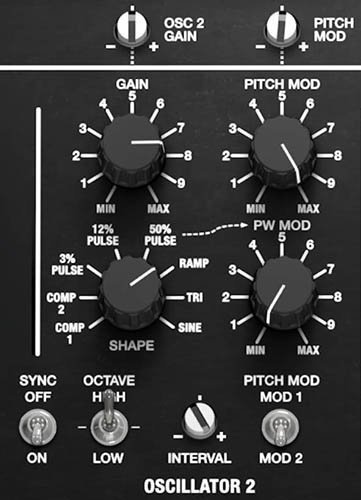
Oscillator 2 adds two important pitch-related features beyond the shared oscillator controls: SYNC and INTERVAL.
Interval
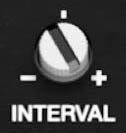
INTERVAL: (-12 to +12 semitones) Transposes Oscillator 2 relative to the played note in discrete semitone steps. Use it to create fixed musical intervals such as thirds, fourths, fifths, octaves, or more dissonant relationships.
Because the control is quantized to semitones, it isn’t intended for fine detuning or subtle oscillator beating. Use CHORUSING for that purpose. Its SLOW and FAST settings introduce the slight pitch differences that create slower or faster beating between the oscillators.
Sync
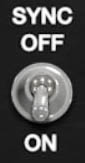
SYNC: (On/Off) Synchronizes Oscillator 2 to Oscillator 1. With Sync enabled, Oscillator 1 acts as the master oscillator, forcing Oscillator 2 to restart its waveform each time Oscillator 1 begins a new cycle.
The characteristic sync sound becomes audible when Oscillator 2’s pitch is shifted relative to Oscillator 1. Adjust Oscillator 2’s INTERVAL control to create a fixed pitch relationship, or use PITCH MOD to move Oscillator 2’s pitch dynamically. As Oscillator 2 moves farther from Oscillator 1, its waveform is repeatedly reset at different points in its cycle, producing the bright, increasingly complex harmonics associated with oscillator sync.
Oscillator 2 must also be audible in the mix, so make sure its GAIN control is turned up. With Oscillator 2 Gain at minimum, the synchronization is still occurring, but there’s no Oscillator 2 signal to hear.
Tip: For a classic animated sync sound, enable Sync, raise Oscillator 2 Gain, then apply Pitch Mod to Oscillator 2. The modulation changes Oscillator 2’s pitch while Oscillator 1 remains the master, turning what would normally be a pitch sweep into a moving harmonic sweep.
Oscillator 3
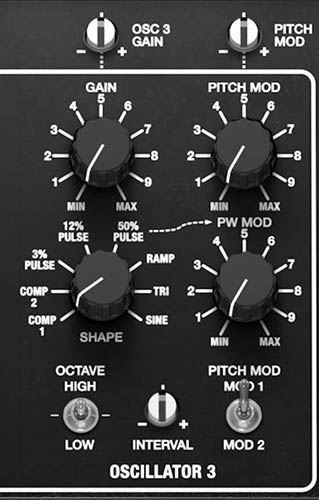
Oscillator 3 provides the same principal sound-building controls as the other oscillators and includes its own INTERVAL control.
Interval
INTERVAL: (-12 to +12 semitones) Transposes Oscillator 3 relative to the played note in discrete semitone steps. Use it to create fixed musical intervals such as thirds, fourths, fifths, octaves, or more dissonant relationships. Because both Oscillators 2 and 3 have independent Interval controls, Pentaphonic can build three-note structures inside a single played note.
For example, Oscillator 1 can establish the root, Oscillator 2 can supply a fifth, and Oscillator 3 can add an octave or another chord tone. This can be especially effective in Mono or Unison operation, where a single key can trigger a much larger harmonic structure.
Be careful with fixed intervals in ordinary polyphonic playing. An interval relationship that sounds impressive on one note is duplicated for every note in a chord, and harmonic density accumulates very quickly.
Building a Three-Oscillator Sound
The best way to understand Pentaphonic’s oscillator section is to build sounds incrementally rather than turning everything up at once.
To build a balanced three-oscillator patch:
Set Oscillators 2 and 3 GAIN to minimum.
Raise Oscillator 1 GAIN and choose the waveform that best represents the core sound.
Set its OCTAVE to the desired register.
Raise Oscillator 2 GAIN gradually.
Choose a contrasting or complementary Shape for Oscillator 2.
Adjust its OCTAVE and INTERVAL as needed.
Bring in Oscillator 3 at a lower level.
Choose its Shape and Interval according to the role you want it to play.
Balance the three Gain controls rather than automatically setting them equally.
Only after the raw oscillator blend works musically, begin shaping it with the Filter, envelopes, modulation, Chorusing, and effects.
This approach makes it much easier to identify what each oscillator is contributing.
Noise
NOISE: (Min to Max) Sets the level of the Noise source. The Noise control adds a non-pitched noise source to the oscillator mix.
Noise contains energy across a broad range of frequencies rather than producing a fixed musical pitch. This makes it useful for breath, hiss, wind, percussion, attack transients, and less obviously tonal textures. At low levels, Noise can add a subtle layer of imperfection behind sustained oscillator sounds. At higher levels, it can become the primary material for synthesized percussion or effects.
Because Noise has no conventional pitch, the Filter becomes especially important. Closing the Filter creates darker rushing or rumbling textures, while higher Cutoff settings preserve brighter hiss and attack detail.

Adding Noise to a Plucked Sound
To use Noise as an attack transient:
Create a basic oscillator patch with a fast Amp Attack.
Add a small amount of NOISE.
Lower the Filter Cutoff enough that the noise doesn’t dominate the sustained sound.
Use a short Filter-envelope Decay so the brighter portion of the sound is strongest at the beginning of the note.
Adjust Noise until the attack gains texture without sounding like a separate noise layer.
Even a small amount can help a synthesized pluck feel less perfectly smooth.
Chorusing
Pentaphonic’s CHORUSING section is closely tied to the oscillator architecture and belongs conceptually with the sound sources rather than with the later effects processors.

On the original Gleeman, Chorusing altered the tuning of Oscillators 2 and 3 around Oscillator 1. SLOW produced approximately ±0.39% detuning, while FAST doubled that spread to approximately ±0.78%. The result was slower or faster beating among the three oscillator banks. In other words, this wasn’t a conventional chorus effect applied after the synth. The thickness was created at the oscillator level.
CHORUSING: (SLOW, FAST) Selects the chorusing mode.
SLOW produces gentler, slower beating among the oscillators.
FAST produces more rapid beating and a more animated ensemble effect.
Chorusing is especially effective when all three oscillators use related waveforms and octave settings. With contrasting intervals or heavy pitch modulation already present, additional chorusing can sometimes make the tuning feel overly diffuse.
Creating a Classic Three-Oscillator Pad
To build a broad Pentaphonic-style pad:
Set all three oscillators to the same OCTAVE.
Select RAMP for Oscillator 1.
Select RAMP or 12% PULSE for Oscillator 2.
Select TRI or RAMP for Oscillator 3.
Use Oscillator 1 as the strongest level and reduce Oscillators 2 and 3 slightly.
Set Oscillator 2 and Oscillator 3 Interval controls to 0 semitones.
Select SLOW CHORUSING.
Use a moderately low Filter Cutoff with some Filter-envelope Amount.
Give the Amp envelope a slower Attack and Release.
Add only as much effects processing as the sound actually needs.
The Chorusing should provide motion before a conventional chorus, delay, or reverb is added. This is part of the Pentaphonic character rather than merely an effect placed on top of it.
Making Creative Use of the Oscillators
Pentaphonic’s oscillator section is simple enough to understand quickly but unusually rich once its controls begin interacting.
Use COMP as seasoning rather than the whole sound. Keep a Ramp or Pulse oscillator as the recognizable foundation and blend COMP 1 or COMP 2 underneath for more unusual harmonic detail.
Use different octaves before reaching for effects. A Low oscillator beneath two High oscillators can make a patch feel substantially larger without increasing modulation or stereo processing.
Let one oscillator stay stable. If Oscillators 2 and 3 are receiving Pitch Mod, leaving Oscillator 1 relatively steady can preserve a clear tonal center.
Try different modulation sources. Assign one oscillator to Modulation 1 and another to Modulation 2. Even modest differences in rate or shape can create movement that never repeats exactly.
Animate the 50% Pulse selectively. PWM on one oscillator can be more effective than applying the same motion to all three.
Use intervals sparingly in polyphonic sounds. A fifth or octave inside each voice can become enormous once full chords are played.
Combine fixed musical intervals with Slow Chorusing. Fixed pitch relationships and continuous oscillator beating solve different problems and can work beautifully together.
Build the raw sound before adding effects. If the three oscillators already form a convincing tone, the five-slot effects system can enhance it rather than rescue it.
The original Pentaphonic earned much of its reputation from exactly this kind of simple architecture. Three oscillators, a distinctive set of waveforms, and carefully chosen tuning relationships were capable of producing unusually rich sounds before elaborate processing entered the picture. Fans particularly praised its thick pads, strings, and beautifully clear three-oscillator character.
Cherry Audio’s additional modulation, synchronization, interval controls, pressure routing, and effects extend that vocabulary considerably. But the same principle still applies.