Keyboard Modes, Multi-Voice, and Touch
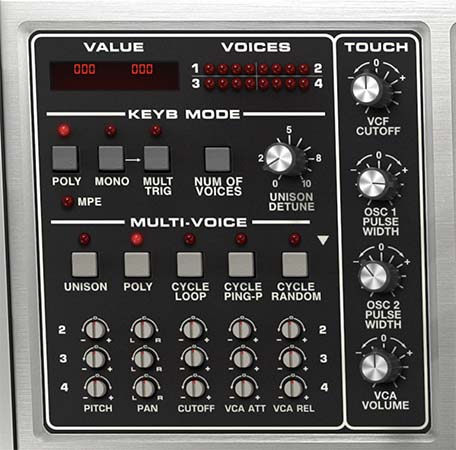
Memorymode 2 can behave like a conventional polyphonic synthesizer, a single-voice lead synth, a massive unison instrument, an expressive MPE controller destination, or something far less orderly through Multi-Voice mode.
The controls in this section determine how notes are assigned to the available voices, how many voices can sound, whether envelopes retrigger during legato playing, and how individual voices can vary in pitch, placement, filter tone, and envelope timing.
Each layer supports up to 16 voices independently. With both Upper and Lower layers active, a preset can use as many as 32 voices in total.
A “voice” refers to one complete instance of the Memorymode 2 synthesis path: three oscillators, mixer, filter, VCA, envelopes, and associated modulation. Playing a four-note chord normally uses four voices. Playing the same chord with both layers active can use eight.
The Glide, Bend Depth, and Chord Mode controls are located in the Performance Controls section and are covered in that chapter. Glide is still relevant here, however, because several Poly modes determine how it behaves as voices are assigned.
Value Display
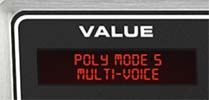
The Value display provides information about the control currently being adjusted.
When a knob is moved, two values (from 000 to 100) appear:
Left value: The setting stored in the currently loaded preset.
Right value: The control’s current edited setting.
This makes it easy to compare an adjustment with the original preset value or return a control to its saved position by matching the two numbers.
On/off buttons display their current state when clicked. Controls with menus, including Poly, Mono, and Number Of Voices, show the currently selected option when the pointer is placed over them.
The Value display also identifies the active Keyboard Mode. For example, selecting the first Poly mode displays:
POLY MODE 1
CYCLIC
This is considerably more civilized than memorizing numbered commands on a calculator-style keypad, as owners of the original hardware were expected to do.
Voices Display
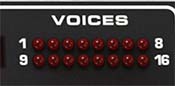
The Voices display contains 16 LEDs arranged in two rows:
Top row: Voices 1 through 8
Bottom row: Voices 9 through 16
The LEDs illuminate to show which voices are currently active. A single note normally lights one LED. Chords illuminate several. In Unison modes, one played note may light many LEDs because multiple voices are stacked together.
The display is especially useful in Multi-Voice mode, where it shows voices advancing through the repeating four-voice variation pattern. It’s a monitor rather than an editing control. The LEDs don’t select voice groups or offset rows.
Keyboard Mode
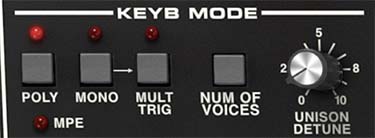
The Poly and Mono buttons open menus containing Memorymode 2’s available voice-assignment modes. These modes determine how played notes are distributed among the internal voices.
The first four Poly modes reproduce the characteristic voice-allocation behavior of the original instrument. Their differences become most apparent when Glide is enabled, when notes are repeated, or when a passage alternates between chords and single-note lines.
Poly Mode 5 activates the Multi-Voice system. Poly Mode 6 activates MPE.
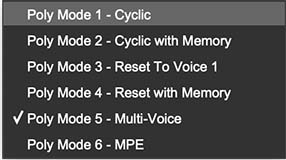
Poly Modes
Poly Mode 1: Cyclic
Function: Assigns played notes to the available voices in a repeating sequence.
With four voices available, successive notes are assigned:
1 → 2 → 3 → 4 → 1 → 2 → 3 → 4
Sound and feel: This is the most straightforward general-purpose polyphonic mode. Voice allocation moves continuously forward, regardless of which pitches were previously played.
Glide interaction: Because repeated notes may be assigned to different internal voices, Glide can produce movement even when the same notes or chords are played again.
Use it for: Conventional polyphonic playing, animated Glide effects, arpeggios, and passages where changing voice assignment is part of the sound.
Poly Mode 2: Cyclic with Memory
Function: Uses cyclic voice assignment but remembers which voices were assigned to repeated pitches.
If a chord is assigned to Voices 1, 2, and 3, repeatedly playing the same chord continues using those voices. New voice assignments occur when different notes are introduced.
Sound and feel: Repeated notes and chords behave more consistently because they return to the same internal voices.
Glide interaction: Repeated pitches generally remain in place instead of gliding from another voice’s previous pitch.
Use it for: Repeated chords, rhythmic comping, and Glide-enabled patches that should remain stable when the same notes are restruck.
Poly Mode 3: Reset To Voice 1
Function: Resets voice allocation when all notes have been released, so the next note begins again with Voice 1.
Sound and feel: Chords still play polyphonically, but each new phrase begins from a predictable voice assignment.
Glide interaction: Single-note phrases can behave more like a monophonic synthesizer because each new phrase begins with the same internal voice.
Use it for: Patches that move between chords and single-note leads, or any sound that benefits from a consistent start to each phrase.
Poly Mode 4: Reset with Memory
Function: Combines the pitch memory of Poly Mode 2 with the voice-reset behavior of Poly Mode 3.
Repeated pitches retain their previous voice assignments, but releasing all notes resets the next new phrase to Voice 1.
Sound and feel: This provides stable repeated notes while keeping the beginning of each new phrase predictable.
Use it for: Expressive Glide patches, repeated chords, and performances where consistent retriggering matters without sacrificing polyphony.
Poly Mode 5: Multi-Voice
Function: Enables the Multi-Voice section and applies its voice-to-voice offsets.
When another Poly mode is selected, the Multi-Voice controls are disabled and appear darkened.
Multi-Voice mode allows repeated voices to differ in pitch, pan position, filter cutoff, VCA Attack, and VCA Release. It can be used subtly to mimic the component variation of vintage hardware or pushed much further for chord stacks, rotating stereo patterns, and deliberately unruly behavior.
The complete Multi-Voice section is described later in this chapter.
Poly Mode 6: MPE
Function: Activates MIDI Polyphonic Expression mode directly.
Selecting Poly Mode 6 replaces the previous Memorymode workflow that required MPE to be enabled from the Settings window. No separate global MPE switch is necessary.
When MPE is active:
The MPE indicator illuminates.
Mono, Mult Trig, Number Of Voices, and Multi-Voice are overridden.
The four Touch controls relabel as V, X, Y, and Z.
Expression can be assigned independently for each note.
A standard non-MPE controller plays only one note while Poly Mode 6 is selected. Use one of the ordinary Poly modes unless an MPE-compatible controller is connected and configured.
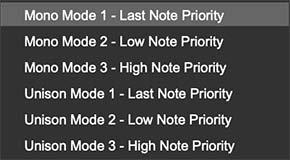
Mono and Unison Modes
Clicking the Mono button opens six options: three single-voice Mono modes and three stacked Unison modes.
The priority setting determines which note is heard when more than one key is held.
Mono Mode 1: Last Note Priority
Function: Plays one voice at a time. The most recently played note takes priority.
Sound and feel: This is usually the most natural and responsive Mono mode for leads and basses because newly played notes immediately take control.
Use it for: Fast leads, legato basses, solos, and most modern monophonic playing.
Mono Mode 2: Low Note Priority
Function: Plays the lowest currently held note.
Sound and feel: Higher notes can be played and released above a held bass note without replacing it.
Use it for: Vintage-style bass technique, pedal tones, and passages where the bottom note should remain anchored.
Mono Mode 3: High Note Priority
Function: Plays the highest currently held note.
Sound and feel: Lower held notes can act as anchors while higher notes take precedence.
Use it for: Trills, ornamented leads, and playing styles in which the upper melodic line should dominate.
Unison Mode 1: Last Note Priority
Function: Stacks multiple voices on one note, with the most recently played note taking priority.
The number of stacked voices is set by Number Of Voices.
Sound and feel: Large, dense, and immediate. This is the most broadly useful Unison mode for leads, basses, and effects.
Unison Mode 2: Low Note Priority
Function: Stacks the selected number of voices on the lowest held note.
Use it for: Heavy basses, pedal tones, and low-note lines that must remain stable beneath additional fingering.
Unison Mode 3: High Note Priority
Function: Stacks the selected number of voices on the highest held note.
Use it for: Cutting leads, upper-note trills, and phrases where the highest pitch should remain dominant.
Mult Trig
Function: Determines whether the Filter and VCA envelopes retrigger when a new note is played while another note remains held.
Mult Trig applies to the Mono and Unison modes. It’s disabled in Poly modes.
Mult Trig On
Every new note retriggers the envelopes.
Sound and feel: Each note receives a fresh attack. The result is more articulated, percussive, and responsive.
Use it for: Punchy basses, aggressive leads, fast passages, and sounds whose attack is an important part of every note.
Mult Trig Off
The envelopes retrigger only when no other notes are held. Playing legato changes pitch without restarting the envelopes.
Sound and feel: Notes connect smoothly, allowing a phrase to flow through one continuous filter and volume contour.
Use it for: Legato solos, expressive portamento, and techniques resembling a guitarist or wind player changing pitch without beginning a new articulation.
Tip: Combine Mult Trig Off with Glide for smooth monophonic lines. Turn Mult Trig on when every note needs a fresh filter snap or volume attack.
Number Of Voices
Function: Selects from 2 through 16 available voices independently for each layer. Its exact role depends on the active mode.
In Poly Modes
Number Of Voices sets the maximum polyphony for the selected layer. A setting of 8 allows up to eight notes to sound simultaneously. When more notes are played than are available, older voices may be reassigned to new notes.
In Mono Unison Modes
Number Of Voices sets the number of voices stacked on each played note. Higher values create greater density and movement but also consume more processing power.
In Multi-Voice Poly Mode
Number Of Voices sets the maximum number of simultaneous polyphonic notes.
In Multi-Voice Unison Mode
Number Of Voices sets the size of the unison stack.
Tip: More voices aren’t automatically better. A 16-voice unison patch can sound enormous, but four or six voices may retain more definition, especially when both layers are active.
Unison Detune
Function: Spreads the tuning of stacked voices in the Unison modes.
Sound: Low settings add gentle thickness and beating. Higher settings create a broader, looser, and more obviously detuned stack.
Interactions: Unison Detune is applied in addition to any Pitch offsets created in Multi-Voice mode. Combining wide Pitch intervals with heavy Unison Detune can become harmonically adventurous rather quickly.
Tip: For a focused lead, begin with four voices and a small amount of detuning. For huge pads or cinematic stabs, increase the voice count and spread, but listen carefully to the center pitch. A sound can become impressive and vaguely seasick at the same time.
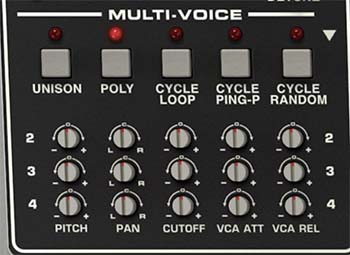
Multi-Voice
Multi-Voice gives individual voices slightly different characteristics. On a vintage analog polysynth, component tolerances caused each hardware voice card to respond a little differently. One might be slightly sharp, another a little darker, and another might have a slower envelope.
Memorymode 2 lets you create that behavior deliberately.
The system uses a repeating four-voice pattern:
Voice 1: Main panel settings, unchanged
Voice 2: Offset row 2
Voice 3: Offset row 3
Voice 4: Offset row 4
When more than four voices are used, the same pattern repeats:
Voices 5, 9, and 13: Unchanged reference settings
Voices 6, 10, and 14: Row 2 offsets
Voices 7, 11, and 15: Row 3 offsets
Voices 8, 12, and 16: Row 4 offsets
This keeps programming manageable. You create three variations around one reference voice rather than editing 16 separate sets of parameters.
The offsets are added to the main panel settings. Changing the main Filter Cutoff, for example, moves every voice together while preserving the relative Cutoff differences established in Multi-Voice.
Multi-Voice Assignment Modes
After selecting Poly Mode 5: Multi-Voice, choose one of the five assignment modes in the Multi-Voice section.
Unison
Function: Stacks the selected Number Of Voices on each played note.
All voices sound simultaneously, so the four-voice offset pattern is heard as a layered stack rather than a sequence.
Musical result: Pitch offsets can create chord intervals, Pan offsets spread the stack across the stereo field, and envelope differences keep the voices from moving in perfect lockstep.
Tip: Use small Pitch offsets for thick unison sounds or select one of the Unison Multi chord presets for one-finger harmonies.
Poly
Function: Plays notes polyphonically while applying the repeating Multi-Voice offset pattern.
Musical result: Notes within a chord can differ slightly in tuning, stereo placement, brightness, and envelope timing. Used subtly, the chord feels less mechanically uniform. Used dramatically, each note can appear to come from a different instrument.
Tip: Begin with tiny Pitch and Cutoff offsets. The goal is often to notice that the chord feels richer without immediately hearing why.
Cycle Loop
Function: Assigns each new note to the next available voice in a fixed forward sequence.
With four variations, the pattern follows:
1 → 2 → 3 → 4 → 1 → 2 → 3 → 4
Musical result: Repeated notes can rotate through tuning, pan, filter, and envelope differences in a predictable pattern.
Tip: Apply alternating Pan offsets to create a repeated sequence that walks across the stereo field.
Cycle Ping-P
Function: Moves forward and backward through the voice order.
With four variations, the pattern follows:
1 → 2 → 3 → 4 → 3 → 2 → 1
Musical result: Creates symmetrical motion that reverses direction rather than jumping abruptly from the last voice back to the first.
Tip: This is particularly effective with Pan and Cutoff offsets, producing stereo and tonal movement that feels structured but less obviously repetitive than Cycle Loop.
Cycle Random
Function: Assigns each new note to a randomly selected available voice.
Musical result: Voice differences occur unpredictably, creating a more organic and less patterned result.
Tip: Use modest Pitch, Cutoff, Attack, and Release variations to make repeated notes feel as though they’re being played by a slightly unreliable vintage instrument. Push everything harder for a machine that may require both servicing and an exorcism.
Multi-Voice Offset Controls
Pitch
Range: -12 to +12 semitones.
Function: Offsets the pitch assigned to each variation row from the main oscillator tuning.
Sound: Small values create subtle tuning differences. Larger values create musical intervals or deliberate dissonance.
Tip: For analog-style variation, use very small offsets. For chord stacks, tune Rows 2, 3, and 4 to useful intervals around the unchanged reference voice.
Pan
Range: -100 to +100.
Function: Offsets the voice’s stereo position from the layer’s main Pan setting.
Sound: Small offsets add width. Larger values distribute voices strongly across the stereo field.
Interactions: Pan offsets are relative to the main layer Pan setting and are followed by the layer and Global effects chains. Stereo effects may broaden or alter the resulting placement.
Tip: Avoid hard-panning every variation by default. Moderate differences often create a wider and more coherent image.
Cutoff
Range: -100 to +100.
Function: Offsets the voice’s filter Cutoff from the main VCF Cutoff setting.
Sound: Negative and positive offsets make individual voices darker or brighter than the reference voice.
Interactions: The offset remains relative to the main Cutoff control, so sweeping the main filter moves all voices together while preserving their differences.
Tip: Small Cutoff variations can make sustained chords feel remarkably alive. This is one of the most effective ways to suggest independent analog voice cards without making the patch sound out of tune.
VCA ATT
Range: -100 to +100.
Function: Offsets the VCA Envelope Attack time for each variation row.
Sound: Individual voices can begin slightly earlier or later than one another. Small variations soften the mechanical precision of a chord. Large variations can turn a single chord into a staggered swell.
Interactions: The offset is applied to the main VCA Attack setting. One direction shortens the Attack and the other lengthens it.
Tip: Use subtle differences on pads so the chord blooms rather than arriving as one solid block.
VCA REL
Range: -100 to +100.
Function: Offsets the VCA Envelope Release time for each variation row.
Sound: Notes can fade at different rates, adding movement and depth to sustained chords and layered textures.
Interactions: The offset is applied to the main VCA Release setting. The shared Release button must still be enabled for release tails to be heard.
Tip: Vary Attack and Release together for ensemble-like behavior, or vary only Release so the notes begin together but dissolve at different speeds.
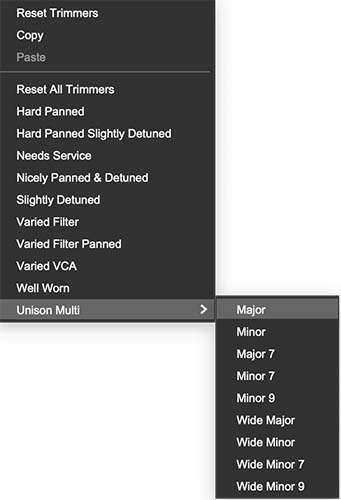
Multi-Voice Menu
Click the white triangle at the upper-right of the Multi-Voice section to open its Utility menu. This menu contains both editing commands as well as multi-voice presets.
Editing Commands
Reset Trimmers: Returns the current Multi-Voice trimmer settings to neutral values.
Copy: Copies the Multi-Voice setup.
Paste: Pastes a copied Multi-Voice setup.
Reset All Trimmers: Clears all Multi-Voice variations and returns the complete setup to its unaltered reference state.
Multi-Voice Presets
The menu includes prepared configurations that quickly demonstrate different uses of the offset system:
Hard Panned
Hard Panned Slightly Detuned
Needs Service
Nicely Panned & Detuned
Slightly Detuned
Varied Filter
Varied Filter Panned
Varied VCA
Well Worn
The names give a useful indication of what each preset changes. Some focus on stereo placement and tuning, while others introduce filter or envelope variation. Needs Service and Well Worn lean further into deliberate instability.
These presets are useful starting points, but they’re also educational. Load one, examine the trimmer positions, and adjust the offsets to suit the patch.
Unison Multi Presets
The Unison Multi submenu contains ready-made chord tunings:
Major
Minor
Major 7
Minor 7
Minor 9
Wide Major
Wide Minor
Wide Minor 7
Wide Minor 9
These presets configure the Pitch offsets so a single played note produces a chord in Multi-Voice Unison mode.
The Wide variations distribute the chord tones across a broader register for a more open voicing.
Tip: Unison Multi presets and Performance Chord Mode solve related problems in different ways. Unison Multi uses the repeating Multi-Voice Pitch offsets and offers instant prepared chord types. Chord Mode lets you record a custom chord shape from the keyboard.
Touch Controls
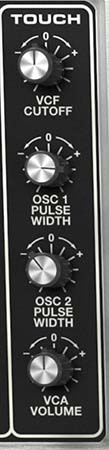
The Touch section contains four independent modulation assignments. Each slot consists of:
A bipolar amount knob
A destination label beneath it
An independently selectable modulation destination
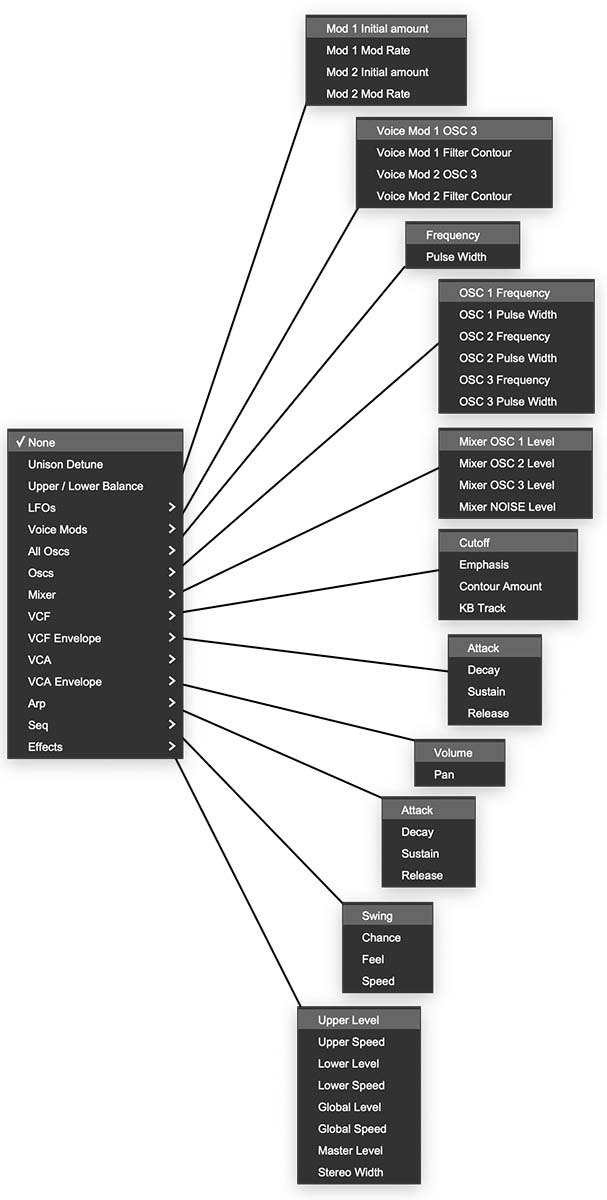
Click the destination label, initially shown as None, to choose a target.
The available top-level categories are:
None
Unison Detune
Upper/Lower Balance
LFOs
Voice Mods
All Oscs
Oscs
Mixer
VCF
VCA
Arp
Seq
Effects
Categories containing multiple parameters open additional submenus.
Touch Amount Knobs
Function: Sets the amount and polarity of pressure modulation sent to the selected destination. At the center position, no modulation is applied. Turning clockwise applies positive modulation. Turning counterclockwise applies negative modulation.
What positive and negative mean depends on the destination. A positive VCF Cutoff assignment opens the filter as pressure increases, while a negative assignment closes it. A negative effect-mix assignment could reduce an effect as pressure increases rather than adding more.
Each Touch assignment is stored independently for the Upper and Lower layers.
Touch Animator and Sequenced Modulation
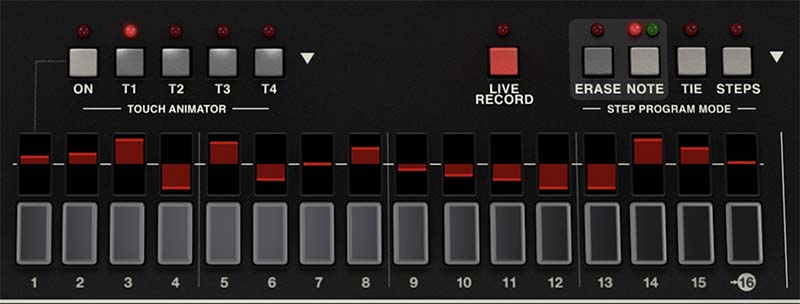
The Touch Animator, available in the Motion view, can automate the four modulation routings assigned in the Touch section. The Touch knobs determine each slot’s destination, polarity, and maximum modulation amount, while Touch Animator changes that amount step by step as the Sequencer runs.
T1, T2, T3, and T4 correspond directly to Touch slots 1 through 4. For example, if Touch 1 is assigned to VCF Cutoff, sequencing T1 can make the filter open by a different amount on every step. This can create rhythmic accents, gradual sweeps, alternating values, or evolving modulation patterns without requiring live pressure input.
Touch Animator can operate alongside sequenced notes or animate manually played and held notes without triggering a note pattern. See the Motion Controls chapter for complete Touch Animator programming instructions.
Polyphonic Aftertouch Behavior
Memorymode 2 supports polyphonic aftertouch when used with a controller that provides it. In ordinary Poly modes, polyphonic aftertouch affects each held note independently. Pressing harder on one note can change its filter, pitch, level, or another assigned destination without applying the same change to the rest of the chord.
In Mono and Unison modes, pressure is applied to the active note.
This makes Touch useful for much more than conventional vibrato. A held chord can contain individually opening filters, independently changing effects, or notes that move in and out of prominence according to finger pressure.
Touch Programming Ideas
Pressure-Controlled Brightness
Assign Touch to VCF Cutoff with a moderate positive amount.
Soft pressure keeps the sound dark. Pressing deeper opens the filter. On a polyphonic-aftertouch controller, individual notes within a chord can brighten independently.
Pressure-Controlled Unison Spread
Assign Touch to Unison Detune.
The patch can begin focused and become wider and more animated as pressure increases. This works especially well for sustained leads and dramatic chord swells.
Layer Morphing
Assign Touch to Upper/Lower Balance.
Use one layer for a stable foundation and the other for a brighter, more animated, or heavily processed variation. Pressure can then move the sound between the two.
Performance Effects
Assign one or more Touch slots to effect parameters.
Pressure can introduce rotary motion, widen a phaser, increase delay feedback, or move a sound into a more spacious effect chain. Negative amounts are useful when the performance should become drier or more focused as pressure increases.
Touch in MPE Mode
When Poly Mode 6 is selected, the four Touch slots relabel as V, X, Y, and Z. These are the four expression sources used by Memorymode 2’s MPE implementation.
Each source can be routed to an independently selected destination.
V: Velocity
Function: Represents the note’s initial strike velocity.
V is captured once when the note begins. Unlike X, Y, and Z, it isn’t a continuously changing stream while the note is held.
Use it for: Initial brightness, level, envelope depth, oscillator balance, or other note-on articulation.
X: Per-Note Pitch
Function: Represents continuous per-note pitch bend, usually produced by sideways finger movement on an MPE controller.
Each note receives its own independent X data.
Use it for: Individual bends within chords, vibrato gestures, scoops, and pitch movement that affects only the touched note.
Y: Per-Note Timbre
Function: Represents continuous per-note timbre data, conventionally transmitted as MIDI CC74.
On many MPE controllers, Y is generated by moving a finger forward and backward along the playing surface.
Use it for: Filter cutoff, pulse width, oscillator balance, effects, or any destination that changes the note’s tone.
Z: Per-Note Pressure
Function: Represents continuous pressure applied after the note begins.
Each held note can send its own Z stream independently.
Use it for: Volume swells, filter expression, vibrato depth, layer balance, effects, and other pressure-controlled gestures.
Understanding the Difference
V describes how the note begins.
X, Y, and Z describe what happens while it continues.
This distinction is central to MPE. A chord can begin with different velocities, then each note can bend, brighten, and respond to pressure independently for as long as it remains held.
MPE Performance Tip
Avoid assigning every dimension at maximum depth immediately. Begin with one clear relationship:
X to pitch
Y to filter cutoff
Z to volume or effect depth
V to envelope or brightness
Once those responses feel natural, add secondary destinations. MPE becomes expressive when gestures remain controllable.