Autobend
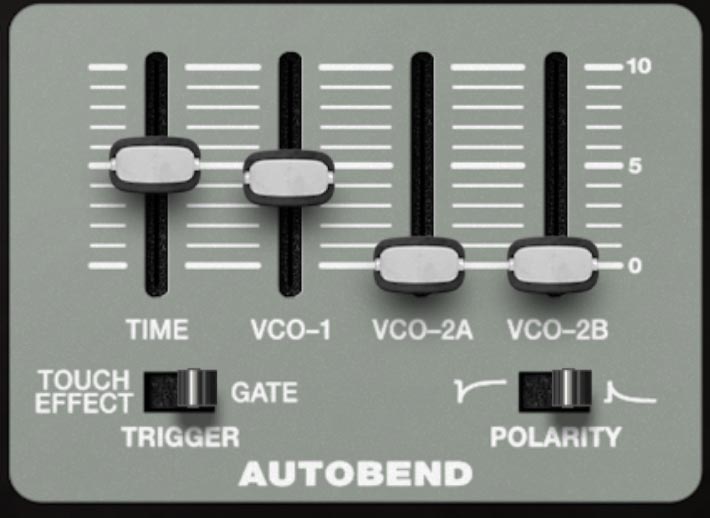
Autobend adds a fast, one-shot pitch sweep at the start of a note. It’s a simple idea with a lot of mileage. You set how long the bend takes, how much each oscillator bends, what triggers it (a key press or aftertouch), and which direction it bends.
What it Does
When Autobend is triggered, the selected oscillators briefly start sharp or flat, then slide back to their normal pitch. It’s not an LFO and it’s not random drift. It’s a single pitch swoop at the front edge of the note.
Controls
TIME
Sets how quickly the bend returns to normal pitch. Short times feel like a punchy chirp or snap. Longer times turn into obvious pitch swoops.
VCO-1 / VCO-2A / VCO-2B (sliders)
Sets the bend amount per oscillator. At 0, that oscillator ignores Autobend. Higher settings make the pitch start further away before it settles. This per-oscillator control is the real trick: you can bend just one oscillator for edge and articulation, while keeping the others stable for pitch clarity.
TRIGGER
Chooses what starts the bend:
GATE: Autobend triggers when a new note is played (keyboard, MIDI, sequencer, etc.).
TOUCH EFFECT: Autobend triggers from aftertouch, so you can inject the bend after the note begins.
POLARITY
Sets the direction of the sweep:
Positive (right): pitch starts high and slides down to normal.
Inverted (left): pitch starts low and slides up to normal.
Practical Tips
If you want the sound to stay musical, bend one oscillator and keep at least one oscillator at 0. It’s the synth equivalent of adding a little consonant to the front of a vowel. For bigger, more obvious dives and rises, bend two or three oscillators together, then use TIME to decide whether it’s a flick, a swoop, or a full cartoon fall.
Ways to use Autobend
Punchier bass attacks: a short downward bend can make bass notes feel like they grab the speaker cone before settling.
Analog-style percussive plucks: a short, fast bend on just one oscillator adds that classic synth blip without turning into a pitch effect you notice.
Tape-start illusion: a gentle upward bend with a medium TIME can mimic the feeling of a note coming up to speed.
Pseudo-sync bite (without using sync): bend only VCO-2A or VCO-2B while keeping VCO-1 stable. You get a tense, bright attack that sounds aggressive but stays playable.
Riser and faller one-shots: crank TIME and amount, then play notes to create sci-fi UI bleeps, drops, and transitions.
Aftertouch accents: set TRIGGER to TOUCH EFFECT and use a short TIME. Press harder mid-note to add a quick pitch jump on demand. This is good for leads and effects.