Ring Modulator
Ring modulation is one of those synth features that you often either love or largely ignore. On SH-MAX, it’s more flexible than on many other synths because it gives you two things most ring-mod implementations don’t:
a clear choice of what goes into it, and
a flexible routing system that lets you tame the output by sending it to the filter configuration of your choice.
The end result is that SH-MAX’s ring mod isn’t just for making clangourous, inharmonic sounds. It’s a flexible tone generator that you can decide which lane it should live in.
What Ring Modulation Does
A ring modulator multiplies two signals together. The result is a new spectrum made of sum-and-difference components of the two signals or sidebands. Practically speaking, this often sounds metallic, bell-like, industrial, or at lower levels, like a gritty texture sitting on top of something more tonal. It can also do surprisingly musical things if you keep it controlled, especially when you band-limit it with filters.
Output Level and Placement
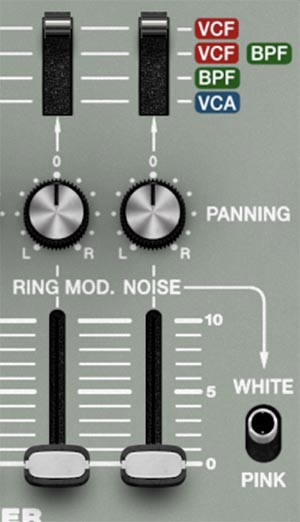
Ring Mod has its own channel in the Mixer with:
This is a big deal. Most synths force ring mod straight into the filter, and you have to simply deal with it. SH-MAX lets you decide whether ring mod should be filtered broadly in the VCF lane, focused and tamed in the BPF lane, layered through both filters in parallel, or bypassed directly to the VCA lane for full-range clang.
Tip: Treat ring mod like a textural layer. Most ring mod patches fail because ring mod is too loud. Start with the Ring Mod fader much lower than your oscillators, then bring it up until you miss it when it’s muted.
X Input
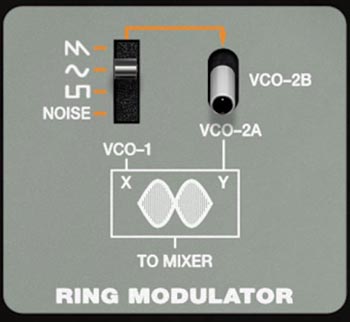
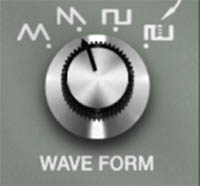
On the panel, X is associated with VCO-1 as the primary input with a choice of triangle, saw, square, or pulse wave shapes as selected with VCO-1's Wave Form knob. Think of VCO-1 as the carrier in common ring-mod vocabulary, though ring mod is symmetrical in practice.
Y Input
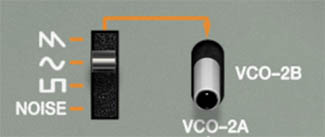
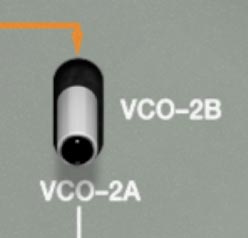
The Y input can be switched between VCO-2A and VCO-2B. For VCO-2B, select the desired wave shape with the 4-position switch for a choice of saw, sine, square, or noise.
So you can ring-mod:
VCO-1 × VCO-2A for classic two-VCO clang and animated inharmonics, or:
VCO-1 × VCO-2B for a different kind of complexity, often thicker or more “choral-metallic,” because VCO-2B can be a stacked octave composite
Choosing the X Input
In SH-MAX, X Input is the waveform for the Ring Mod’s X-side signal. It's the internal audio-rate source that gets multiplied with the other Ring Mod input. So when you use VCO-1's Wave Form knob to choose Triangle, Saw, Square, or Pulse, you’re picking the partner waveform the Ring Mod uses to generate sidebands.
Waveform choices for Input X (VCO-1)
Triangle: The cleanest, most tuned ring mod option. Fewer extra partials going in means the sidebands feel more focused and bell-like, with less hash on top. Try it when you want some clang without making the patch sound like a tin can.
Sawtooth: The most harmonically dense of the pitched options, so it tends to produce the busiest, buzziest ring mod textures. If you want an industrial edge, Saw is often the best choice.
Square: Brighter and more aggressive than Triangle. A square wave brings more harmonics into the multiplication, so the output gets edgier and more complex. Try it for harder metallic tones.
Pulse: Think of this as the Square wave's more variable alternative. It’s still a pitched waveform, but with variable pulse width, which shifts the harmonic balance and can make the ring-mod tone feel narrower, reedier, and more nasal, or thinner and more cutting depending on the width. If your patch supports pulse width modulation, PWM into ring mod can create a lively, animated texture without needing more oscillators.
Practical tips
If you’re trying to get a ring-mod sound that still sound musical, start with Triangle. Move to Square or Saw when you want more bite and complexity.
Use Pulse when you want the ring-mod character to feel more vocal, hollow, or sharply contoured, and especially when you want extra motion via pulse width (manual or modulation).
If the result feels harsh, switch the VCO-1 Waveform to Triangle, then bring brightness back elsewhere (filter, or by mixing in a bit more of the dry oscillator signal if your patch allows).
Choosing the Y Input
In SH-MAX, the Y Input selector chooses what signal gets multiplied against the Ring Mod’s X-side waveform. Use the toggle switch to select either VCO-2A or VCO-2B. Again, VCO-2B offers a different kind of complexity because VCO-2B can be a stacked octave composite.
VCO-2A
This is the classic ring-mod input. This is the straightforward, textbook way to do ring mod. Feed a single oscillator into Y and use its pitch as your sideband driver. Try it when you want bells, gongs, industrial percussion, or sci-fi textures.
Waveform choices for VCO-2A
Triangle: The cleanest, most tuned ring mod option. Fewer extra partials going in means the sidebands feel more focused and bell-like, with less hash on top. Try it when you want some clang without making the patch sound like a tin can.
Sawtooth: The most harmonically dense of the pitched options, so it tends to produce the busiest, buzziest ring mod textures. If you want an industrial edge, Saw is often the best choice.
Square: Brighter and more aggressive than Triangle. A square wave brings more harmonics into the multiplication, so the output gets edgier and more complex. Try it for harder metallic tones.
Pulse: Think of this as the Square wave's more variable alternative. It’s still a pitched waveform, but with variable pulse width, which shifts the harmonic balance and can make the ring-mod tone feel narrower, reedier, and more nasal, or thinner and more cutting depending on the width. If your patch supports pulse width modulation, PWM into ring mod can create a lively, animated texture without needing more oscillators.
How to use it:
Detune VCO-2A to shift the sidebands (small moves make big changes).
Modulate VCO-2A pitch slightly for animated clang.
If sync is engaged, sweeping VCO-2A pitch gets more tense and harmonically compressed, which can turn ring mod into a sharper, more urgent kind of metallic.
VCO-2B
This is unique to SH-MAX. VCO-2B isn’t just another oscillator. It can be a layered stack across footages, and each footage lane can choose its own waveform. Feeding that into ring mod gives you a denser, more complex sideband structure than a single-source Y signal. Try if for Choral-metallic textures, evolving inharmonics that don’t feel like one simple clang, and weird but playable drones.
Waveform choices for VCO-2B
Sawtooth: The most harmonically dense of the pitched options, so it tends to produce the busiest, buzziest ring mod textures. If you want industrial edge, Saw is often the best choice.
Sine: The cleanest, most tuned ring mod option. Fewer extra partials going in means the sidebands feel more focused and bell-like, with less hash on top. Try it when you want some clang without turning the patch into a tin can.
Square: Brighter and more aggressive than Sine. A square wave brings more harmonics into the multiplication, so the output gets edgier and more complex. Try it for harder metallic tones.
Noise: This turns ring mod into a texture machine. Instead of a pitched carrier, you’re multiplying by a broadband signal, which creates a splattery, atonal edge. Try it for impact hits, breathy texture, sci-fi debris, and broken radio coloration.
How to use it:
Build VCO-2B as a stable harmonic stack first, then ring-mod it. Think of VCO-2B as your controlled complexity generator.
Use fewer layers for “pitched metal” and more layers for “texture metal.”
If the result gets too noisy, simplify VCO-2B (fewer footages, cleaner waves) before you start filtering and band-aiding.
Practical Tips
If you want ring mod that still sounds like a note, start with VCO-2A as Y and keep the pitch relationships simple. Then get weird on purpose by tuning the oscillators to widely different intervals or by modulating the pitch of one or more them.
Envelopes play a key role in shaping the sound of ring mod! To create bells and other struck metal textures, route the ring mod through the VCF and for envelopes use fast attacks, relatively fast decays, no sustain, and moderate release times.
If you want complexity without instantly turning the patch into scrap metal, use VCO-2B as Y but make it a controlled stack. For example 16’ and 8’ Sine/Saw for body, then a small amount of 4’ or 2’ Pulse wave for edge. You’ll get complexity without losing the musical center.
Remember the roles: X sets the overall metal personality, Y is what you tune and move to steer the sidebands. When the sound is wrong, don’t just twist everything. Change one role at a time and the patch will tell you what it wants.