Modulation
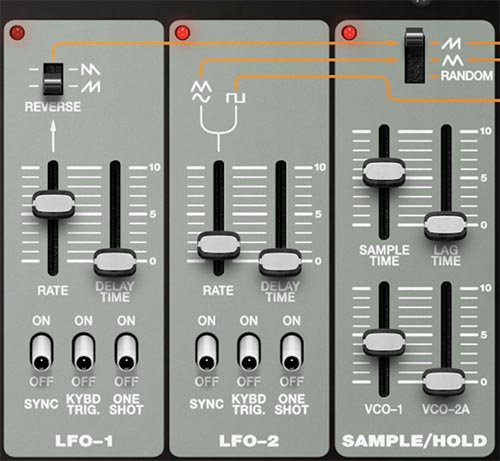
SH-MAX gives you three dedicated modulation sources: two classic LFOs for periodic motion, and a Sample/Hold generator for stepped or chaotic motion. Between them, you can do everything from vibrato and filter sweeps to classic sci-fi pitch hops and computer burble.
The orange lines across the top of the panel show the three modulation lanes that originate from each of these modulation sources and where they are routed in the synth. Read them like a signal flow, and not just a graphic.
One important detail that’s easy to miss: Sample/Hold isn’t always standalone. Depending on which source you choose in Sample/Hold, it can sample one of the LFO lanes (and therefore inherit that LFO’s behavior, including tempo sync), or it can sample noise for true randomness.
A Quick Vocabulary
LFO (Low Frequency Oscillator): repeating periodic motion for vibrato, tremolo, filter sweeps, and pulse width modulation (PWM).
S/H (Sample & Hold): motion made of steps. Think sci-fi burbles and random pitch or filter jumps. Add Lag to make it smoother and more glide-like.
Tip: Decide what kind of motion you want before you pick a source and a destination. If you want a cyclic repeating motion like vibrato or trills, try using one of the LFOs. If you want steppy unpredictable movement, try using Sample/Hold. Then decide whether your chosen mod destination should be oscillator pitch, filter cutoff, pulse width, or something else.
LFO-1
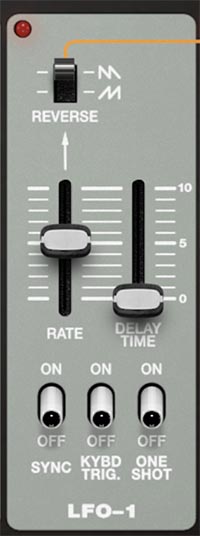
LFO-1 gives you sawtooth and reverse sawtooth waveshapes to work with, both of which are ramps with a hard reset at the end of each cycle.
WAVEFORM SWITCH (saw/reverse saw)
Selects the LFO-1 shape, sawtooth or reverse sawtooth. The sawtooth wave ramps downward then snaps back. Reverse sawtooth ramps up then snaps back. That snap-back is why saw waves feel more aggressive than a triangle or sine when they’re modulating pitch or cutoff.
RATE
Sets LFO-1 speed. Lower settings are slow sweeps. Higher settings apply faster modulation.
DELAY TIME
Adds a fade-in to the LFO amount after a note starts. Think modulation delay. The note plays unmodulated at first, then the LFO gradually comes in.
SYNC (On/Off)
When On, LFO-1 rate locks to the master Tempo (standalone clock, or your DAW tempo when hosted). When Off, LFO frequency is controlled by the Rate slider.
KYBD TRIG (On/Off)
When On, the LFO wave restarts from the beginning with each key press. When Off, it runs continuously in the background (so notes you play will catch it at whatever point it happens to be at).
ONE SHOT (On/Off)
When On, LFO-1 runs through a single cycle of the selected waveform and stops, instead of repeating continuously. This is essentially a one-cycle modulation.
Tips for LFO-1
Key-triggered LFO is your friend for tight basses and plucks. (Free-running LFO can make repeated notes land on different points of the cycle, which can feel sloppy. Key Trigger makes every note start the same way.)
One Shot is like a bonus third envelope. If you want a repeatable ramp or swoop that isn’t tied to ADSR timing, A One Shot LFO can act like an extra modulation gesture.
LFO-2
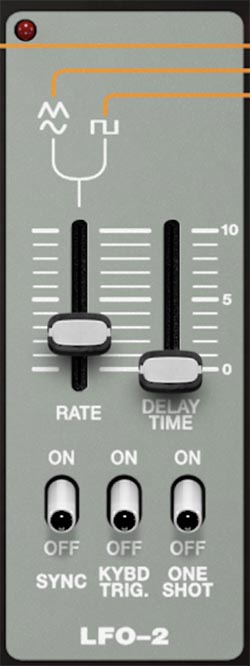
LFO-2 provides your more traditional waveshapes (triangle, sine, square). It’s your go-to for vibrato, tremolo, trills and smooth pulse width modulation.
WAVEFORM SWITCH (triangle / sine / square)
Selects the LFO-2 shape. Triangle is a steady and even up and down ramp. Sine is the smoothest (often the most natural for vibrato). Square is abrupt high/low switching, which can sound like a two-step pattern when routed to pitch, filter, or amplitude.
RATE
Sets LFO-2 speed.
DELAY TIME
Sets how long it takes for LFO-2 to fade in after the start of a note.
SYNC (On/Off)
When On, LFO-1 rate locks to the master Tempo (standalone clock, or your DAW tempo when hosted). When Off, LFO frequency is controlled by the Rate slider.
KYBD TRIG (On/Off)
Restarts the LFO wave on each key press when On.
ONE SHOT (On/Off)
Plays one cycle and stops when On.
Tips for LFO-2
Sine + KYBD TRIG is the most natural vibrato combo. Add a bit of Delay Time for a more nuanced feel.
Square waves are fantastic when you want rhythmic stepping without going full Sample/Hold. Try a square wave LFO on filter cutoff for a simple, two-state groove.
ONE SHOT with a square wave LFO can act like a single flip to a new value and back, which is useful for trill-like note accents.
Sample/Hold
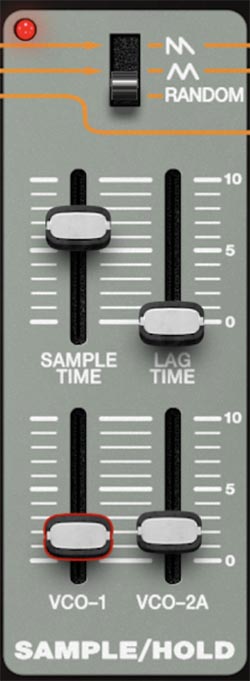
Sample/Hold is for stepped modulation. It samples a source signal at a clock rate, then holds that value until the next sample. The result is a staircase of values instead of a smooth curve. This is where SH-MAX does classic vintage random pitch steps, robotic filter chatter, and sci-fi motion.
Important Note: Sample/Hold’s Source Switch determines what it samples, and two of those choices are linked to the LFO lanes. That means LFO settings can change the behavior of Sample/Hold even though Sample/Hold itself doesn’t have a Sync switch.
SOURCE SWITCH (saw / triangle / random)
Chooses what gets sampled.
Saw: Samples the LFO-1 lane. This produces stepped ramp motion, and it can be influenced by LFO-1 settings (for example, LFO-1 SYNC and RATE, and the selected saw direction).
Triangle: Samples the LFO-2 lane's triangle wave. This produces stepped up/down motion, and it can be influenced by LFO-2 settings (including SYNC and RATE).
Random: Samples the noise generator, producing truly random values. This is the classic vintage S/H sound, and it’s not shaped by either LFO.
Practical takeaway: If you’re wondering why a Sample/Hold pattern suddenly locks”to tempo, it’s because you’re sampling an LFO lane that’s synced to Tempo. The orange line flow is doing exactly what it promised.
SAMPLE TIME
Sets how often sampling happens (the effective clock rate). Faster sampling gives rapid, nervous stepping. Slower sampling gives more spaced, deliberate steps.
LAG TIME
Adds glide (slew) to the stepped output. At minimum, you get crisp, hard steps. As you raise it, the steps smear into smoother transitions, which can turn harsh random jumps into liquid, sliding motion.
VCO-1 (slider)
Sets how much Sample/Hold modulation is sent to VCO-1 for pitch modulation.
VCO-2A (slider)
Sets how much Sample/Hold modulation is sent to VCO-2A for pitch modulation.
Tips for Sample/Hold
For sci computer blips: Choose RANDOM as the source, set a medium SAMPLE TIME, set LAG TIME to zero, send a small amount to VCO-1. To turn this into a robotic swarm of bees, send a different amount of Sample/Hold to VCO-2A.
For stepped, tempo-locked pattern motion: set SOURCE to Saw or Triangle, then turn on SYNC in the corresponding LFO. Now Sample/Hold can feel rhythmically intentional instead of chaotic, because you’re sampling a clocked lane.
For stepped filter chatter, route S/H to VCF cutoff via the Mod 1 knob. Choose Random as the source and add just a little LAG TIME.