Oscillators
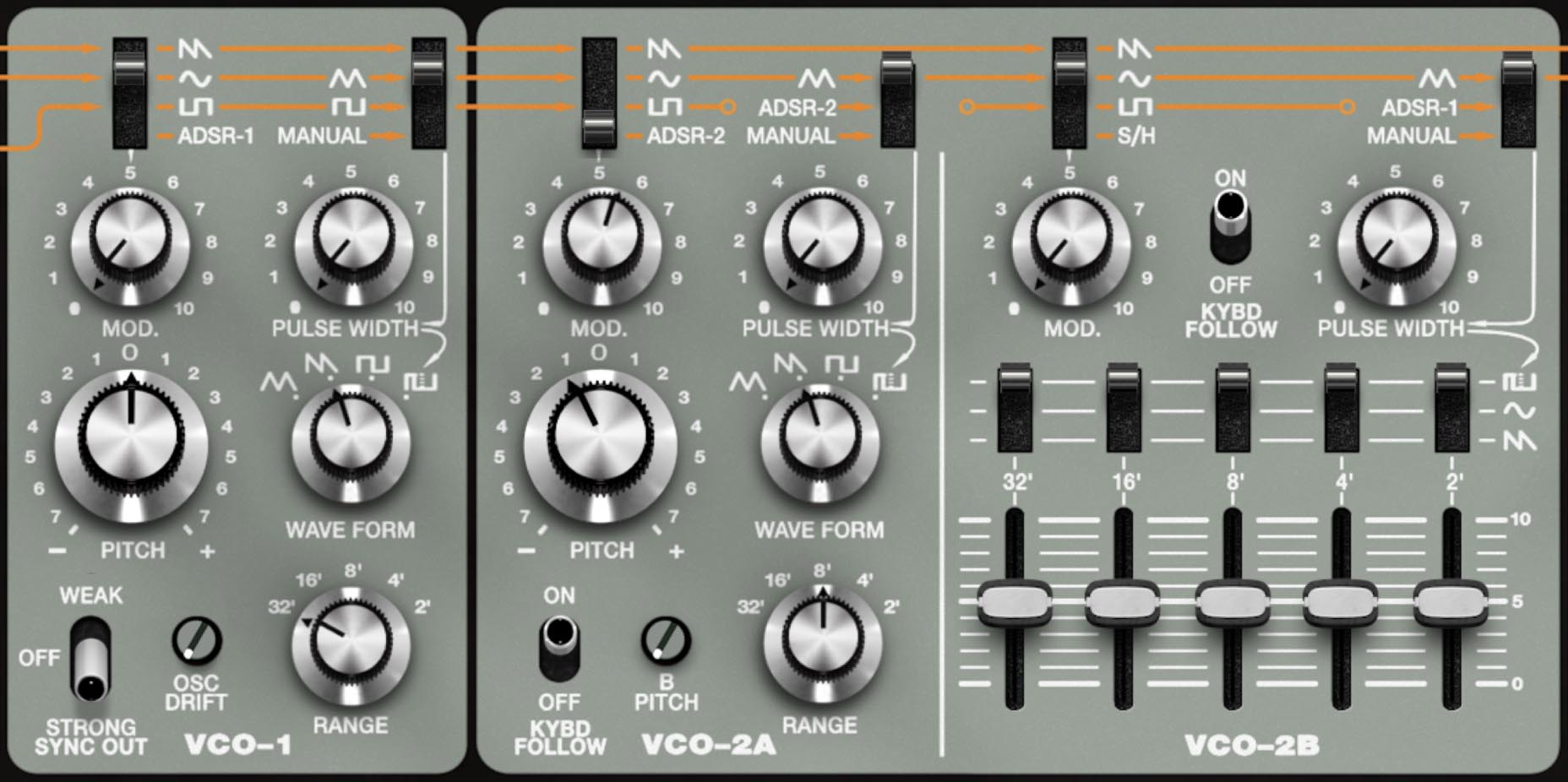
SH-MAX’s three oscillators are like three instruments that happen to share a keyboard. The impressive part is how you can assign them distinct jobs (anchor, motion, texture), then route each into its own lane (VCF, BPF, or straight to VCA) for separate filtering and separate effects.
The Oscillators:
VCO-1: the primary classic SH oscillator. Solid waveform fundamentals, great as an anchor, and the master for the sync system.
VCO-2A: the second “standard” oscillator (the SH-5’s VCO-2 equivalent). Designed for intervals, detune, sync timbre tricks, and envelope-driven pitch/PWM tricks. Includes a KYBD FOLLOW toggle.
VCO-2B: the SH-3-derived drawbar oscillator. Divide-down, phase-locked, perfectly in tune, equal amplitude per footage. It’s closer to organ drawbars than just another VCO.
Tip: When starting out, don’t think “which oscillator do I like?” Think “what role do I need?” Anchor (VCO-1), motion/edge (VCO-2A), harmonic architecture (VCO-2B).
How the Oscillators Connect to the Rest of SH-MAX
Each oscillator has its own channel in the Mixer, and each Mixer channel can be routed independently to:
But Oscillator programming is only half the story. Where you send each oscillator is the other half. Routing is sound design. A single big oscillator stack routed to one lane behaves like a normal synth. Splitting oscillators across lanes behaves like a mini production with different tone shaping, different effects, and different roles.
The Orange Modulation Lanes, Applied to Oscillators
SH-MAX’s orange lines show three global modulation lanes distributed across the panel: LFO-1, LFO-2, and S/H. Oscillator modulation follows the same pattern in multiple places: pick a destination (Pitch or Pulse Width), choose a source using a selector/changeover switch (LFO shapes, S/H, ADSR, or Manual, depending on the oscillator), then set depth with a MOD knob or Pulse Width control.
VCO-1
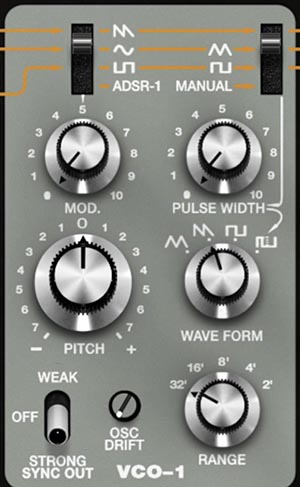
VCO-1 is the main oscillator and often the most direct voice in the instrument.
Waveform
VCO-1 offers classic waveforms for triangle, sawtooth, square, and pulse. Each has a distinct musical role: triangle for smooth fundamentals, saw for bright harmonic density, square for hollow reed-like tone, pulse for the most animated and cutting voice (especially with PWM).
Range and Pitch
Range sets register. Pitch provides fine tuning around center (±7 semitones).
Tip: Use Range for register, Pitch for relationship. If you’re stacking oscillators, lock the octave with Range first, then tune intervals or detuning with Pitch.
OSC Drift
VCO-1 includes an OSC DRIFT control. This is SH-MAX’s way of adding controlled instability to oscillator behavior. Drift introduces subtle, natural-sounding variation so tones don’t feel perfectly static.
Tip: Drift is best used as seasoning. If you can clearly identify the drift, it may be too much for most musical contexts. A little drift can make a patch feel analog. A lot can make it feel drunk.
VCO-1 pitch modulation (MOD)
VCO-1’s pitch modulation works like the SH-5. Basically, select a modulation signal with the source selector (LFO shapes, S/H, Manual), and set depth with the MOD knob. The LFO rate is set by the chosen LFO.
Tip: S/H pitch can be either subtle or from outer space. If you want analog-like drift, keep depth small and add Lag. If you want classic sci-fi stepping, reduce Lag and increase depth.
VCO-1 Pulse Width and PWM
VCO-1 pulse width behaves like the SH-5: the selector determines whether Pulse Width is Manual or modulated by an LFO shape, and the Pulse Width control either sets static width (Manual) or sets PWM depth (mod positions). LFO rate sets PWM speed.
Tip: Slow PWM is like a Chorus effect. Fast PWM is more like a special effect.
Sync Out (WEAK/STRONG)
Oscillator sync forces a slave oscillator’s waveform cycle to restart in lockstep with a master oscillator. The musical result is that when you sweep the slave oscillator’s pitch, you get harmonically rich tearing and vowel-like brightness changes that stay tied to the note you play.
SH-MAX's WEAK vs STRONG settings change the intensity of the sync effect. Strong tends to sound more dramatic and bright, weak tends to be subtler and more organic. It's best to consider Sync as a timbre tool and not a tuning tool.
SH-MAX oscillator sync follows the classic SH-5-style setup. VCO-1 is always the master, and VCO-2A is the only oscillator that can be hard-synced. The WEAK/STRONG switch doesn’t change what sync is doing, it changes how forcefully VCO-1 pulls VCO-2A back into line, which affects the tone, stability, and how the two oscillators fight (or cooperate) during pitch movement.
STRONG
A more decisive reset behavior. VCO-2A locks more aggressively to VCO-1, giving you that classic, bright sync bite with predictable, repeatable results across the keyboard. It’s the setting for bold, cutting sync leads and sharp, harmonically complex sweeps.
WEAK
A looser, more nuanced coupling. VCO-2A still syncs to VCO-1, but is less brash and can give you more interesting in-between behavior when you sweep or modulate pitch.
How to use Sync musically:
Enable sync (via VCO-1 Sync Out STRONG).
Set the slave oscillator to a bright waveform (saw or pulse).
Use an envelope or LFO to modulate the slave oscillator’s pitch (not the master’s).
Keep master relatively stable.
Tip: Envelope-driven sync sweeps sound more instrument-like. That’s where the famous tearing harmonics and vocal-like sweeps come from. LFO-driven sync can be cool, but envelope sweeps feel intentional and performable.
VCO-2A
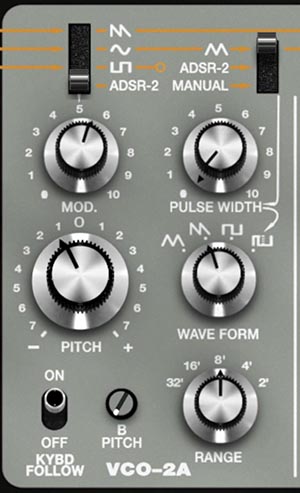
VCO-2A is the second oscillator and the primary one for detuning, intervals, sync timbre tricks, and envelope-shaped motion.
Range and Pitch
VCO-2A can be tuned to musical intervals with VCO-1 to create heavier, fuller sounds. Range sets register. Pitch provides fine tuning around center (±7 semitones).
Tip: Boring intervals make useful sounds. Unison detune, octaves, and fifths survive filters, effects, and mixing better than clever intervals (like 7ths or 9ths) that sometimes fight the key.
Keyboard Follow (KYBD FOLLOW)
When KYBD FOLLOW is ON, VCO-2A tracks the keyboard normally. When OFF, it holds the pitch set by its Pitch and Range controls regardless of which key you press. This is excellent for drones and for fixed-frequency interaction effects (including ring mod).
Tip: KYBD FOLLOW OFF turns VCO-2A into a fixed machine tone. Great for drones, beating against the played note, and consistent ring mod behavior.
VCO-2A Pitch Modulation (MOD)
VCO-2A pitch modulation mirrors VCO-1’s LFO options, and crucially adds ADSR 2 as a mod source. Selecting ADSR 2 means VCO-2A pitch follows that envelope contour.
Practical ADSR MOD uses
Tip: A tiny pitch envelope adds realism. Even a subtle, fast pitch drop at the start of a sound can add character and presence without sounding like a cartoon effect.
VCO-2A Pulse Width including ADSR PWM
VCO-2A pulse width can be Manual or ADSR-driven. ADSR PWM is one of the best ways to make a pulse wave kick in on attack, then settle. If you’re tired of every patch using the usual filter envelope, try shaping PWM with ADSR instead. It’s a different kind of movement.
VCO-2B (drawbar oscillator)
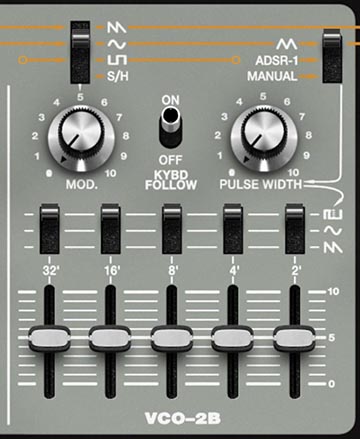
VCO-2B is derived from the SH-3 design and behaves like a compact drawbar/additive-style generator. It’s modeled as divide-down circuitry. In other words, the footage components are perfectly in tune, phase-locked, and equal amplitude. This makes VCO-2B stable even when you stack multiple octaves.
Footage Sliders: 32’, 16’, 8’, 4’, 2’
These blend five octave registers. Use them like organ drawbars. Build the foundation first (16’ and 8’), then add brightness (4’ and 2’) to taste.
Tip: Start with 16’ + 8’, then add 4’. It gives you size and clarity without turning the patch into an organ.
Per-footage Waveform Selection
Each footage lane can select its own waveform (sine/saw/pulse). This lets you build hybrid composites: smooth lows, brighter highs, or pulse only in certain registers.
Pulse Width (VCO-2B)
Pulse Width affects only the footage lanes set to pulse. It does nothing for sine or saw.
Tip: PWM the highs, keep the lows stable. Set 4’ and 2’ to pulse and modulate PW slowly. Keep 16’ and 8’ on sine/saw. You get upper harmonic motion without overwhelming the lower range.
VCO-2B Tuning: B Pitch
Even though VCO-2B is a drawbar oscillator, SH-MAX lets you tune it against the rest of the synth. The B Pitch trimmer (located in the VCO-2A area) adjusts the pitch of VCO-2B. Use it to detune VCO-2B subtly for width, or tune it to intervals for intentional harmonic stacks.
Tip: Detuning VCO-2B sounds different than detuning a normal VCO. Because VCO-2B’s internal octaves are phase-locked and coherent, detuning it creates a unified, stable beating against the other oscillators, not a messy five oscillators clashing effect.
Try tuning VCO-2B a fifth above VCO-1, then keep VCO-1 as the fundamental anchor. You’ll get harmonic density that sounds like more notes without actually playing chords.
Using the Three Oscillators Together
A few SH-MAX-native layer approaches that take advantage of routing and lane effects.
Produced Monosynth in One Patch
VCO-1 → VCA (quiet anchor)
VCO-2A → VCF (body and motion)
VCO-2B → BPF or VCF+BPF (character layer)
Huge Pad without Chorus Mush
VCO-2B → VCF (stable bed)
VCO-2A → VCF+BPF (animated presence)
VCO-1 → VCA (definition at low level)
Controlled Ring Mod instrument
Ring Mod: VCO-1 × VCO-2A (or × VCO-2B for richer complexity)
Set VCO-2A KYBD FOLLOW OFF for fixed-frequency interaction
Route Ring Mod → BPF for instrument band control
Keep an anchor oscillator underneath (VCO-1 direct or VCO-2B filtered)
Common Oscillator Pitfalls and Quick Fixes
“My patch is huge but too buzzy.” Too many bright layers. Pick one main bright source, keep the others supportive (lower registers, band-limited, or stable beds).
“My patch feels out of tune.” You’ve likely modulated pitch on multiple oscillators. Keep one stable, animate one.
“VCO-2B sounds static.” That’s the point. Add PWM only to the higher footages or move it through BPF for controlled motion.
“My sync patch isn’t doing anything.” Sync only affects VCO-2A. Engage sync on VCO-1, then modulate VCO-2A pitch. Keep VCO-1 relatively stable.
VCO Modulation Destinations
You’ve now met the three orange modulation lanes at the top of the panel: LFO-1, LFO-2, and S/H. This section is about where those lanes land in oscillator world, and how to use them.
On SH-MAX, oscillator modulation isn’t a hidden matrix. It’s right there on the panel, and it’s mostly built from the same simple pattern:
Pick a destination (Pitch, Pulse Width, sometimes other VCO-specific targets).
Choose a source (often one of the orange lanes, or an envelope/manual option) with a selector switch.
Set the depth with a Mod Amount control.
Once you think in “lane → destination → depth,” programming is fast.
Pitch Modulation
Pitch modulation is where the orange lanes show their personality immediately:
LFOs give you cyclic vibrato.
S/H (via the Sample/Hold section) gives you stepped drift, sci-fi blips, and unstable oscillator behavior.
VCO Pitch Controls
Each VCO has normal pitch controls (Pitch knob and Range settings), plus pitch modulation controls:
In addition, the S/H section includes dedicated pitch-depth faders for VCO-1 and VCO-2A.
Tip: If you want classic vibrato, start with LFO-2. Make LFO-2 your vibrato lane, and keep it consistent across patches.
Classic Vibrato
Choose LFO-2 as the pitch mod source for the oscillator you want animated.
Set LFO-2 Rate to a musical vibrato speed.
Use LFO-2 Delay so vibrato blooms in after the attack.
Keep depth small.
Tip: Vibrato on one oscillator often sounds more natural than vibrato on everything. Try keeping VCO-1 steady for body, and apply vibrato only to VCO-2A for motion. Your ear hears expression without seasickness.
S/H Pitch Modulation
S/H pitch is great because it’s not a continuous wobble. It’s events. Route S/H using the controls in the Sample/Hold section.
Set S/H Sample Time for how often pitch changes.
Use S/H Lag if you want those changes to glide (or smear) instead of step.
Raise the dedicated S/H pitch depth fader for VCO-1 or VCO-2A carefully.
Tip: “Analog drift” lives at almost-zero depth. If you can clearly hear the stepping, you’ve gone past drift and into robot land. Which can be useful, but be purposeful.
Detuned Complexity without Chorus
A very SH-MAX move is to keep one oscillator stable and let another wander slightly:
VCO-2B: stable layer (centered)
VCO-2A: subtle S/H pitch drift with a little Lag
VCO-1: either stable or gently LFO’d
PWM and Timbral Modulation
Pulse Width Modulation is where SH-MAX can go from sweet, simple analog tone to alive and animated without changing pitch.
Pulse Width Basics
Pulse Width affects only pulse waveforms. If the oscillator isn’t set to pulse, PW modulation does nothing.
PWM with the orange lanes
This is one of the best uses of a second LFO:
Tip: Slow PWM is a tool for rich pads. Fast PWM is more like a special effect.
VCO-2B PWM
VCO-2B is unique because each footage lane can be set to pulse or not, independently.
Pulse Width affects only the lanes set to pulse.
That means you can do things like: make only the 4’ and 2’ lanes pulse and PWM them, while the 16’ and 8’ lanes stay sine/saw for stability.
Tip: PWM the highs and keep the lows stable. If your bottom end is moving, your whole patch feels wobbly. If only the upper lanes are moving, it feels alive and controlled.
Keyboard Follow on the Oscillators
VCO-2A and VCO-2B each include a KYBD FOLLOW toggle. In normal subtractive land, oscillator pitch follows the keyboard. So when a synth gives you a switch for it, it’s usually because the oscillator can be repurposed as a modulation audio source or used in nonstandard ways.
With keyboard follow ON, the oscillator tracks the played pitch normally.
With keyboard follow OFF, the oscillator becomes decoupled from note pitch, which enables drone behavior and can change how modulation and interactions behave.
Tip: KYBD FOLLOW OFF is for drones and fixed resonator tricks. Try routing a non-following oscillator into a filter lane and letting the filter do the musical motion while the oscillator stays fixed. It can create strange, static formant bed textures.
Modulation Examples
Here are some lane → destination examples.
Example 1: A lead with three layers of motion
LFO-1 → VCO-2A Pitch (small depth, with Delay)
LFO-2 → VCO-2A Pulse Width (slow rate, small depth)
VCO-1 stays steady (or gets only a touch of Drift)
Result: vibrato expression + subtle timbral evolution, without destabilizing the whole patch.
Example 2: Stable center, animated top
VCO-2B: 16’ and 8’ set to sine or saw (stable body)
VCO-2B: 4’ and 2’ set to pulse
LFO-2 → Pulse Width (slow)
Result: the patch feels wide and alive, but the fundamental stays glued.
Example 3: Vintage sci-fi pitch stepping
S/H Sample Time: moderate
S/H Lag: low (or moderate for glides)
S/H depth → VCO-2A Pitch (tiny for drift, larger for bleeps & bloops)
Result: stepped or glidey random pitch motion that suggests classic B-movie lab equipment.
Example 4: Sync-based harmonic sweep
Sync Mod Examples
These are quick, repeatable setups that show what WEAK vs STRONG sync is good for.
1: Classic Sync Lead Sweep
Goal: the iconic sync tear that tracks the note cleanly.
Setup
VCO-1: saw
VCO-2A: saw or pulse
Sync: STRONG
Modulation
VCO-2A MOD source: ADSR. Set a fast Attack, moderate Decay, lower Sustain, and adjust pitch-mod depth for an obvious attack sweep.
Routing
Route the main tone through VCF (LPF) for classic control.
2: WEAK Sync Thickness Without Detune
Goal: density and stability, like two oscillators thickening without obvious beating.
Setup
Routing
VCO-1 quietly to VCA as an anchor
VCO-2A to VCF for tone shaping
3: Sync “talk” Using SH-MAX Filter Lanes
Goal: sync aggression shaped into a vocal, mix-ready layer.
Setup
Sync on (start STRONG)
Modest VCO-2A pitch sweep (ADSR mod)
Routing
Route VCO-2A to VCF+BPF
Set VCF mode to BPF (two different bandpass architectures in parallel)
Keep VCO-1 as the anchor (VCA or VCF)
Motion
Keep one bandpass relatively steady and move the other slightly (envelope or slow LFO). You’ll get formant-like articulation without losing the sync edge.
4: Sync Vibrato
Goal: animated sync lead.
Setup
Sync on (WEAK )
Use LFO-1 pitch modulation on VCO-2A, but keep depth small
Use LFO Delay so vibrato blooms after the attack
Tip: Modulate the slave lightly, not everything.
Keep VCO-1 steady and let VCO-2A carry expression.