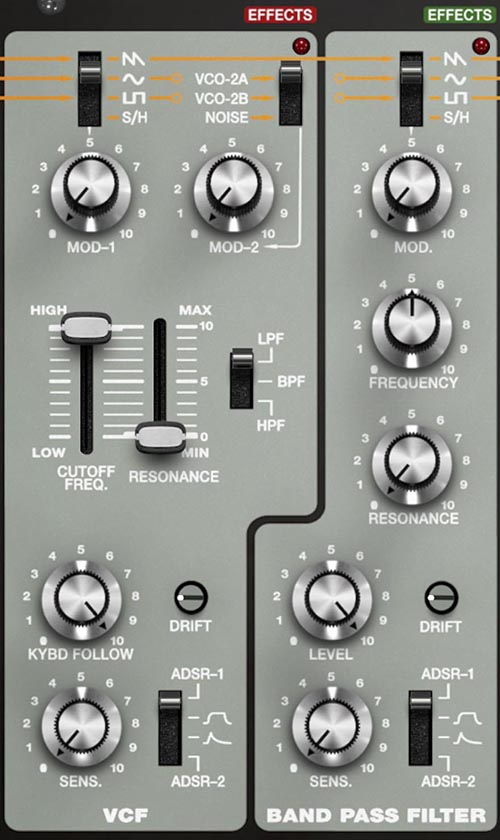
The Filters
On SH-MAX, the filters aren’t a single checkpoint your whole sound has to pass through. They’re two different tone engines sitting in parallel lanes, and you choose (per mixer source) which lane a signal takes. That’s why the VCF and the dedicated Band Pass Filter (BPF) belong in the same mental bucket: they’re not either/or so much as “how much of each flavor do you want, and for which sources?”
If you came from synths where the filter is one big shared decision, SH-MAX will feel like the synth gave you a second paintbrush and told you to use both. You should. It’s half the fun.
How the Mixer Fits In
The routing switches in the Mixer determine which sources feed the VCF, the BPF, both (VCF+BPF), or neither (VCA bypass). The VCF and BPF do not feed into each other. They run in parallel, and when you select VCF+BPF for a source, SH-MAX splits the same signal to both filters and mixes the filter outputs together. Each path (VCF, BPF, VCA) also has its own effects chain, so filter choice also determines which effects lane a sound will hit.
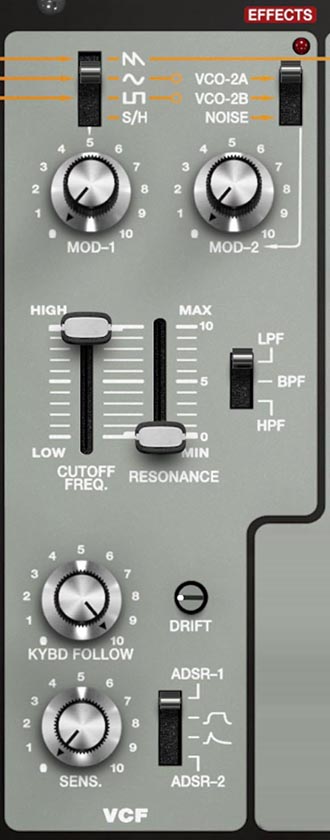
VCF Section
Think of the VCF as your main filter block. It’s flexible and familiar, but it has a couple of SH-MAX twists that make it more than a cutoff and resonance machine.
Cutoff Freq
Sets the VCF’s cutoff frequency. This is the primary brightness/tone control whenever a source is routed to VCF or VCF+BPF.
Resonance
Emphasizes frequencies around the cutoff. With enough resonance, the filter will develop a strong peak and can approach self-oscillation behavior depending on settings.
Filter Mode (LPF / BPF / HPF switch)
Chooses the VCF response type:
LPF (Low Pass Filter): removes highs above the cutoff.
BPF (Band Pass Filter): emphasizes a band around the cutoff and removes both lows and highs.
HPF (High Pass Filter): removes lows below the cutoff.
Important: routing a source to VCF doesn’t always mean lowpass. It means whatever the VCF mode switch is set to. This gives you tremendous flexibility in tone shaping.
MOD-1 / MOD-2
These set how strongly the selected modulation sources affect the cutoff (and possibly other VCF behavior depending on implementation). The key point for programming is that you have two modulation inputs, each with an amount control, so you can combine a musical modulator (like an LFO) with something more brash (like Noise, or VC0-2A or VCO-2B ) without forcing everything through one lane.
KYBD Follow (knob)
Adjusts how much the cutoff tracks the keyboard. More follow means the filter opens as you play higher notes, preserving brightness across the range.
SENS (knob)
This is a sensitivity control that determines how strongly the selected envelope drives the filter. In practice, this is your filter envelope amount control. It’s a fast way to go from static tone shaping to dynamic, plucky, expressive filtering.
ADSR select (switch)
Selects which envelope generator controls the VCF’s envelope-driven behavior (ADSR-1 or ADSR-2).
VCF Drift
Adds instability to the filter behavior for a more organic, less perfectly static response.
Tip: Treat VCF SENS as your patch intensity knob. If you want a patch to go from polite to aggressive without changing the basic sound, SENS is often the fastest dial. It changes how much the envelope responds without needing to redesign the whole patch.
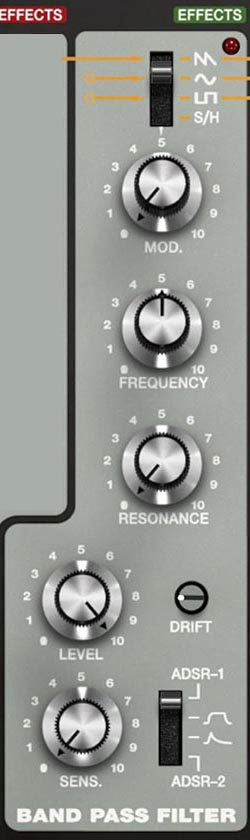
BPF Section
The dedicated BPF is not a duplicate of the VCF’s bandpass mode. It's a different filter architecture with its own sound. That’s the whole reason it exists here, and it’s why the SH-MAX can do band-focused tones that feel more alive and less generic than a single bandpass stage.
Frequency (knob)
Sets the center frequency of the bandpass.
Resonance (knob)
Controls the peak and bandwidth. Higher resonance typically narrows the band and emphasizes the center frequency more strongly.
MOD (amount knob)
Controls how much the selected modulation source affects the BPF frequency.
SENS (knob)
Controls how strongly the selected envelope affects the BPF.
ADSR select (switch)
Chooses ADSR-1 or ADSR-2 as the envelope source for the BPF.
BPF Drift (knob)
Adds adjustable instability to the BPF behavior.
Tip: Use the BPF as a moving presence layer, not just a special effect. A bandpassed layer mixed under a main filtered tone can make a patch read clearly in a mix without turning into brittle top-end. It’s like a musical EQ that follows the patch’s motion.
How to Think About VCF vs BPF in SH-MAX
Because routing is per source, you can assign jobs:
VCF path: broad shaping (weight, brightness control, classic subtractive movement)
BPF path: focused character (vowel-ish, nasal, formant, presence, clang control)
VCF+BPF: layered interpretation (one source becomes two tonal versions blended together)
A good default approach is to use the VCF to define the main silhouette of the patch and use the BPF to add a voice inside that silhouette.
The Two Different Bandpass Architectures Trick
If you set the VCF mode to BPF, and you route a source to VCF+BPF, you are running that source through two different bandpass filters in parallel: Bandpass A is the VCF in BPF mode. Bandpass B is the dedicated BPF.
They don't sound the same. Their architectures differ, so their resonance behavior, bandwidth, and tone will be different. When you mix them together, you can get complex vocal-like peaks, shifting formants, and animated midrange textures that are hard to recreate with one bandpass plus EQ.
Why this Sounds Special
Two different bandpass filters at different center frequencies create two distinct peaks. As you modulate one (or both), those peaks move relative to each other. Your ear interprets that motion as speech-like vowel shifts, acoustic resonances, or animated circuitry depending on how you drive it.
Tip: You’re building formants, not just filtering. A single bandpass gives you one “mouth.” Two different bandpass architectures give you “throat plus mouth,” or two resonant cavities. That’s why it can sound strikingly alive.
Sound Design Examples
These examples assume you understand the mixer routing from the Mixer chapter. The core idea is to pick a source, route it to VCF+BPF, and treat the two filters as two different resonance voices.
Example 1: Classic “talking synth” vowel sweep (two-BPF formants)
Goal: A lead that sounds like it’s forming vowel shapes as you play.
Mixer
VCF
Set VCF mode to BPF.
Set cutoff to the lower-mid “throat” region (start lower than you think).
Set resonance moderately high.
Set KYBD FOLLOW low to moderate (you want the formant to feel like a fixed vocal cavity, not track perfectly with pitch).
Set ADSR to an envelope with a slightly soft attack, moderate decay. and a bit of release, and raise SENS until the filter “speaks” on each note.
Dedicated BPF
Set frequency higher than the VCF’s center frequency.
Set resonance higher than the VCF’s resonance (narrower peak reads as a stronger vowel component).
Use its envelope SENS more subtly than the VCF, or modulate it with a slow LFO for continuous mouth movement.
What to listen for: If both bandpass centers are too close, it’ll sound like one peak. Spread them apart until you hear two distinct resonances. Then modulate one filter slowly and the other quickly (or one by envelope and the other by LFO) and you’ll get the talking effect.
Tip: Let one filter be stable. Most talking synth”patches fall apart because everything moves at once. Keep one bandpass center relatively fixed and animate the other. That’s how you get intelligible vowel shifts instead of random wah.
Example 2: Formant pad that stays smooth
Goal: A pad that has vocal character but doesn’t turn too nasal.
Mixer
Route VCO-1 to VCF only (this is your main body).
Route VCO-2A to VCF+BPF (this is your character layer).
Optionally route VCO-2B to VCA for additional stable center reinforcement.
VCF
Set VCF mode to LPF for the main pad behavior.
Use a soft envelope (or slow LFO via MOD-1/MOD-2) for gentle cutoff motion.
For the VCO-2A layer routed to VCF+BPF, the VCF’s LPF creates a smooth version of the sound.
Dedicated BPF
Set frequency to a “presence” region above where the LPF is rolling off.
Keep resonance moderate, not extreme.
Use a slow modulation source to move it slightly, or just leave it static as a fixed formant.
What to listen for: You should hear a smooth pad from the VCF, with a subtle, band-focused human-like presence riding inside it. If it’s too obvious, lower the routed source’s mixer level or reduce BPF resonance.
Tip: The BPF layer is a mix tool disguised as synthesis. read in a dense mix, try blending in a bandpassed version of one oscillator. It can sit in the track without adding brittle highs.
Example 3: Dual bandpass phaser motion without a phaser
Goal: Moving peaks that feel like a phaser, but with a more organic, resonant character.
Mixer
VCF
Dedicated BPF
Set resonance a little higher than the VCF’s.
Set MOD to a second modulation source (for example, triangle or S/H with smoothing, or a slightly faster LFO).
Keep its frequency offset from the VCF’s band center.
What to listen for: You’ll hear two resonant peaks moving differently. That interaction creates shifting emphasis that can feel phaser-like, but more vocal and less glassy than a traditional phaser effect.
Tip: Offset the modulation rates slightly. If both peaks sweep in sync, the effect is obvious and repetitive. If they drift at slightly different rates, it stays alive for much longer.
Example 4: Tamed ring mod clang
Goal: Metallic ring mod that’s musical instead of broadband punishment.
Mixer
VCF
Set VCF mode to BPF.
Use resonance to find a note inside the clang.
If the ring mod output feels too edgy, use VCF BPF as the body filter with moderate resonance.
Dedicated BPF
Tip: Find one stable peak, then animate the other. A stable bandpass peak turns ring mod into something like a struck metal bar. Animating a second peak adds motion without destroying pitch perception.
Practical Calibration Tips
If a filter layer “disappears”
Increase the source’s mixer level, cutoff frequency, or pan it center temporarily while dialing in filter settings. Bandpass layers can sound quieter because they remove a lot of energy outside the band.
If the patch gets too loud when using VCF+BPF
You’re mixing two processed outputs. Lower the source level fader and rebuild the balance.
If dual bandpass sounds like nothing special
Your cutoff frequency centers are too close, or resonance is too low. Spread the center frequencies and push resonance until you hear two distinct peaks.
If it sounds too nasal
Lower the dedicated BPF level contribution by reducing the source level, lowering resonance, or moving the BPF frequency away from the most sensitive midrange zone.